Apple bucked a trend when it unveiled macOS Monterey in June featuring an abstract wallpaper graphic, breaking an eight-year tradition of using a photo of the natural landscape that inspired the latest Calfornia-themed version name.
This change came as a shock to YouTuber and photographer Andrew Levitt and his friends Jacob Phillips and Taylor Gray, whom together have made recreating macOS wallpapers something of a tradition.
Once the trio of friends had come to terms with the new abstract wallpaper, they concluded that it was supposed to represent Monterey Canyon, which is deep underwater and impossible to photograph. So, instead they decided to create their own Monterey landscape, but finding the right shot came with its own problems, as their intrepid video diary explains.
After several false starts, the group eventually found an ideal location – Lone Cypress on Pebble Beach – and, using time-lapse photography, were able to create a not only a still image but also a dynamic wallpaper that changes according to the time of day.
"Missing" Monterey Dynamic Wallpaper
They have since made both the still shot and the dynamic version available to download. The following steps explain how to install the dynamic version of the Monterey wallpaper.
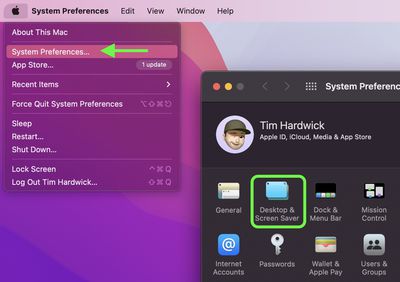
Click the Apple symbol in the menu bar and select System Preferences....
Click Desktop & Screen Saver in the preferences pane.
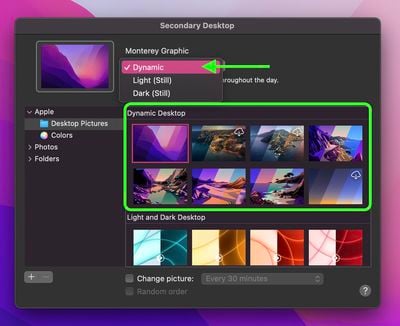
Select one of the official wallpapers that come with macOS, such as "Catalina," "Big Sur," or "Monterey Graphic," and set it to Dynamic.
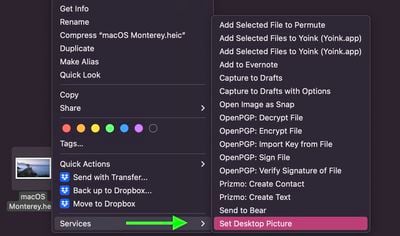
Open a Finder window and navigate to the "macOS Monterey.heic" wallpaper you downloaded.
Right-click (or Ctrl-click) on the file and select Services -> Set Desktop Picture from the contextual menu.
Apple should unveil the iPhone 17 series in September, and there might be one bigger difference between the Pro and Pro Max models this year.
As always, the Pro Max model will be larger than the Pro model:iPhone 17 Pro: 6.3-inch display
iPhone 17 Pro Max: 6.9-inch displayGiven the Pro Max is physically larger than the Pro, it has more internal space, allowing for a larger battery and...
Since the iPhone X in 2017, all of Apple's highest-end iPhone models have featured either stainless steel or titanium frames, but it has now been rumored that this design decision will be coming to an end with the iPhone 17 Pro models later this year.
In a post on Chinese social media platform Weibo today, the account Instant Digital said that the iPhone 17 Pro models will have an aluminum...
The calendar has turned to July, meaning that 2025 is now more than half over. And while the summer months are often quiet for Apple, the company still has more than a dozen products coming later this year, according to rumors.
Below, we have outlined at least 15 new Apple products that are expected to launch later this year, along with key rumored features for each.
iPhone 17 Series
iPho...
Apple is continuing to refine and update iOS 26, and beta three features smaller changes than we saw in beta 2, plus further tweaks to the Liquid Glass design. Apple is gearing up for the next phase of beta testing, and the company has promised that a public beta is set to come out in July.
Transparency
In some apps like Apple Music, Podcasts, and the App Store, Apple has toned down the...
In 2020, Apple added a digital car key feature to its Wallet app, allowing users to lock, unlock, and start a compatible vehicle with an iPhone or Apple Watch. The feature is currently offered by select automakers, including Audi, BMW, Hyundai, Kia, Genesis, Mercedes-Benz, Volvo, and a handful of others, and it is set to expand further.
Apple has a web page with a list of vehicle models that ...
Apple's next-generation iPhone 17 Pro and iPhone 17 Pro Max are just over two months away, and there are plenty of rumors about the devices.
Below, we recap key changes rumored for the iPhone 17 Pro models.
Latest Rumors
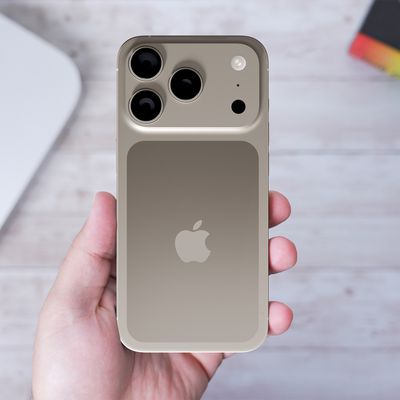
These rumors surfaced in June and July:Apple logo repositioned: Apple's logo may have a lower position on the back of the iPhone 17 Pro models, compared to previous...
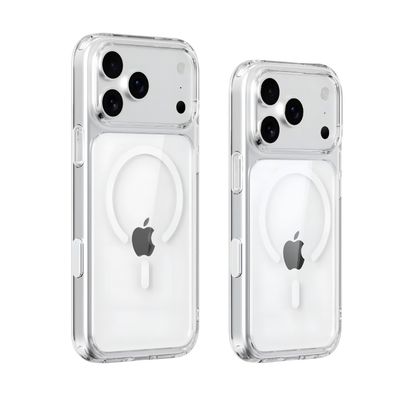
New renders today provide the best look yet relocated Apple logo and redesigned MagSafe magnet array of the iPhone 17 Pro and iPhone 17 Pro Max.
Image via Majin Bu.
Several of the design changes coming to the iPhone 17 Pro model have been rumored for some time, such as the elongated camera bump that spans the full width of the device, with the LiDAR Scanner and flash moving to the right side.
...
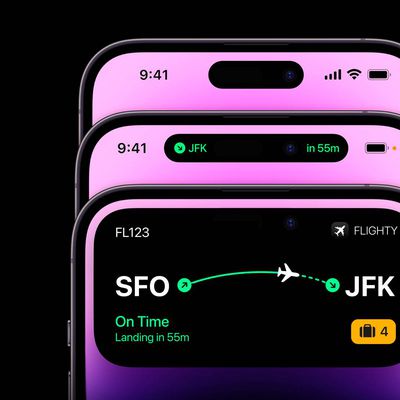
iPhone 17 models will feature a redesigned Dynamic Island user interface, according to a post today from Digital Chat Station, an account with more than three million followers on Chinese social media platform Weibo. The account has accurately leaked some information regarding future Apple products in the past.
The account did not share any specific details about the alleged changes that are ...
Amazon is back with its annual summertime Prime Day event, lasting for four days from July 8-11, the longest Prime Day yet. As it does every year, Prime Day offers shoppers a huge selection of deals across Amazon's storefront. With the event now underway, we're tracking numerous all-time low prices on Apple gear right now.
Note: MacRumors is an affiliate partner with Amazon. When you click a...
I'll only use the default desktop picture provided by Apple with each Mac OS release. I'm sure Apple went through millions of desktop pictures before choosing one.
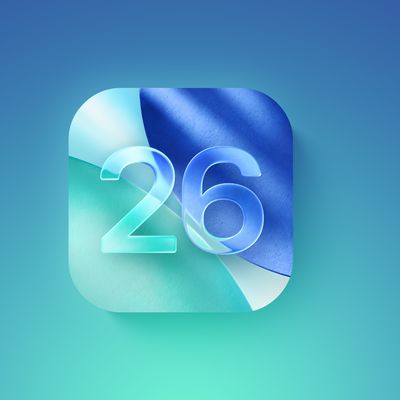
Biggest design overhaul since iOS 7 with Liquid Glass, plus new Apple Intelligence features and improvements to Messages, Phone, Safari, Shortcuts, and more. Developer beta available now ahead of public beta in July.