Apple today previewed iOS 14, which features an all-new home screen design with widgets and a new App Library view, plus much more.
Widgets
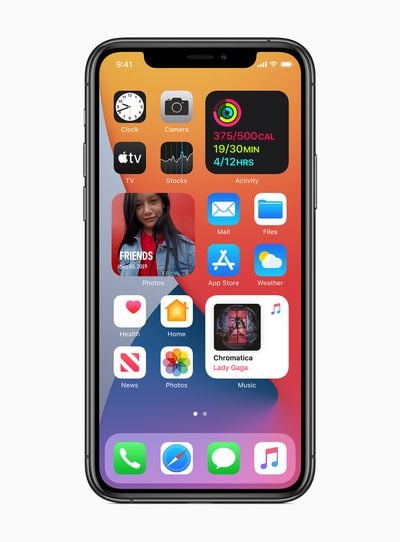
Widgets can be pinned in different sizes on any home screen page, providing useful information at a glance. Users can also create a Smart Stack of widgets, which uses machine learning to surface the right widget based on time, location, and activity. Widgets can be customized for work, travel, sports, entertainment, and other areas of interest.
App Library
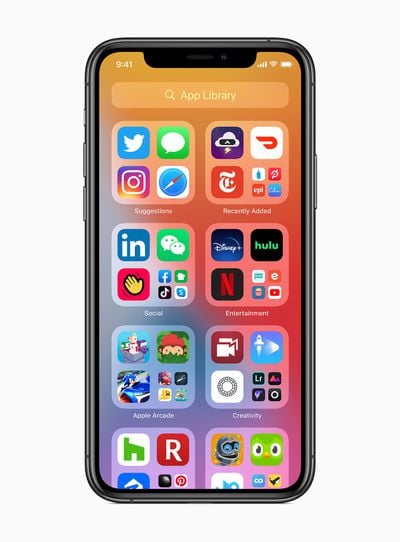
After the final home page screen is the App Library, an all-new section that automatically organizes all of a user's apps into one, easy-to-navigate view, and intelligently surfaces apps that may be helpful at a given time. Users can choose to limit how many home screen pages are displayed in order to gain quicker access to the App Library.
Incoming Calls Are Less Obtrusive
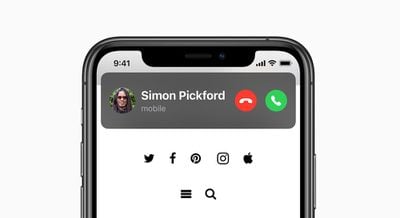
When you receive an incoming phone or FaceTime call on your iPhone or iPad, it is now presented with a compact banner rather than taking up the entire screen, which is a far less disruptive experience.
More Coverage of iOS 14
- iOS 14 Features New Translate App With Support for 11 Languages and Offline Mode
- iOS 14 Includes Picture-in-Picture Mode for iPhone
- iOS 14 Adds Subtle Design for Siri That Doesn't Take Up Entire Screen
- iPhone and Apple Watch Becoming Digital Car Keys, Feature Rolling Out to BMW Customers Next Month
- New iOS 14 Feature 'App Clips' Lets You Access Small Part of an App
- iMessage in iOS 14: Mentions, Pinned Conversations, Inline Replies, and More
- Phone Calls Will Finally Stop Taking Up the Entire Screen in iOS 14
- iOS 14 Compatible With iPhone 6s and 6s Plus and Later
- Find My App Gaining Support for Third-Party Products
- Emoji Search Finally Coming to iOS in iOS 14
- Apple Seeds First Betas of iOS and iPadOS 14 to Developers
- iOS 14 Lets Developers Make Subscriptions Available for Family Sharing
- Third-Party Mail and Browser Apps Able to Be Set as Default in iOS and iPadOS 14
- iOS 14 Tidbits and Hidden Features: Privacy Updates, Emoji Picker, New Dark Sky Weather Forecasts and More
Apple outlines additional iOS 14 features:
- Translate is designed to be the best and easiest app for translating conversations, offering quick and natural translation of voice and text among 11 different languages. On-device mode allows users to experience the features of the app offline for private voice and text translation.
- Siri expands its knowledge, helps find answers from across the internet, and can now send audio messages. Keyboard dictation runs on device when dictating messages, notes, email, and more.
- The Home app makes smart home control even easier with new automation suggestions and expanded controls in Control Center for quicker access to accessories and scenes. Adaptive Lighting for compatible HomeKit-enabled lights automatically adjusts the color temperature throughout the day, and with on-device Face Recognition, compatible video doorbells and cameras can identify friends and family. The Home app and HomeKit are built to be private and secure, so all information about a user’s home accessories is end-to-end encrypted.
- AirPods gain the ability to seamlessly switch between Apple devices with automatic device switching. Spatial audio with dynamic head tracking brings a theater-like experience to AirPods Pro. By applying directional audio filters, and subtly adjusting the frequencies each ear receives, sounds can be placed virtually anywhere in a space to provide an immersive listening experience.
- Digital car keys give users a secure way to use iPhone or Apple Watch to unlock and start their car. Digital car keys can be easily shared using Messages, or disabled through iCloud if a device is lost, and are available starting this year through NFC. Apple also unveiled the next generation of digital car keys based on Ultra Wideband technology for spatial awareness delivered through the U1 chip, which will allow users to unlock future car models without removing their iPhone from their pocket or bag, and will become available next year.
- Find My will add support for finding third-party products and accessories with the new Find My network accessory program. This will allow customers to use the Find My app to locate other important items in their lives, in addition to their Apple devices. User privacy remains central to the Find My network with end-to-end encryption built in. A draft specification is available for accessory makers and product manufacturers starting today.
- Safari offers a Privacy Report so users can easily see which cross-site trackers have been blocked, secure password monitoring to help users detect saved passwords that may have been involved in a data breach, and built-in translation for entire webpages.
- Health has all-new experiences to manage sleep, better understand audio levels that may affect hearing health, and a new Health Checklist — a centralized place to manage health and safety features — includes Emergency SOS, Medical ID, ECG, Fall Detection, and more. Health also adds support for new data types for mobility, Health Records, symptoms, and ECG.
- The Weather app and widget keep users up to date on severe weather events and a new next-hour precipitation chart shows minute-by-minute precipitation when rain is in the forecast.
- Accessibility features include Headphone Accommodations, which amplifies soft sounds and tunes audio to help music, movies, phone calls, and podcasts sound crisper and clearer, and sign language detection in Group FaceTime, which makes the person signing more prominent in a video call. VoiceOver, the industry’s leading screen reader for the blind community, now automatically recognizes what is displayed visually onscreen so more apps and web experiences are accessible to more people.
iOS 14 is available in beta for registered Apple developers today, with a public beta to follow next month. The free software update will be released in the fall for the iPhone 6s and newer.