

Skip to Content

Everything New in iOS 12.2 Beta 3: Apple TV Remote Redesign, Apple News Tweak, Bug Fixes and More

Apple this morning released the third beta of iOS 12.2 to developers, and as with most early betas, the new software introduces refinements and user interface changes for various features.

There are several minor tweaks, such as an update to the Apple News logo, along with more major updates that include a new Apple TV Remote design and multiple important bug fixes. We've outlined everything new in the third beta of iOS 12.2 below.

- Apple TV Remote redesign - The ‌Apple TV‌ Remote has been redesigned again with a darker interface, both in the Remote app itself and in Control Center.
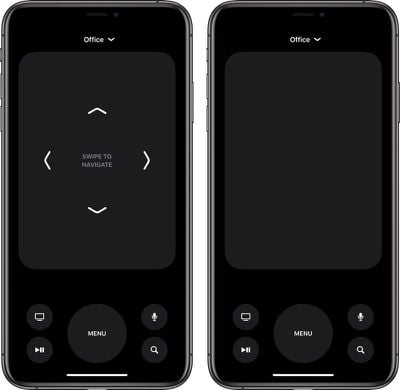
tvremotenewinterface
- Lock screen charging fix - The second beta of iOS 12.2 had a pesky bug that caused the iPhone's charge to be displayed on the Lock screen instead of the date. In beta 3, that's been fixed.

- ‌Apple News‌ logo - In the ‌Apple News‌ app, instead of spelling out "‌Apple News‌," Apple uses the "" symbol along with the word "News," similar to Apple Pay.

applenewslogo
- About screen - The interface for viewing information about your ‌iPhone‌ has been updated and rearranged in a more logical way with info like model number and serial number at the top with carrier information at the bottom.
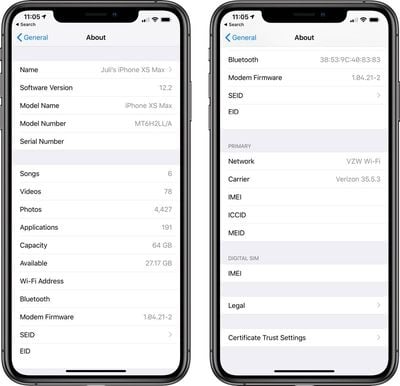
aboutscreenios122beta
- Group FaceTime bug fix - The Group ‌FaceTime‌ bug has been addressed in iOS 12.2 and Group ‌FaceTime‌ is now once again available to iOS 12.2 users.

- Developer updates - Alongside iOS 12.2 beta 3, Apple introduced new resources for developers. Siri Shortcuts design resources are available, as are new iOS system design templates, Adobe XD Apple Watch design resources, and an SF Compact Rounded font. Developers are also now able to offer subscription discounts on a broader basis thanks to a new API.

Siri Apple Store suggestions - There's a new section under ‌Siri‌ & Search > Apple Store that indicates ‌Siri‌ in iOS 12.2 will be able to suggest Today at Apple sessions for you based on your Safari and app usage.

Apple has introduced many other changes over the course of the beta testing period, with most of the updates outlined in our iOS 12.2 tidbits post.

Additional details on iOS 12 can be found in our iOS 12 roundup.

Related Forum: iOS 12

Popular Stories

MacBook Neo Feature Pastel 1

First MacBook Neo Benchmarks Are In: Here's How It Compares to the M1 MacBook Air

Thursday March 5, 2026 4:07 pm PST by
Benchmarks for the new MacBook Neo surfaced today, and unsurprisingly, CPU performance is almost identical to the iPhone 16 Pro. The MacBook Neo uses the same 6-core A18 Pro chip that was first introduced in the iPhone 16 Pro, but it has one fewer GPU core. The MacBook Neo earned a single-core score of 3461 and a multi-core score of 8668, along with a Metal score of 31286. Here's how the...

MacBook Neo Feature Pastel 1

Apple Announces $599 'MacBook Neo' With A18 Pro Chip

Wednesday March 4, 2026 6:15 am PST by
Apple today announced the "MacBook Neo," an all-new kind of low-cost Mac featuring the A18 Pro chip for $599. The MacBook Neo is the first Mac to be powered by an iPhone chip; the A18 Pro debuted in 2024's iPhone 16 Pro models. Apple says it is up to 50% faster for everyday tasks than the bestselling PC with the latest shipping Intel Core Ultra 5, up to 3x faster for on-device AI workloads,...
Multicolored Low Cost A18 Pro MacBook Feature

Apple Accidentally Leaks 'MacBook Neo'

Tuesday March 3, 2026 7:00 am PST by
Apple appears to have prematurely revealed the name of its rumored lower-cost MacBook model, which is expected to be announced this Wednesday. A regulatory document for a "MacBook Neo" (Model A3404) has appeared on Apple's website. Unfortunately, there are no further details or images available yet. While the PDF file does not contain the "MacBook Neo" name, it briefly appeared in a link...

Top Rated Comments

Swazaloo Avatar
92 months ago
I live in a Condo. If only there was a way to prevent all of my neighbors Apple TV's from showing up in my AirPlay device list.
Score: 14 Votes (Like | Disagree)
Luiz Claudio Eudes Corrêa Avatar
92 months ago
I live in a Condo. If only there was a way to prevent all of my neighbors Apple TV's from showing up in my AirPlay device list.
On Airplay settings on your AppleTV, just switch from allowing close devices to only allow devices from your network (-;
Score: 14 Votes (Like | Disagree)
IRockThat828pScreen Avatar
92 months ago
I'm just so ready for iOS 13.
Score: 12 Votes (Like | Disagree)
92 months ago
can they actually redesign the actual apple tv remote? i mean...it's a piece of crap
Score: 9 Votes (Like | Disagree)
mpainesyd Avatar
92 months ago
You know those buttons you could barely see? Well, you see them even less now! Can't innovate my ass! /sarcasm
A mute button would be a welcome addition. It is irritating that apps like Netflix suddenly play loud previews.
Score: 7 Votes (Like | Disagree)
imola.zhp Avatar
92 months ago
I live in a Condo. If only there was a way to prevent all of my neighbors Apple TV's from showing up in my AirPlay device list.
We live in a single family home and still have this issue...

It also means that any apple TV's you have are showing up in their lists too.
Score: 6 Votes (Like | Disagree)









































