Disk Utility Bug in macOS High Sierra Exposes Passwords of Encrypted APFS Volumes in Plain Text [Updated] - MacRumors
Skip to Content

Disk Utility Bug in macOS High Sierra Exposes Passwords of Encrypted APFS Volumes in Plain Text [Updated]

Brazilian software developer Matheus Mariano appears to have discovered a significant Disk Utility bug that exposes the passwords of encrypted Apple File System volumes in plain text on macOS High Sierra.
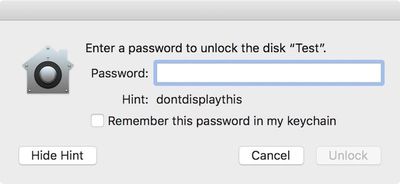
disk utility password prompt

MacRumors confirmed our test password "dontdisplaythis" appeared as the hint

Mariano added a new encrypted APFS volume to a container, set a password and hint, and unmounted and remounted the container in order to force a password prompt for demonstration purposes. Then, he clicked the "Show Hint" button, which revealed the full password in plain text rather than the hint.

A second video with English system language is embedded below

MacRumors reproduced this behavior on a 2016 MacBook Pro running macOS High Sierra, including versions 10.13 and 10.13.1 beta. German software developer Felix Schwarz also shared a video of the issue on Twitter today.
The issue currently only affects Macs with SSD storage due to Apple File System compatibility, but APFS will eventually support machines with Fusion Drives as well. Schwarz believes users who haven't specified a password hint, or haven't used Disk Utility whatsoever, are probably not affected.

For clarity, this appears to be a bug within Disk Utility itself. When creating an encrypted APFS volume in Terminal with the diskutil command line utility, the actual hint is shown, rather than the password.

Mariano said he has reported the vulnerability to Apple. The company did not immediately respond to our request for a comment on the matter, but we'll update this article if we hear back.

Update: Apple has addressed this bug by releasing a macOS High Sierra 10.13 Supplemental Update, available from the Updates tab in the Mac App Store. Apple has also shared a support document outlining steps to back up, erase, and restore the encrypted APFS volume upon updating.

The bug has also been fixed in the base version of macOS High Sierra for those who have yet to install the full software update.


Tag: APFS
Related Forum: macOS High Sierra

Popular Stories

Tim Cook Rainbow

Apple CEO Tim Cook Stepping Down, John Ternus Taking Over

Monday April 20, 2026 1:33 pm PDT by
Apple CEO Tim Cook is stepping down as Apple's chief executive officer, and hardware engineering chief John Ternus is set to take over, Apple announced today. Cook will continue on as Apple CEO through the summer, with Ternus set to join Apple's Board of Directors and take over as CEO on September 1, 2026. Cook is going to transition to executive chairman, and he will "assist with certain...
Four iPhone 18 Pro Colors Mock Feature

iPhone 18 Pro Launching in September With These 10 New Features

Monday April 20, 2026 7:13 am PDT by
While the iPhone 18 Pro and iPhone 18 Pro Max are not launching until September, there are already plenty of rumors about the devices. It was initially reported that the iPhone 18 Pro models would have fully under-screen Face ID, with only a front camera visible in the top-left corner of the screen. However, the latest rumors indicate that only one Face ID component will be moved under the...
macOS 27 on MacBook Pro

macOS 27 Will Mark the End of an Era

Saturday April 18, 2026 6:45 am PDT by
During its Platforms State of the Union segment at WWDC 2025, Apple revealed that macOS 26 Tahoe is the final major macOS version for Intel-based Macs. The upcoming macOS 27 release will be compatible with Apple silicon Macs only, meaning that you will need a Mac with an M-series chip or a MacBook Neo with an A18 Pro chip in order to install the software update. macOS 27 should be available...

Top Rated Comments

masotime Avatar
112 months ago
Apple seriously needs to start hiring better QA engineers....
Score: 49 Votes (Like | Disagree)
112 months ago
But we need to have animated emoji faces...
Score: 26 Votes (Like | Disagree)
112 months ago
Does showing the password itself as the hint count as a password hint? ;)
Score: 23 Votes (Like | Disagree)
Frosties Avatar
112 months ago
Thank you for the laugh. Great alpha software.
Score: 20 Votes (Like | Disagree)
112 months ago
Apple seriously needs to start hiring better QA engineers....
Yes, there some HUGE problems with Apple QA these days.

iOS 11 is riddled with obvious bugs. I just got one about 10 minutes ago. Was just deleting a few voicemails (swipe delete) and the Phone App crashed. Then there is a very reproducible Messages bug where the keyboard obscures the last few messages and you can't get to them. Real rinky-dink stuff that should be caught.

I'm starting to think that Apple is relying too much on the Beta process to collect bugs instead of having robust internal QA.
Score: 18 Votes (Like | Disagree)
112 months ago
To be clear, the linked Twitter thread ('https://twitter.com/felix_schwarz/status/915851372217683970/video/1') suggests that this is a Disk Utility bug, where if you create a password-protected volume in Disk Utility it inadvertently sets the hint to the password itself. It's not a bug that allows the password itself to be uncovered via other means, which is what I originally thought this meant and which was surprising to me since the only way to do that should be computationally expensive brute-force methods (the data itself is encrypted with the password; it's not just artificially protected by one, and it shouldn't be possible to "reverse lookup" the password by any true means).
Score: 17 Votes (Like | Disagree)