Office for iPad Design Manager Talks About Design Process - MacRumors
Skip to Content

Office for iPad Design Manager Talks About Design Process

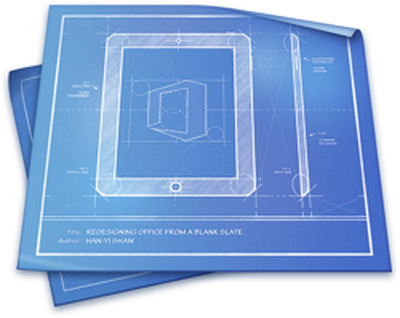
Office for iPadMicrosoft's design manager for Office for iPad has posted an interesting piece discussing the company's design philosophy behind the software.

The software, released back in March, has been well received by both users and critics. It's seen more than 27 million downloads and has already seen a significant update to add features that weren't ready for launch.

Han-Yi Shaw writes about the scenarios that the team imagined Office for iPad users would find themselves in, as well as the user experience goals they had:

- Familiar Office experience, with no learning curve
- Unmistakably Office, optimized for iPad
- Immersive and removes distractions
- Document content, not UI, takes center stage
- Experience is always beautiful, fast, and fluid

The purpose of a familiar Office experience is simple: a low learning curve and high user confidence. However, it’s just as important to strike a balance between “unmistakably Office” and “platform optimization,” which means optimizing for iOS platform conventions and touch-first user expectations. The most important, yet challenging, goal was finding the sweet spot between the essence of Office and iOS. Fortunately, since the Office for iPad and Mac team (formally known as the Macintosh Business Unit) is made up of Apple platform specialists, we were able to apply our deep knowledge of Apple platforms to the task.

The piece talks about how Microsoft redesigned The Ribbon -- the control strip at the top of all Office programs -- to mesh with Apple's design philosophies following the release of iOS 7. "That meant stripping out extraneous detail," said Shaw. "If there was a visual treatment or text label that wasn't absolutely necessary, we stripped it away."
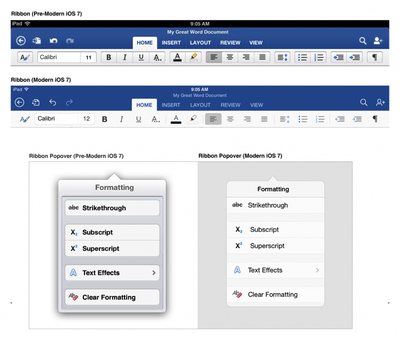
Old and New Office
The full piece is an interesting peek behind the curtain for designers and anyone interested in how software used by millions of people gets built.

Office for iPad is available from the App Store. [Direct Link: Word, Excel, PowerPoint]
Popular Stories

macOS 27 on MacBook Pro

Apple Says macOS 27 Won't Be Compatible With These Macs

Wednesday June 3, 2026 8:29 am PDT by
During WWDC 2025, Apple revealed that macOS 26 Tahoe would be the final major macOS version for Intel-based Macs. macOS 27 will be compatible with Apple silicon Macs only, meaning that you will need a Mac with an M-series chip or a MacBook Neo with an A18 Pro chip in order to install the software update. Apple will unveil macOS 27 during its WWDC 2026 keynote this Monday, June 8, and the...
MacBook Neo on Yellow Feature

MacBook Neo is So Popular That Apple Reportedly Doubled Production

Wednesday June 3, 2026 9:24 am PDT by
On an earnings call in late April, Apple's CEO Tim Cook said that customer response to the MacBook Neo was "off the charts," and the popularity of the laptop has reportedly led the company to significantly boost production. Apple supply chain analyst Ming-Chi Kuo this week said he believes that MacBook Neo shipments to Apple were doubled from an initial target of 5 million units to 10...
iphone 18 pro blue%402x

iPhone 18 Pro: Dark Cherry, Light Blue, and Dark Gray Chassis Leaked [Update]

Thursday June 4, 2026 5:18 am PDT by
Update: Since publication, new information has come to light suggesting the images have been AI-manipulated and are not in fact iPhone 18 Pro chassis parts. The original article follows. The color options Apple is reportedly planning for the upcoming iPhone 18 Pro and ‌iPhone 18 Pro‌ Max have appeared online today in the form of images of chassis parts of unknown authenticity....

Top Rated Comments

AngerDanger Avatar
157 months ago
Based on the screenshots, it made "designing" the UI a lot easier.

"Should we add some borders or shadows to distinguish between various tappable areas?"
"What, no! Next thing you know, people will want graphics or something to go along with them!"

I personally cannot wait until design becomes so simple, intuitive, refined, beautiful, gorgeous, (insert denigrated aesthetic term) that our homescreens are white backgrounds with a list of unformatted text. Ahhh, that'll be something…

(http://i.imgur.com/VpYGPUS.png)

</misplaced anger>
Score: 38 Votes (Like | Disagree)
surfingarbo Avatar
157 months ago
I really like the green, blue, and orange colours Microsoft use for each app. Both classic and modern at the same time. Great design work.
Score: 18 Votes (Like | Disagree)
maflynn Avatar
157 months ago
I will say I like the pre iOS 7 ribbon better but nonetheless word and excel are great apps on the iPad.
Score: 14 Votes (Like | Disagree)
Sky Blue Avatar
157 months ago
The new iOS 7 version looks ssoooo much better

new Office for Mac please :)
Score: 12 Votes (Like | Disagree)
157 months ago
Note how the pre-iOS 7 ribbon defers to content much better than the "modern" one.
Score: 9 Votes (Like | Disagree)
157 months ago
Its just to bad you have to pay a subscription to use Office on the iPad :( Because of that I won't touch it.

I think we're all going to find a LOT of software for Mac / PC / iPad etc. going the way of subscription.

Remember the days of buying a program on disk... using it for a long while and eventually deciding to get the next updated version-- (2 years later !)

Now, Adobe CS is Subscription based, AVID MC is going that way it seems, MS Office is that way now... It's the ONLY way to have a continuous revenue stream for these companies.

It's Sad, but soon, with the cost of the hardware, the cost of monthly data and the cost of subscription based software... who will be able to afford today's technology ?!?!
Score: 8 Votes (Like | Disagree)