OS X 10.10.3 Now Supports Dell's Dual-Cable 5K Monitor on Retina iMac and Mac Pro

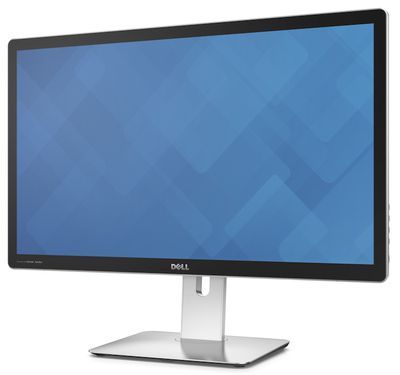
With the release of OS X 10.10.3 last Wednesday, Apple has expanded support for high-resolution 4K and even 5K external displays (via 9to5Mac). Most notably, OS X 10.10.3 enables the Retina 5K iMac and 2013 Mac Pro to drive Dell's UP2715K 27-inch 5K display released late last year. The display requires more bandwidth than is currently supported over a current single DisplayPort/Thunderbolt cable, so it uses a dual-cable solution taking up two ports on the user's machine.
dell_up2715k_5k
This bandwidth issue for the current DisplayPort standard has been seen as a major roadblock keeping Apple from releasing a standalone 5K Thunderbolt Display. With the Retina iMac, Apple has been able to build custom internal components to drive the massive display, but for external displays, a dual-cable solution such as that used by Dell has been considered by many to be "un-Apple like."

As a result, Apple has been widely expected to wait until the release of Intel's Skylake platform with DisplayPort 1.3 support later this year before releasing an external 5K Thunderbolt Display that will function over a single cable. Whether the inclusion of support for Dell's dual-cable solution in OS X 10.10.3 is a sign Apple may be willing to adopt that arrangement for its own display and perhaps release it earlier is, however, unclear.

Beyond 5K displays, OS X 10.10.3 has also expanded support for 4K displays to include "most single-stream 4K (3840x2160) displays" at 60 Hz, expanding beyond the previous support of only Multi-Stream Transport displays introduced in late updates to Mavericks. The new 4K display support will function with most of the Mac line, from the 27-inch iMac to the brand-new Retina MacBook. However, only the Mac Pro and iMac will support full 4096x2160 resolution at 60Hz.

With OS X Yosemite v10.10.3, most single-stream 4K (3840x2160) displays are supported at 60Hz operation on the following Mac computers:

- MacBook Pro (Retina, 13-inch, Early 2015)
- MacBook Pro (Retina, 15-inch, Mid 2014)
- Mac Pro (Late 2013)
- iMac (27-inch, Late 2013 and later)
- Mac mini (Late 2014)
- MacBook Air (Early 2015)
- MacBook (Retina, 12-inch, Early 2015)

As for the new 12-inch MacBook, the laptop will be able to support displays and rates of 3840x2160 at a 30 Hz refresh rate and 4096x2160 at a 24 Hz refresh rate. MacBook users wanting to use such a display will, of course, need to use Apple's USB-C Digital AV Multiport Adapter to do so.


Related Forums: MacBook, iMac, Mac Accessories, Mac Pro

Popular Stories

maxresdefault

Apple Shows Off a Key Reason to Upgrade to the iPhone 17

Saturday February 7, 2026 9:26 am PST by
Apple today shared an ad that shows how the upgraded Center Stage front camera on the latest iPhones improves the process of taking a group selfie. "Watch how the new front facing camera on iPhone 17 Pro takes group selfies that automatically expand and rotate as more people come into frame," says Apple. While the ad is focused on the iPhone 17 Pro and iPhone 17 Pro Max, the regular iPhone...
m5 macbook pro deal

Why You Shouldn't Buy the Next MacBook Pro

Tuesday February 10, 2026 4:27 pm PST by
Apple is planning to launch new MacBook Pro models as soon as early March, but if you can, this is one generation you should skip because there's something much better in the works. We're waiting on 14-inch and 16-inch MacBook Pro models with M5 Pro and M5 Max chips, with few changes other than the processor upgrade. There won't be any tweaks to the design or the display, but later this...
iOS 26

Apple Releases iOS 26.3 and iPadOS 26.3

Wednesday February 11, 2026 10:07 am PST by
Apple today released iOS 26.3 and iPadOS 26.3, the latest updates to the iOS 26 and iPadOS 26 operating systems that came out in September. The new software comes almost two months after Apple released iOS 26.2 and iPadOS 26.2. The new software can be downloaded on eligible iPhones and iPads over-the-air by going to Settings > General > Software Update. According to Apple's release notes, ...
apple wallet drivers license feature iPhone 15 pro

Apple Says These 7 U.S. States Plan to Offer iPhone Driver's Licenses

Monday February 9, 2026 6:24 am PST by
In select U.S. states, residents can add their driver's license or state ID to the Apple Wallet app on the iPhone and Apple Watch, and then use it to display proof of identity or age at select airports and businesses, and in select apps. The feature is currently available in 13 U.S. states and Puerto Rico, and it is expected to launch in at least seven more in the future. To set up the...
Apple Logo Zoomed

Apple Expected to Launch These 10+ Products Over the Coming Months

Tuesday February 10, 2026 6:33 am PST by
It has been a slow start to 2026 for Apple product launches, with only a new AirTag and a special Apple Watch band released so far. We are still waiting for MacBook Pro models with M5 Pro and M5 Max chips, the iPhone 17e, a lower-cost MacBook with an iPhone chip, long-rumored updates to the Apple TV and HomePod mini, and much more. Apple is expected to release/update the following products...

Top Rated Comments

141 months ago


- WORST OF ALL: it almost never wakes from sleep (and powering on/off) won't help. You basically have to power down your ENTIRE MAC every time you walk away, because otherwise you'll end up blind and having to force-shutdown. Which I've done many times, and yes, data loss can result. Only a full boot will make a picture appear reliably..
Hi. Long time reader, zero time commenter. Registered as I know the solution to the problem you're having!

Check your revision sticker on the back of your monitor. Dell did a silent update to that monitor to fix the issues you describe. They come from a buggy MST implementation - most 4k monitors shipped early on have that problem. If your revision is A00 call Dell support. They will need to replace the whole monitor for you. You'll get the A01 revision, which has that bug fixed.

As a bonus, you'll get a new stand (which doesn't sit on a weird angle)

One more thing: the P2415Q exists now. Much cheaper ($400) and doesn't use MST at all - so absolutely zero MST weirdness. Just like a normal monitor.
Score: 13 Votes (Like | Disagree)
SpiderDude Avatar
141 months ago
"- MacBook (Retina, 12-inch, Early 2015)"

Dual 5k monitors on an intel M core.
That oughta be fun...
Score: 11 Votes (Like | Disagree)
141 months ago
and dell is still charging 2499 for just the monitor.. Apple should add support to use a second 5k imac as a monitor.. it's the same damn price..
Score: 7 Votes (Like | Disagree)
141 months ago
Thanks! I've heard that, but I've also heard of the new revision NOT fixing the problem.

And I WILL get a used/refurb if I ask for that swap: more hairs and dust and scratches than the brand-new one came with. I've heard horror stories.

I'm still thinking of trying it, but with the solution being less than certain, I don't want to for now. (Plus I've heard Dell makes you pay for costly shipping?)
I had the UP2414Q before I upgraded. The revision fixed the problem for me. MST in and of itself is a dirty hack, a MST monitor will never operate quite like a SST monitor. Still, after the swap the weirdness should just be 'the monitor takes an extra second or two to wake after sleep'

AFAIK they come in retail packaging.

Dell does not make you pay for shipping.

You could always sell the UP2414Q and get the P2415Q. That one fixes most of your complaints, doubly so the MST-related ones. It doesn't pretend to have a metal finish anymore, it doesn't have touch buttons. Just all together better. I say 'sell' as the UP2414Q is, for reasons passing my understanding, selling for more than the P2414Q's MSRP. Maybe people really want that 'metal' housing?

Oh, and the UP2414Q will never work right on non-2013 Mac Pros (no MST support), but the P2415Q will work on any Mac Pro with a DisplayPort 1.2 GPU (a MacVidCards 7950/7970 being among the cheapest ways to get one)

Plug and play.


Yes, they do have one part-timer--and her job (which she did badly) was to copy this:

Image (http://origin.arstechnica.com/journals/apple.media/metalimac9.jpg)
Oh please. Dell's ports-on-back design predates that iMac even existing. Putting ports on the back of the display isn't even close to something Apple 'owns'. Apple may 'own' the ports facing straight out, I get that....but Dell displays have them facing down (an annoyance to anyone who needs to unplug something from their monitor)

Either way, that seems like a really silly thing to be screaming 'knockoff!' about.
Score: 6 Votes (Like | Disagree)
palebluedot Avatar
141 months ago
So... if you think a Dell is the display of your dreams, go in with low expectations. Expect a cheaply-made, unreliable stopgap until you can afford (and find!) something better.

I think you are wrong on this. Dell customer support for their high-end/pro monitors is equivalent to AppleCare/Apple customer support in my experience. I've personally had Dell go through 5 seperate monitors with me to make sure I found one with the gamut, lack of bleed, and angles I liked.

I've had just as many mfg defects in Apple products as Dell monitors and I've found both companies (with the exception of having to email Tim Cook to get something fixed once) easily stand behind their products. YMMV, but I think you may be an outlier there. Should have called Dell and gotten a new unit.
Score: 5 Votes (Like | Disagree)
141 months ago
"- MacBook (Retina, 12-inch, Early 2015)"

Dual 5k monitors on an intel M core.
That oughta be fun...

That's not what the article says: it says the Retina Macbook only supports 1 4K display up to 3840*2160 @30Hz.
Score: 5 Votes (Like | Disagree)