

Roundup of OS X 10.8 Mountain Lion Features and Notes - MacRumors
Skip to Content

Roundup of OS X 10.8 Mountain Lion Features and Notes

Apple surprised everyone this morning with a developer preview of OS X 10.8 Mountain Lion. The new release brings a number of iOS-like features to the Mac, as detailed in this video:


- Messages - new version of iChat with iMessage support
- Reminders - create lists and tasks, synced via iCloud
- Notes - create notes, synced via iCloud
- Notification Center - on screen pop-up notifications
- Share Sheets - share buttons to email, tweet, message, etc...
- Game Center - social gaming center for Mac
- AirPlay Mirroring - broadcast your Mac's screen to your Apple TV

Apple also released a public beta of the Messages App for OS X Lion users and is available today.

Apple did give some of the media early previews of Mountain Lion, which we suspect may have been the unusual media event that had been predicted. OS X Mountain Lion is available to registered developers today, and will be go on sale in late summer 2012.

Roundup of our earlier coverage:

- OS X Mountain Lion's Documents in the Cloud Simplifies File Access Across Devices
- Apple Officially Drops 'Mac' Name from OS X Mountain Lion
- Software Update to Move Inside Mac App Store in OS X Mountain Lion
- OS X Mountain Lion Limits Apps to Mac App Store, Signed Apps by Default
- OS X Mountain Lion Drops Support for Many 2006-2008 Macs with Integrated Graphics
- OS X Mountain Lion to Be True Mac App Store Exclusive

We've also opened an OS X 10.8 Mountain Lion forum for questions and discussions about Apple's new operating system.

Popular Stories

8 CarPlay Features in iOS 27 Feature

Which iOS 27 CarPlay Features Actually Work in Your Car?

Thursday September 17, 2026 4:17 am PDT by
In iOS 27, available now, CarPlay gets its biggest update in years, but some features depend on what type of car you have rather than your iPhone model. Some of the biggest additions won't do anything in the vast majority of vehicles on the road today. Here's how the new features pan out. Works in Any CarPlay Vehicle Custom widgets: In iOS 27, CarPlay is no longer limited to Apple's handful ...
iphone 18 pro max prepare

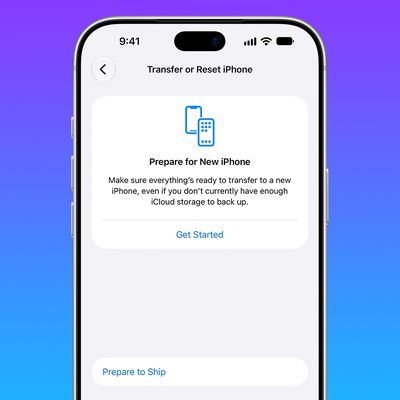
iPhone 18 Pro Max Requires 'Prepare to Ship' Battery Drain Before Shipping

Friday September 18, 2026 4:27 pm PDT by
The iPhone 18 Pro Max has a battery capacity over 20 watt-hours, which means there are additional shipping requirements. If an iPhone 18 Pro Max needs to be shipped somewhere, its maximum battery capacity has to be limited through firmware. According to Apple, the iPhone 18 Pro Max uses an "innovative battery-firmware solution" that limits battery capacity to below 20Wh between when the...
Apple Watch New Charging Puck

Here's Why a New Apple Watch Charging Puck Was Just Released

Wednesday September 16, 2026 8:53 am PDT by
The new Apple Watch Series 12 and Apple Watch Ultra 4 have hardware changes that allow for faster charging, but you will need to use the new version of the Apple Watch Magnetic Fast Charger included in the box in order to achieve this boost. If you need extra ones for your own charging stands or travel or so forth, Apple released the new version of the charger on its online store last week, with...

Top Rated Comments

190 months ago
No Pro

They haven't mentioned a single feature related to pro users. Nothing. It's all about being a consumer, consuming video and sharing your unemployment stories with your friends.

P.S. Why am I a newbie even though i joined in 2003?
Score: 27 Votes (Like | Disagree)
ECUpirate44 Avatar
190 months ago


And we need game center on our Macs why?

To play games with friends? It's a perfectly understandable addition to OSX.
Score: 24 Votes (Like | Disagree)
190 months ago
I wonder if we'll get "One more thing" at WWDC. Maybe Siri for Mac?
Score: 17 Votes (Like | Disagree)
PBP Avatar
190 months ago
This annoying checkbox from Lion is finally fixed!
It remembers his 'state'. So you don't have to uncheck it anymore.
Score: 16 Votes (Like | Disagree)
Prodo123 Avatar
190 months ago
I hate how Notification Center pushes the entire desktop away to the left. A semi-transparent sliding overlay similar to Growl's default UI would be much more elegant.
Score: 15 Votes (Like | Disagree)
AustinIllini Avatar
190 months ago
iOS X 10.9
Dandelion. Segue to flower names
Score: 12 Votes (Like | Disagree)














