Belkin recently introduced the $99 Boost Charge Pro 2-in-1 Wireless Charger Stand with MagSafe, which joins the existing Belkin-branded 3-in-1 MagSafe Charger that came out earlier this year.
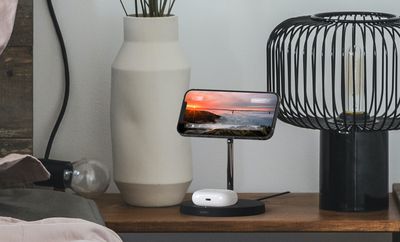
belkin magsafe charger
Belkin continues to be the only third-party accessory maker that offers Apple-approved MagSafe-compatible charging accessories that are able to charge Apple's iPhone 12 models at the maximum speeds, so there's not a lot of competition out there aside from Apple's own ‌MagSafe‌ Charger and ‌MagSafe‌ Duo.

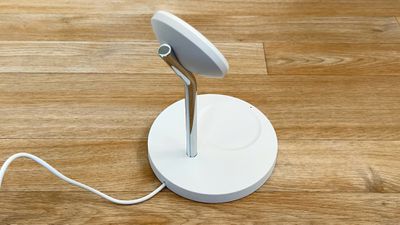
belkin charger design
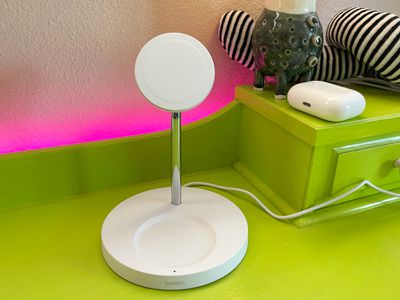
Design wise, the 2-in-1 ‌MagSafe‌ Charger features a circular base with a chrome arm that houses a ‌MagSafe‌ charging puck that works with the ‌iPhone‌ 12, 12 mini, 12 Pro, and 12 Pro Max. The charger's base is made from a plastic material and comes in either black or white. It's not the most high quality charger that I've used, but I think it looks fine on a desk or table, blending in well without standing out.
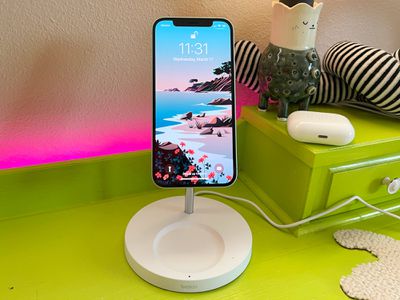
belkin charger on desk
The ‌MagSafe‌ charging puck is similar to Apple's own ‌MagSafe‌ Charger in design, with that same soft rubber feel, and underneath, the charger has silicone pads to keep it in place on a desk. At the bottom of the base, there's a built-in Qi-based wireless charger that's meant to be used for the AirPods. There's a small hollow where the AirPods or AirPods Pro fit, and positioning the AirPods case within this hollow ensures that it's in the proper position for charging.
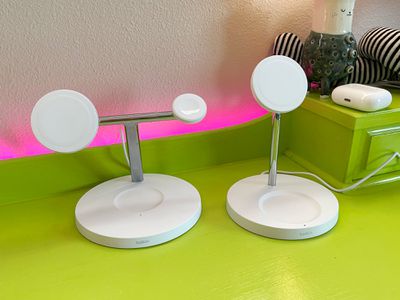
belkin charger next to 3 in 1
Even though the Qi charger at the base is designed for AirPods, it also works with other iPhones and smartphones that support Qi-based charging. The hollow is bigger and wider than the hollow Belkin added for the 3-in-1 charger, but it still works for iPhones of all sizes. This base charger is limited to 5W though, so it's not going to charge anything at high speeds.
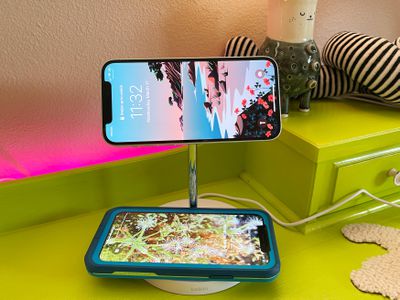
belkin charger two iphones
The main ‌MagSafe‌ charging puck is identical to Apple's charging options and it charges the ‌iPhone‌ 12, 12 Pro, and 12 Pro Max at 15W. The iPhone 12 mini maxes out at 12W, which the 2-in-1 charger also accommodates. The 2-in-1 charger is weighted a bit, but you do need to use a grab and twist gesture to undock an ‌iPhone‌ without lifting the charger itself. I've had no problems with this, and just giving that small twist when pulling up keeps it on my desk where it belongs.

With Apple's ‌MagSafe‌ chargers you need to make sure you have the appropriate power adapter, which is not included, but there's no guesswork involved with the Boost Charge Pro 2-in-1 Wireless Charger Stand because it comes with a power adapter.
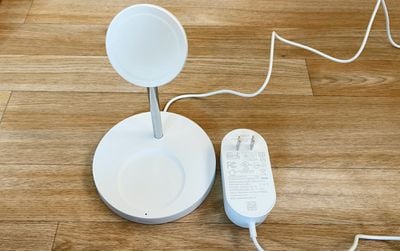
belkin charger power adapter
The circular base of the Belkin 2-in-1 ‌MagSafe‌ Charger doesn't take up too much room on a desk (it's about 5.3 inches at its widest point), which I appreciate, and the upright ‌MagSafe‌ charging arm can be used in either portrait or landscape mode. The charging arm is angled slightly to put the ‌iPhone‌ in an ideal position for watching videos, taking FaceTime calls, or glancing over to see the time at night.

The 2-in-1 ‌MagSafe‌ Charger comes in either black or white, and there's a small LED light on the base that lights up when the Qi-based charger is in use so you know if charging is happening. There's no need for a light for the ‌MagSafe‌ charging puck because the ‌iPhone‌ connects magnetically and automatically gets oriented in the right position.
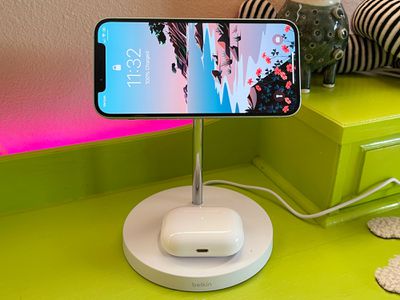
belkin charger with airpods
You can use the ‌MagSafe‌ charger with a naked ‌iPhone‌ or with a MagSafe-compatible case, but because it's magnetic, it does not work with non-MagSafe cases or with non-iPhone 12 models because they don't have the necessary built-in magnets.

In my testing, Belkin's 2-in-1 ‌MagSafe‌ Charger charged my ‌iPhone‌ 12 from dead to 62 percent in an hour while also charging the AirPods Pro at 5W, which is just about the same charging speed that I tend to get from a standard Apple ‌MagSafe‌ Charger. It should be noted, though, that charging with ‌MagSafe‌ is variable, both with this Belkin charger and Apple's standard charger.

In some tests I get around 60 percent battery life in an hour from dead, but in other tests, battery life can be closer to 70 percent, so your actual charging speeds may vary somewhat. What I can say, though, is that the Belkin charger seems to be charging right at the same speeds as a standard ‌MagSafe‌ Charger, even when charging another device too.

Bottom Line

Apple's standard ‌MagSafe‌ Charger is $39, which means the 2-in-1 ‌MagSafe‌ Charger from Belkin is $60 more expensive. Not everyone is going to want to pay that price, but for those who are fully investing in the ‌MagSafe‌ product lineup, it could be worth the cost.
belkin charger desktop
I prefer Belkin's upright charging options to the standard Apple ‌MagSafe‌ Charger because they're just more convenient to use. It's easier to grab an ‌iPhone‌ off a desk from the charging arm than it is to grab one from the flat charger, and there's also space for charging AirPods or another device with the Qi charging base. All-in-one charging options save space and require fewer cables, which is a bonus.

In the future there may be more ‌MagSafe‌ charging options to choose from, but right now you're only going to get the fastest speeds from Apple-approved accessories like the ‌MagSafe‌ Charger and Belkin's options. You can get a much cheaper magnetic charger from a third-party company, but those cheaper chargers are limited to 7.5W rather than 15W and aren't worth it for those who want the faster ‌MagSafe‌ charging speeds.

How to Buy

The Belkin 2-in-1 ‌MagSafe‌ Charger can bepurchased from the Apple website for $99.95.

Top Rated Comments

anyjungleinguy Avatar
62 months ago
Is that vase dented?
Score: 7 Votes (Like | Disagree)
repoman016 Avatar
62 months ago

In my opinion, $99 is too much for what it is. I would give it a try at $40.
eh i dunno, belkin is usually pretty reliable and this does look pretty neat. id give it a shot at $60-$75
Score: 5 Votes (Like | Disagree)
blairh Avatar
62 months ago
I have the 3-1 model and I really like it.
Score: 5 Votes (Like | Disagree)
ouimetnick Avatar
62 months ago

In my opinion, $99 is too much for what it is. I would give it a try at $40.
Still cheaper that the flimsy MagSafe Duo
Score: 3 Votes (Like | Disagree)
dukee101 Avatar
62 months ago
I have the Belkin 3-in-1 MagSafe charging stand and can confirm it is a fantastic piece of charging hardware. I can't recommend it enough. Extra points for the super-cool floating effect of an iPhone on a vertical MagSafe puck.
Score: 3 Votes (Like | Disagree)
Apple_Robert Avatar
62 months ago

Still cheaper that the flimsy MagSafe Duo
That is true. I wouldn't touch the Duo $150 either.
Score: 3 Votes (Like | Disagree)

Popular Stories

iOS 26

15 New Things Your iPhone Can Do in iOS 26.2

Friday December 5, 2025 9:40 am PST by
Apple is about to release iOS 26.2, the second major point update for iPhones since iOS 26 was rolled out in September, and there are at least 15 notable changes and improvements worth checking out. We've rounded them up below. Apple is expected to roll out iOS 26.2 to compatible devices sometime between December 8 and December 16. When the update drops, you can check Apple's servers for the ...
Intel Inside iPhone Feature

Apple's Return to Intel Rumored to Extend to iPhone

Friday December 5, 2025 10:08 am PST by
Intel is expected to begin supplying some Mac and iPad chips in a few years, and the latest rumor claims the partnership might extend to the iPhone. In a research note with investment firm GF Securities this week, obtained by MacRumors, analyst Jeff Pu said he and his colleagues "now expect" Intel to reach a supply deal with Apple for at least some non-pro iPhone chips starting in 2028....
ios 18 to ios 26 upgrade

Apple Pushes iPhone Users Still on iOS 18 to Upgrade to iOS 26

Tuesday December 2, 2025 11:09 am PST by
Apple is encouraging iPhone users who are still running iOS 18 to upgrade to iOS 26 by making the iOS 26 software upgrade option more prominent. Since iOS 26 launched in September, it has been displayed as an optional upgrade at the bottom of the Software Update interface in the Settings app. iOS 18 has been the default operating system option, and users running iOS 18 have seen iOS 18...
iOS 26

Apple Seeds iOS 26.2 and iPadOS 26.2 Release Candidates to Developers and Public Beta Testers

Wednesday December 3, 2025 10:33 am PST by
Apple today seeded the release candidate versions of upcoming iOS 26.2 and iPadOS 26.2 updates to developers and public beta testers, with the software coming two weeks after Apple seeded the third betas. The release candidates represent the final versions of iOS 26.2 and iPadOS 26.2 that will be provided to the public if no further bugs are found during this final week of testing....
Photos App Icon Liquid Glass

John Gruber Shares Scathing Commentary About Apple's Departing Software Design Chief

Thursday December 4, 2025 9:30 am PST by
In a statement shared with Bloomberg on Wednesday, Apple confirmed that its software design chief Alan Dye will be leaving. Apple said Dye will be succeeded by Stephen Lemay, who has been a software designer at the company since 1999. Meta CEO Mark Zuckerberg announced that Dye will lead a new creative studio within the company's AR/VR division Reality Labs. On his blog Daring Fireball,...
iOS 26

When Will Apple Release iOS 26.2?

Monday December 1, 2025 4:37 pm PST by
We're getting closer to the launch of the final major iOS update of the year, with Apple set to release iOS 26.2 in December. We've had three betas so far and are expecting a fourth beta or a release candidate this week, so a launch could follow as soon as next week. Past Launch Dates Apple's past iOS x.2 updates from the last few years have all happened right around the middle of the...
maxresdefault

iPhone Fold: Launch, Pricing, and What to Expect From Apple's Foldable

Monday December 1, 2025 3:00 am PST by
Apple is expected to launch a new foldable iPhone next year, based on multiple rumors and credible sources. The long-awaited device has been rumored for years now, but signs increasingly suggest that 2026 could indeed be the year that Apple releases its first foldable device. Subscribe to the MacRumors YouTube channel for more videos. Below, we've collated an updated set of key details that ...
ive and altman

Jony Ive's OpenAI Device Barred From Using 'io' Name

Friday December 5, 2025 6:22 am PST by
A U.S. appeals court has upheld a temporary restraining order that prevents OpenAI and Jony Ive's new hardware venture from using the name "io" for products similar to those planned by AI audio startup iyO, Bloomberg Law reports. iyO sued OpenAI earlier this year after the latter announced its partnership with Ive's new firm, arguing that OpenAI's planned "io" branding was too close to its...
iphone air camera

iPhone Air's Resale Value Has Dropped Dramatically, Data Shows

Thursday December 4, 2025 5:27 am PST by
The iPhone Air has recorded the steepest early resale value drop of any iPhone model in years, with new data showing that several configurations have lost almost 50% of their value within ten weeks of launch. According to a ten-week analysis published by SellCell, Apple's latest lineup is showing a pronounced split in resale performance between the iPhone 17 models and the iPhone Air....
iPhone 17 Pro Cosmic Orange

iPhone 17 Pro Lost a Camera Feature Pro Models Have Had Since 2020

Thursday December 4, 2025 5:18 am PST by
iPhone 17 Pro models, it turns out, can't take photos in Night mode when Portrait mode is selected in the Camera app – a capability that's been available on Apple's Pro devices since the iPhone 12 Pro in 2020. If you're an iPhone 17 Pro or iPhone 17 Pro Max owner, try it for yourself: Open the Camera app with Photo selected in the carousel, then cover the rear lenses with your hand to...