In iOS 18, Apple has made a significant enhancement to the Notes app, introducing a built-in audio recording feature that streamlines the process of capturing and transcribing voice notes. The new functionality is available on iPhone 12 and later models, and allows you to record audio directly within a note, eliminating the need to use separate apps or share files.
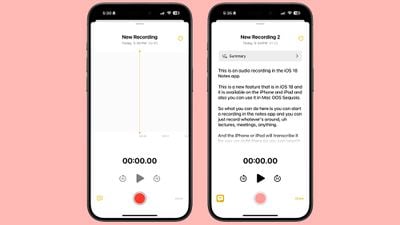
ios 18 notes app voice recording
The new audio recording tool in Notes offers more than just simple voice capture. As users record, the app automatically generates a real-time transcript, making it easier to review and search through recorded content. This feature is particularly useful for students attending lectures, professionals in meetings, or anyone who needs to quickly capture and reference spoken information.

Record a Voice Note and Get a Transcript

To use the new audio recording feature in iOS 18's Notes app, simply follow these steps:

  1. Open the Notes app and create a new note or open an existing one.
  2. Tap inside the note, then select the paperclip icon from the menu above the keyboard.
  3. Choose Record Audio from the pop-up menu.
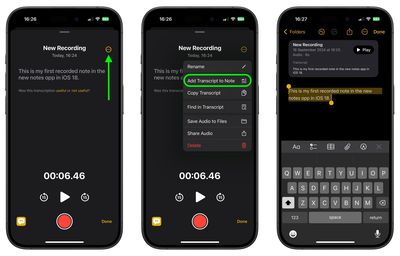
  4. Press the red record button to start recording, and tap it again to stop. To view the transcript, tap the quote bubble icon in the bottom-left corner.
    notes

  5. To add the full transcript to the note, tap the three-dot menu in the upper right corner.
  6. Select Add Transcript to Note from the dropdown menu.
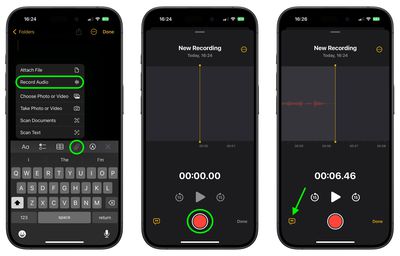
    notes

That's all there is to it. While the audio recording feature offers new note-taking abilities, it's worth noting that it currently only supports English, but Apple will likely bring support for additional languages in a future update.

In an iOS 18 update coming later this year, Apple Intelligence will also be able to generate transcription summaries, offering a distilled, more easily digestible version of your voice recordings.
Top Rated Comments

Jxdawg Avatar
15 months ago
If only this was available when I was a student…

Also, proud of Apple for not slapping the AI label on it like so many other companies have been.
Score: 7 Votes (Like | Disagree)
anakin44011 Avatar
15 months ago

If only this was available when I was a student…

Also, proud of Apple for not slapping the AI label on it like so many other companies have been.
I hear you...now everything from a data dashboard to a bayesian filter has now been rebranded as AI. Pretty soon my next cheeseburger will be AI-enhanced.

On another note, unless you are at least five years into retirement, we are all still students. The world is accelerating way, way too fast to not be studying (or practicing) something at all times. So I welcome any technology that helps us learn...including, almost ironically given my earlier statement...AI.
Score: 5 Votes (Like | Disagree)
citysnaps Avatar
15 months ago
An outstanding feature...one I'll be using a lot!
Score: 5 Votes (Like | Disagree)
kiranmk2 Avatar
15 months ago
Seems a bit complicated - too much clicking on strange icons or the three dots to find "hidden" options. I would have thought a better approach was to make this part of the Voice Recordings app and give a (clear) option to transcribe the recording and add this to the Notes app.
Score: 4 Votes (Like | Disagree)
jmarsh5 Avatar
15 months ago
I kind of wish the transcription text was actually transcribed onto the note itself (or at least be an option to do so) instead of being contained in the little voice module inside the note. A small annoyance but it would make navigating those much easier for me personally. For example, being able to use “Find in Note” directly from the note itself and not having to first click into the recording. Also, even if you don’t give the recording a title it doesn’t carry over to being the title of the actual note. Quite an annoying to have to title things twice.
Score: 3 Votes (Like | Disagree)
Rradcircless Avatar
15 months ago
I mistakenly thought they would improve the transcription with the addition of this feature but it’s just as bad as it‘a always been. When it transcribes my memos it completely changes words, writes sentences that don’t make any sense and creates new words which don’t even exist. I thought it was gonna become as good as Otter, that was my mistake.
Score: 3 Votes (Like | Disagree)

Popular Stories

Early Black Friday Deals 1

The Best Early Black Friday Apple Deals on AirPods, Apple Watch, iPad, and More

Saturday November 8, 2025 6:16 am PST by
We're officially in the month of Black Friday, which will take place on Friday, November 28 in 2025. As always, this will be the best time of the year to shop for great deals, including popular Apple products like AirPods, iPad, Apple Watch, and more. In this article, the majority of the discounts will be found on Amazon. Note: MacRumors is an affiliate partner with some of these vendors. When ...
2024 iPhone Boxes Feature

Apple Adjusts Trade-In Values for iPhones, iPads, Macs, and More

Thursday November 6, 2025 11:12 am PST by
Apple today updated its trade-in values for select iPhone, iPad, Mac, and Apple Watch models. Trade-ins can be completed on Apple's website, or at an Apple Store. The charts below provide an overview of Apple's current and previous trade-in values in the U.S., according to its website. Maximum values for most devices either decreased or saw no change, but the iPad Air received a slight bump. ...
All Screen iPhone 2027 Feature 1

Apple to Hide Selfie Camera Under Display of 20th Anniversary iPhone

Monday November 10, 2025 1:55 am PST by
Apple will conceal the front-facing camera under the screen of its 2027 iPhone, a Chinese leaker said today, corroborating reports that Apple's 20th anniversary iPhone will have no visible cutouts in the display. Weibo-based account Digital Chat Station said Apple's development of under-screen camera technology was progressing as planned for adoption in 2027, one year after it will...
Apple fitness plus feature

Future of Apple Fitness+ 'Under Review'

Sunday November 9, 2025 5:30 am PST by
The future of Apple Fitness+ is "under review" amid a reorganization of the service, according to Bloomberg's Mark Gurman. In the latest edition of his "Power On" newsletter, Gurman said that Apple Fitness+ remains one of the company's "weakest digital offerings." The service apparently suffers from high churn and little revenue. Nevertheless, Fitness+ has a small, loyal fanbase that...
m1 chip slide

Five Years of Apple Silicon: M1 to M5 Performance Comparison

Monday November 10, 2025 1:08 pm PST by
Today marks the fifth anniversary of the Apple silicon chip that replaced Intel chips in Apple's Mac lineup. The first Apple silicon chip, the M1, was unveiled on November 10, 2020. The M1 debuted in the MacBook Air, Mac mini, and 13-inch MacBook Pro. The M1 chip was impressive when it launched, featuring the "world's fastest CPU core" and industry-leading performance per watt, and it's only ...
iphone air thinness

iPhone Air Sales Are So Bad That Apple's Delaying the Next-Generation Version

Monday November 10, 2025 11:41 am PST by
The thin, light iPhone Air sold so poorly that Apple has decided to delay the launch of the next-generation iPhone Air that was scheduled to come out alongside the iPhone 18 Pro, reports The Information. Apple initially planned to release a new iPhone Air in fall 2026, but now that's not going to happen. Since the iPhone Air launched in September, there have been reports of poor sales...
Liquid Glass General Feature

Apple Shares Liquid Glass Design Gallery

Thursday November 6, 2025 2:45 pm PST by
Apple is promoting the new Liquid Glass design in iOS 26, showing off the ways that third-party developers are embracing the aesthetic in their apps. On its developer website, Apple is featuring a visual gallery that demonstrates how "teams of all sizes" are creating Liquid Glass experiences. The gallery features examples of Liquid Glass in apps for iPhone, iPad, Apple Watch, and Mac. Apple...
iOS 26

iOS 26.1 Available Now With These 8 New Features

Monday November 3, 2025 5:54 am PST by
Following more than a month of beta testing, Apple released iOS 26.1 on Monday, November 3. The update includes a handful of new features and changes, including the ability to adjust the look of Liquid Glass and more. Below, we outline iOS 26.1's key new features. Liquid Glass Toggle iOS 26.1 lets you choose your preferred look for Liquid Glass. In the Settings app, under Display...
iPhone Satellite Feature

Apple Developing These 5 New Satellite Features for iPhone

Sunday November 9, 2025 6:07 am PST by
Apple is working on a series of new satellite connectivity features for the iPhone, Bloomberg's Mark Gurman reports. In this week's "Power On" newsletter, Gurman revealed that the new features in development include: Apple Maps via satellite: Navigation in Apple Maps without cellular or Wi-Fi connectivity. Photos in Messages via satellite: Support for sending photos in the Messages...
maxresdefault

In-Depth iPhone Battery Experiment Pits Slow Charging Against Fast Charging

Friday November 7, 2025 1:19 pm PST by
HTX Studio this week shared the results from a six-month battery test that compared how fast charging and slow charging can affect battery life over time. Using six iPhone 12 models, the channel set up a system to drain the batteries from five percent and charge them to 100 percent over and over again. Three were fast charged, and three were slow charged. Another set of iPhones underwent...