With iOS 15 and the Hide My Email feature exclusive to iCloud+ subscribers, you can create unique, random email addresses that forward to your personal inbox whenever you want to keep your personal email address private. In iOS 15.2, which is in beta right now, you can use Hide My Email directly from the Mail app.

ios15 mail privacy feature
When you use Hide My Email, all the emails sent to the random Apple-created email address are forwarded to you so you can respond if needed, but the person on the receiving end does not see your real email address.

This is especially useful if you think that a business is likely to share your email address with ad agencies or other third-parties for marketing purposes. Providing them with a dummy address means you can delete the address at any time, ensuring any unsolicited emails don't reach your inbox.

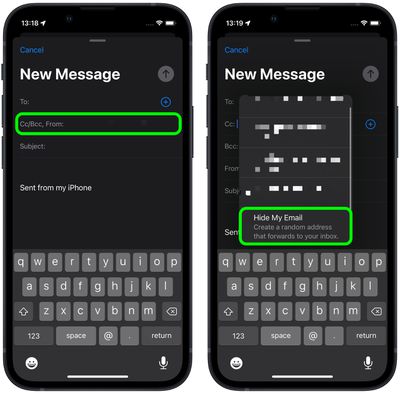
Here's how it works with the Mail app in iOS 15.2.

  1. Launch the Mail app on your iPhone or iPad.
  2. Tap the New Message icon in the bottom-right corner of the main Mail screen to compose a message in the normal way.

  3. Fill in the To: field. Next, tap the Cc/Bc, From: field to collapse it and then tap From again.
  4. Scroll to the bottom of the list of available addresses and select Hide My Email.
    hide my email

  5. Now compose your email as normal and send it.
In addition, as a paid ‌iCloud‌+ subscriber, you can use random email addresses when you're asked to enter your email address on a website in Safari. Just select the Hide My Email option when it appears on the screen.

You can also deactivate or delete addresses generated by Hide My Email, and change your forwarding address at a later date. See the links for details.


Related Forum: iOS 15

Top Rated Comments

contacos Avatar
54 months ago

This is a very good feature. But I'm not sure if it's going to be useful or beneficial?

What's the point of hiding the email when you can receive SPAM emails?
I have a LOT of pages I signed up for once upon a time that I do not even remember and now they got my email address which I wish they didn’t and therefore I wish this would have been available sooner.

Now I can sign up on page X and if I receive spam to that address, I know page X shared my email with 3rd parties and can easily erase that account with one click
Score: 12 Votes (Like | Disagree)
LV426 Avatar
54 months ago

This is a very good feature. But I'm not sure if it's going to be useful or beneficial?

What's the point of hiding the email when you can receive SPAM emails?
You can scrap the auto-generated email address proxy at a time of your choosing. No more spam.
Score: 6 Votes (Like | Disagree)
Bandaman Avatar
54 months ago

Is it kinda of email aliases addresses offered by ie Protonmail, Tutanota etc?!
Not even remotely. You can create unlimited aliases using this, whereas you are limited to a set amount with Protonmail and Tutanota. You can't delete aliases at will like you can with this Apple service. With Tutanota if you max out your aliases you have to wait a year before making new ones. With Protonmail you have to contact customer support just to delete an alias. With this Apple service you are in full control.


I have a LOT of pages I signed up for once upon a time that I do not even remember and now they got my email address which I wish they didn’t and therefore I wish this would have been available sooner.

Now I can sign up on page X and if I receive spam to that address, I know page X shared my email with 3rd parties and can easily erase that account with one click
Yes exactly. You can see exactly what idiots are sharing your e-mail address with third parties.
Score: 6 Votes (Like | Disagree)
Bandaman Avatar
54 months ago

Sounds good, but a i'm bit confused is it only for paid iCloud+ subs?
It’s only for iCloud+
Score: 3 Votes (Like | Disagree)
bankshot Avatar
54 months ago
This came in handy the other day when I was registering for a new website. Normally I use my own domain and just use companyname@mydomain.org to easily see when companies are selling or not protecting my info. But this website absolutely would not accept anything @mydomain.org as a valid email address. I've never encountered that before! I can't imagine the kind of sloppy programming that caused that (I suspect it didn't recognize any .org domain as valid).

Finally I hit the Hide My Email button in Safari, it created a random @icloud.com address, and it worked like a charm.
Score: 3 Votes (Like | Disagree)
LeadingHeat Avatar
54 months ago

I assume this is very similar to the existing feature where you can long press an email field on a registration website, and get Apple to generate a random @icloud.com proxy. I tried that recently. Meh, the website in question instantly reported that it won’t accept that kind of email address.
Yeaahh that’s probably a website I’d steer clear from if they’re actively blocking it. (In attempts to get your data most likely)
Score: 2 Votes (Like | Disagree)

Popular Stories

apple music chatgpt

ChatGPT's Apple Music Integration Is Now Live

Wednesday December 17, 2025 3:50 pm PST by
There's now a dedicated Apple Music app for ChatGPT, which allows ChatGPT to make music recommendations and build playlists. Apple Music can be added to ChatGPT through the Settings section in the Mac app, website, or iOS app. Apple Music is listed under the apps option, and connecting to it requires signing in with your Apple Account for authorization purposes. ChatGPT can be used to...
iPhone Top Left Hole Punch Face ID Feature Purple

iPhone 18 Pro Features Leaked in New Report, Including Under-Screen Face ID

Tuesday December 16, 2025 8:44 am PST by
Next year's iPhone 18 Pro and iPhone 18 Pro Max will be equipped with under-screen Face ID, and the front camera will be moved to the top-left corner of the screen, according to a new report from The Information's Wayne Ma and Qianer Liu. As a result of these changes, the report said the iPhone 18 Pro models will not have a pill-shaped Dynamic Island cutout at the top of the screen....
top stories 2025 12 20

Top Stories: iOS 26.3 Beta, Major Apple Leaks, and More

Saturday December 20, 2025 6:00 am PST by
You'd think things would be slowing down heading into the holidays, but this week saw a whirlwind of Apple leaks and rumors while Apple started its next cycle of betas following last week's release of iOS 26.2 and related updates. This week also saw the release of a new Apple Music integration with ChatGPT, so read on below for all the details on this week's biggest stories! Top Stories i...
airpods pro 3 new blue

AirPods Pro 3's Static and Noise Issues Haven't Been Resolved

Thursday December 18, 2025 3:44 pm PST by
Since the AirPods Pro 3 launched, there have been complaints from users who have noticed a static-like sound or a crackling issue when using the earbuds, particularly when Active Noise Cancellation is on but no media is playing. Users have also run into strange high-pitched whistling sounds that happen intermittently. We shared the issues back in late October, and despite two subsequent...
apple beta 26 lineup

Apple's 2026 and 2027 Product Roadmap: Foldable iPhone, iPhone 18 Pro, M5 Macs, and More

Tuesday December 16, 2025 4:42 pm PST by
There has been a whirlwind of rumors over the last few days, sourced from leaked internal software designed for the iPhone and the Mac, and news sites like The Information. Below, we have a quick recap of everything we've heard this week, which serves as a guide to Apple's product plans in 2026 and beyond. We've organized the info by likely release date, though there are some products that...
iOS 26 Maps Glass

Apple Quietly Discontinued Flyover City Tours in Apple Maps

Thursday December 18, 2025 1:31 pm PST by
Apple Maps no longer offers a Flyover feature that provides users with automated tours of notable landmarks in major cities. The Flyover option appears to have been nixed around when iOS 26 launched, but its removal went largely unnoticed. Flyover city tours were introduced in 2014 with iOS 8 and OS X Yosemite, using Flyover imagery to generate an aerial tour. Most cities with Flyover...
ios 18 security update

Don't Want to Upgrade to iOS 26? Here's How to Stay on iOS 18 [Update: Now Unavailable]

Friday December 19, 2025 10:37 am PST by
Since the beginning of December, Apple has been pushing iPhone users who opted to stay on iOS 18 to install iOS 26 instead. Apple started by making the iOS 18 upgrades less visible, and has now transitioned to making new iOS 18 updates unavailable on any device capable of running iOS 26. If you have an iPhone 11 or later, Apple is no longer offering new versions of iOS 18, even though there...