

Found a Lost AirTag? Here’s What to Do - MacRumors
Skip to Content

Found a Lost AirTag? Here’s What to Do

by

Apple's AirTag item trackers are designed to let users track their everyday possessions, such as keys, wallets, backpacks, and so on. If you find an ‌AirTag‌ that's been separated from its owner, here's how you can safely return it to them.

AirTag and Lavender iPhone
AirTags‌ can be tracked by their owners in Apple's ‌Find My app‌, which uses Bluetooth and other Apple devices to locate them. However, if an ‌AirTag‌ isn't nearby and there are no Apple devices in the area in which it's located, ‌‌‌Find My‌‌‌ can only tell the owner where it was last seen on the map.

In such cases, the ‌AirTag‌ owner can put it in Lost Mode, which allows anyone with an iPhone or Android device that has NFC to help return the ‌AirTag‌ to them. Even if an ‌AirTag‌ isn't in Lost Mode, if it's been separated for a period of time from its owner then it will make a sound to alert anyone nearby.

If you come across an ‌AirTag‌ and you have an NFC-equipped device, here's what you can do to get it back to its rightful owner.

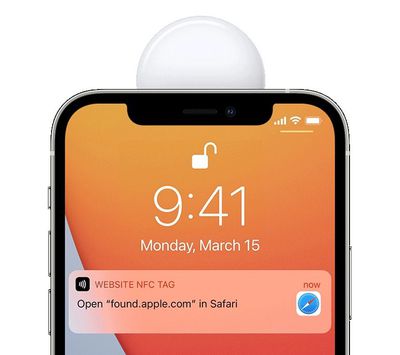
  1. Tap and hold the top of your iPhone or NFC-capable smartphone to the white side of the ‌AirTag‌.
  2. Tap the notification that appears on your device's screen. This will open a website providing you with information about the ‌AirTag‌, including its serial number.
    airtag

  3. If the owner marked the ‌AirTag‌ as lost, you may be shown a message with information about how to contact the owner, enabling you to contact the owner to let them know that you found their AirTagged item.
AirTags can only be used to track items via an iPhone or iPad with the ‌Find My‌ app. Apple sells individual AirTags for $29 or a pack of four for $99. For more details on ‌AirTag‌ item trackers, check out our dedicated guide.

Related Roundup: AirTag
Buyer's Guide: AirTag (Buy Now)

Top Rated Comments

65 months ago
There are gonna be lots of people finding little beeping discs, having no idea what they are or how to deal with them, and shouting to everyone around them to evacuate the building immediately.
Score: 6 Votes (Like | Disagree)
65 months ago

AirTags can only be used to track items via an iPhone or iPad with the Find My app.
Why not with the Find My on the iCloud website?
Score: 4 Votes (Like | Disagree)
Robospungo Avatar
65 months ago
Either ignore it or kick it into the nearest sewer grate? Got it.
Score: 3 Votes (Like | Disagree)
65 months ago

Why not with the Find My on the iCloud website?
That is still called Find iPhone, not Find My, so they clearly have not updated the functionality of the web app, which is a shame.
Score: 3 Votes (Like | Disagree)
65 months ago
I assumed that when you put an AirTag into 'Lost Mode' it would notify any nearby iPhones that it's nearby & lost, but this isn't the case.

They have to actually *see* the AirTag and then use their NFC reader to get the details. The only thing 'Lost Mode' appears to do is allow you to display a phone number (the message thing doesn't work for me) for the person who does scan it.

So it makes no sense whatsoever to hide an AirTag if you expect someone to help get it back to you. They need to be able to see it so they can scan it.
Score: 2 Votes (Like | Disagree)
65 months ago

Either ignore it or kick it into the nearest sewer grate? Got it.
Of course. The idea that Apple would just decide for you that you should take responsibility for someone else's stuff... yeah, right. Not happening.
Score: 1 Votes (Like | Disagree)

Popular Stories

Second Generation AirTag Feature Purple

AirTag 2 Receives Upgraded Feature With Firmware Update

Wednesday April 1, 2026 1:03 pm PDT by
Apple this week released the first firmware update for the AirTag 2, and the company has since shared release notes that explain what is new. According to Apple, the latest firmware "updates the unwanted tracking sound to more easily locate an unknown AirTag during Precision Finding." The firmware update also includes unspecified "bug fixes and other improvements." The new firmware has a ...
Second Generation AirTag Feature

Apple Releases First Firmware Update for AirTag 2

Tuesday March 31, 2026 3:08 pm PDT by
Apple today released new firmware for its second-generation AirTag item trackers. The firmware has a 3.0.45 version number, up from 3.0.41, and it is the first firmware update that Apple has provided for the AirTag 2 that launched in January 2026. According to Apple, the AirTag 2 firmware updates the unwanted tracking sound to make it easier to locate an unknown AirTag during Precision...
Tim Cook Rainbow

Apple CEO Tim Cook Stepping Down, John Ternus Taking Over

Monday April 20, 2026 1:33 pm PDT by
Apple CEO Tim Cook is stepping down as Apple's chief executive officer, and hardware engineering chief John Ternus is set to take over, Apple announced today. Cook will continue on as Apple CEO through the summer, with Ternus set to join Apple's Board of Directors and take over as CEO on September 1, 2026. Cook is going to transition to executive chairman, and he will "assist with certain...








































