How to Add MacRumors to Your iPhone's Home Screen - MacRumors
Skip to Content

How to Add MacRumors to Your iPhone's Home Screen

by

For websites that don't have a dedicated mobile app or a web app for accessing their content, you can still add what is essentially a bookmark of a website to your iPhone or iPad Home screen using a special option in Safari.

macrumors share
Creating a bookmark on your home screen lets you use it as a one-tap portal to access specific online content like MacRumors.com, instead of having to open a browser and then select a bookmark or type in the website's URL address.

The following steps show you how you can add MacRumors to your iPhone's Home screen to make it more convenient to find out what's happening in the world of Apple and related technologies.

How to Add MacRumors to Your Home Screen

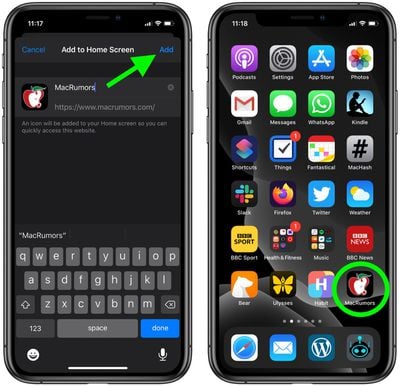
  1. Open Safari on your iPhone or ‌iPad‌ and navigate to www.macrumors.com.
  2. Tap the Action button (often called the Share button) at the bottom of the screen.
  3. Scroll down the share sheet past the rows of contacts and apps, then select Add to Home Screen.
    add macrumors home screen

  4. Edit the name "MacRumors" if desired.
  5. Tap Add to place it on your Home Screen.
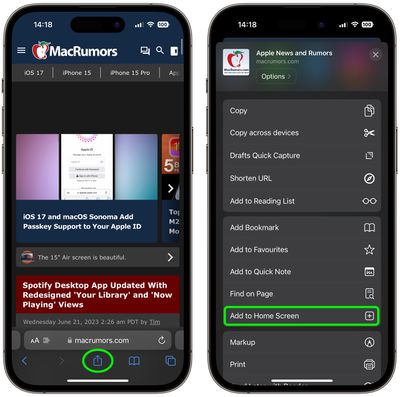
    1how to add a website bookmark to your homescreen

Your new MacRumors "app" will appear in the next available space on your device's Home screen. If you want, you can add it to your iPhone's Dock by long-pressing the icon until the jiggle mode is activated. Then simply drag it to a space in your Dock.


Popular Stories

iCloud iPhone 17 Pro

iPhone Users Who Pay for iCloud Storage Get Two New Perks on iOS 27

Thursday July 2, 2026 6:10 am PDT by
If you pay for certain iCloud+ storage plans beyond the 5GB that Apple offers for free, you will receive two more perks on iOS 27 at no additional cost. A summary of the two new iCloud+ perks on iOS 27:Increased daily usage limits for some new Apple Intelligence features, including image generation in the revamped Image Playground app. HomeKit Secure Video cameras receive generated video...

American Express Gold Apple Pay Feature

American Express Announces New Apple Pay Feature

Tuesday June 30, 2026 10:27 am PDT by
American Express today announced that you can now redeem Membership Rewards points when checking out with Apple Pay on the web and in apps on the iPhone and iPad. When checking out with Apple Pay on iOS 18 or iPadOS 18 or later, tap on your eligible American Express card (Platinum, Gold, Green, and others) and select the Membership Rewards points option. You can use points to cover all or...
series 10 apple watch titanium digital crown

Report: Apple Watch Redesign Coming Next Year With New Band System

Tuesday June 30, 2026 8:45 am PDT by
A "major overhaul" of the Apple Watch's design is due to arrive next year with a new system for connecting bands, according to a known Weibo leaker. In a set of recent posts, the leaker known as "Instant Digital" linked the new claim to older rumors about an "Apple Watch X" model, which was said to introduce a fresh design and break compatibility with the existing watch band system. Citing...