iOS 17: How to Add Effects to Stickers in Messages - MacRumors
Skip to Content

iOS 17: How to Add Effects to Stickers in Messages

by

In iOS 17, Apple has added several new features to its Messages app to make communicating with other Apple users more creative and fun. One such feature is the ability to add effects to your stickers. Keep reading to learn how it works.
iOS 17 Messages Feature
iMessage stickers arrived way back in iOS 10, allowing users to resize stickers, put them on top of chat bubbles, add them in photos, and stick them on top of other stickers, with simple controls for dragging.

Stickers have come a long way since then. In ‌iOS 17‌, for example, users are now able to create their own stickers from photo subjects, and even add neat little effects to individual stickers to change up their look.

There are a number of effects that can be added to stylize your stickers, including a white outline, comic-like shading, a puffy 3D look, and a shiny, holographic finish. The sticker effects will animate and reflect the light appropriately, making your self-created stickers look professionally done.

The following steps show you how sticker effects are applied in iOS 17.

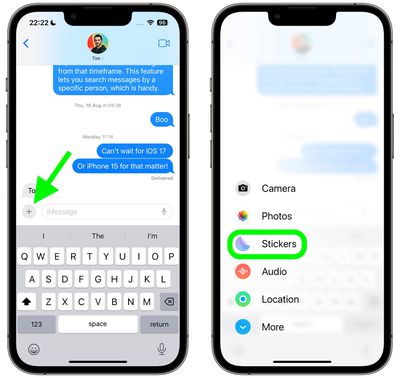
  1. In a Messages conversation, tap the + button next to the text input field.
  2. Tap the Stickers option in the vertical list that appears.
    2add effects stickers messages

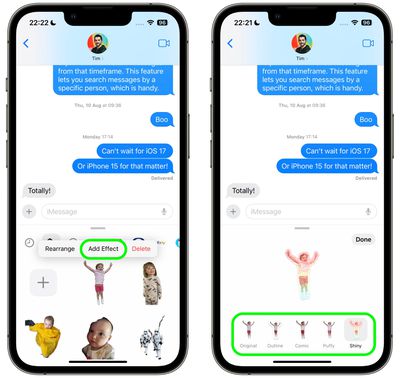
  3. Press and hold on an individual sticker until it "pops," then tap Add Effect in the popup menu.
  4. Tap one of the available effects options: Original, Outline, Comic, Puffy, or Shiny.
  5. Tap Done to finish.
    1add effects stickers messages

That's all there is to it – your stylized sticker is now ready to be shared with the world.

Did you know that another new Messages feature in iOS 17 is the ability to turn Live Photos into Live Stickers? Click the link to learn how it's done.

Popular Stories

Four iPhone 18 Pro Colors Mock Feature

iPhone 18 Pro Launching Later This Year With These 10 New Features

Tuesday May 26, 2026 6:32 am PDT by
While the iPhone 18 Pro and iPhone 18 Pro Max are not launching until September, there are already plenty of rumors about the devices. It was initially reported that the iPhone 18 Pro models would have fully under-screen Face ID, with only a front camera visible in the top-left corner of the screen. However, the latest rumors indicate that only one Face ID component will be moved under the...

apple wallet drivers license feature iPhone 15 pro

Apple Just Expanded iPhone Driver's License Feature to Arkansas

Wednesday May 27, 2026 9:41 am PDT by
In select U.S. states, residents can add their driver's license or state ID to the Apple Wallet app on the iPhone and Apple Watch, and then use it to display proof of identity or age at select airports and businesses, and in select apps. Starting today, the feature is available in Arkansas, which is the 14th state to offer it. However, it may take some time to roll out to all users. To...
Apple Watch Blood Glucose Monitoring Feature 2

Apple Watch for Diabetes: The Latest on Apple's Plans for Non-Invasive Blood Sugar Monitoring

Tuesday May 26, 2026 9:30 am PDT by
For many years now, it has been rumored that the Apple Watch will eventually gain non-invasive blood sugar monitoring capabilities, which would enable millions of people with diabetes to track their blood glucose levels without needing to prick their skin with a needle or wear a dedicated continuous glucose monitor. According to Bloomberg's Mark Gurman, Apple recently shifted oversight of...