iOS 14: How to Search for Emoji on iPhone - MacRumors
Skip to Content

iOS 14: How to Search for Emoji on iPhone

by

In iOS 14 and iPadOS, Apple introduced many new headline features, but it also made several small improvements that make a big impact to the way you do things on iPhone. One of those improvements is to the way emoji works: Apple added a much-requested search feature.
emoji
Users have been able to search emoji on Mac for years now, so it's good to see Apple listen to feedback and finally bring parity to its the iPhone, where emoji are arguably used a lot more often. Here's how the new emoji search works.

Before you follow the steps below, make sure you've enabled emoji in the Settings app: go to General -> Keyboard -> Keyboards -> Add New Keyboard, then select Emoji.

How to Search for Emoji on iPhone

  1. Launch an app that lets you use the keyboard, like Messages or Notes.
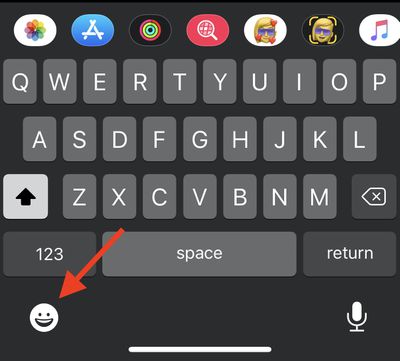
  2. Bring up the keyboard and tap the smiley face or globe in the bottom left corner of the screen.
    emoji

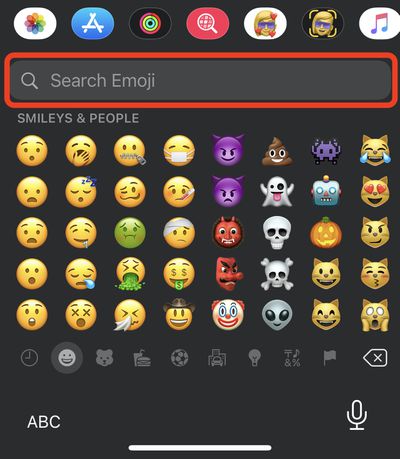
  3. Just above the list of emoji, tap Search Emoji.
    emoji

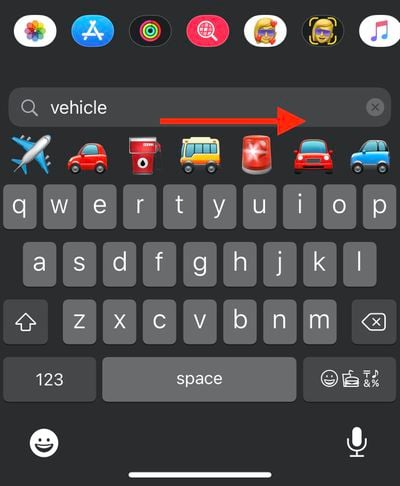
  4. Enter your search term (vehicle, for example). If more than seven filtered emoji match your search, you can swipe across them to see more results.
    emoji

  5. Simply tap an emoji to use it.

Wondering how you can use emoji on your desktop in macOS? Click here to learn how.

Related Forum: iOS 14

Popular Stories

Foldable iPhone 2023 Feature 1

Gurman: iPhone Ultra Wows Early Testers, Except for Its Camera

Sunday August 23, 2026 11:19 am PDT by
Apple's upcoming foldable iPhone Ultra is winning over the few people who have had hands-on time with the device, though the camera setup may leave some users wanting, according to Bloomberg's Mark Gurman. Writing in his latest Power On newsletter, Gurman says people who have used the device – which is reportedly referred to internally as the iPhone Ultra – like how it fits in your...

iPhone 18 Pro Dark Cherry Feature

iPhone 18 Pro and iPhone Ultra: When Will Apple Event Be Announced?

Monday August 24, 2026 6:45 am PDT by
It is now late August, meaning that Apple's annual iPhone event is just around the corner. Below, we take a look at when the event might be held this year. This September, Apple is expected to unveil the iPhone 18 Pro, iPhone 18 Pro Max, and an all-new foldable iPhone that will reportedly be named the iPhone Ultra. The regular iPhone 18, a lower-end iPhone 18e, and the iPhone Air 2 are not...
apple magic keyboard with glyphs 2026 refresh

Apple Quietly Refreshes Magic Keyboards

Tuesday August 25, 2026 7:22 am PDT by
Apple today quietly introduced updated Magic Keyboard models with revised U.S. English key labeling. On the new keyboards, the tab, caps lock, shift, return, and delete keycaps are labeled with glyphs rather than edge text. On the full-size models with a numeric keypad, the change goes further, with the home, page up, page down, end, clear, and enter keys also swapping their text labels for...