

Apple in the iOS 15.2 beta introduced a new Messages Communication Safety option that's designed to keep children safer online by protecting them from potentially harmful images. We've seen a lot of confusion over the feature, and thought it might be helpful to provide an outline of how Communication Safety works and clear up misconceptions.
Communication Safety Overview
Communication Safety is meant to prevent minors from being exposed to unsolicited photos that contain inappropriate content.
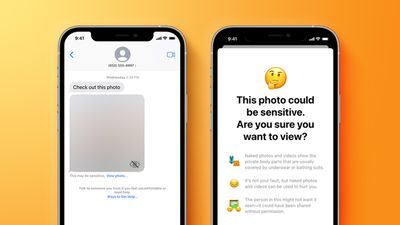
As explained by Apple, Communication Safety is designed to detect nudity in photos sent or received by children. The iPhone or iPad does on-device scanning of images in the Messages app, and if nudity is detected, the photo is blurred.
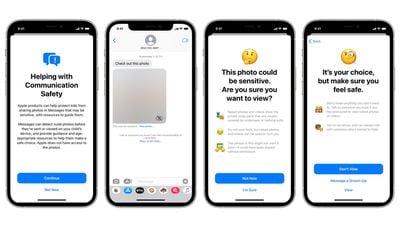
If a child taps on the blurred image, the child is told that the image is sensitive, showing "body parts that are usually covered by underwear or bathing suits." The feature explains that photos with nudity can be "used to hurt you" and that the person in the photo might not want it seen if it's been shared without permission.
Apple also presents children with ways to get help by messaging a trusted grown-up in their life. There are two tap-through screens that explain why a child might not want to view a nude photo, but a child can opt to view the photo anyway, so Apple is not restricting access to content, but providing guidance.
Communication Safety is Entirely Opt-In
When iOS 15.2 is released, Communication Safety will be an opt-in feature. It will not be enabled by default, and those who use it will need to expressly turn it on.
Communication Safety is for Children
Communication Safety is a parental control feature enabled through the Family Sharing feature. With Family Sharing, adults in the family are able to manage the devices of children who are under 18.
Parents can opt in to Communication Safety using Family Sharing after updating to iOS 15.2. Communication Safety is only available on devices set up for children who are under 18 and who are part of a Family Sharing group.
Children under 13 are not able to create an Apple ID, so account creation for younger children must be done by a parent using Family Sharing. Children over 13 can create their own Apple ID, but can still be invited to a Family Sharing group with parental oversight available.
Apple determines the age of the person who owns the Apple ID by the birthday used at the account creation process.
Communication Safety Can't Be Enabled on Adult Devices
As a Family Sharing feature designed exclusively for Apple ID accounts owned by a person under the age of 18, there is no option to activate Communication Safety on a device owned by an adult.
Adults do not need to be concerned about Messages Communication Safety unless they are parents managing it for their children. In a Family Sharing group consisting of adults, there will be no Communication Safety option, and no scanning of the photos in Messages is being done on an adult's device.
Messages Remain Encrypted
Communication Safety does not compromise the end-to-end encryption available in the Messages app on an iOS device. Messages remain encrypted in full, and no Messages content is sent to another person or to Apple.
Apple has no access to the Messages app on children's devices, nor is Apple notified if and when Communication Safety is enabled or used.
Everything is Done On-Device and Nothing Leaves the iPhone
For Communication Safety, images sent and received in the Messages app are scanned for nudity using Apple's machine learning and AI technology. Scanning is done entirely on device, and no content from Messages is sent to Apple's servers or anywhere else.
The technology used here is similar to the technology that the Photos app uses to identify pets, people, food, plants, and other items in images. All of that identification is also done on device in the same way.
When Apple first described Communication Safety in August, there was a feature designed to notify parents if children opted to view a nude photo after being warned against it. This has been removed.
If a child is warned about a nude photo and views it anyway, parents will not be notified, and full autonomy is in the hands of the child. Apple removed the feature after criticism from advocacy groups that worried it could be a problem in situations of parental abuse.
Communication Safety is Not Apple's Anti-CSAM Measure
Apple initially announced Communication Safety in August 2021, and it was introduced as part of a suite of Child Safety features that also included an anti-CSAM initiative.
Apple's anti-CSAM plan, which Apple has described as being able to identify Child Sexual Abuse Material in iCloud, has not been implemented and is entirely separate from Communication Safety. It was a mistake for Apple to introduce these two features together because one has nothing to do with the other except for both being under the Child Safety umbrella.
There has been a lot of blowback over Apple's anti-CSAM measure because it will see photos uploaded to iCloud scanned against a database of known Child Sexual Abuse Material, and Apple users aren't happy with the prospect of photo scanning. There are concerns that the technology that Apple is using to scan photos and match them against known CSAM could be expanded in the future to cover other types of material.
In response to widespread criticism, Apple has delayed its anti-CSAM plans and is making changes to how it will be implemented before releasing it. No anti-CSAM functionality has been added to iOS at this time.
Release Date and Implementation
Communication Safety is included in iOS 15.2 in the United States, and it is also expanding to the UK in the future.

















































