Skip to Content

MacBook Pro With M4 Chip May Support Up to Two External Displays

Apple's upcoming entry-level M4 14-inch MacBook Pro may be capable of supporting up to two external displays with the lid open, up from one display supported in the current M3 model, if recent leaks are anything to go by.
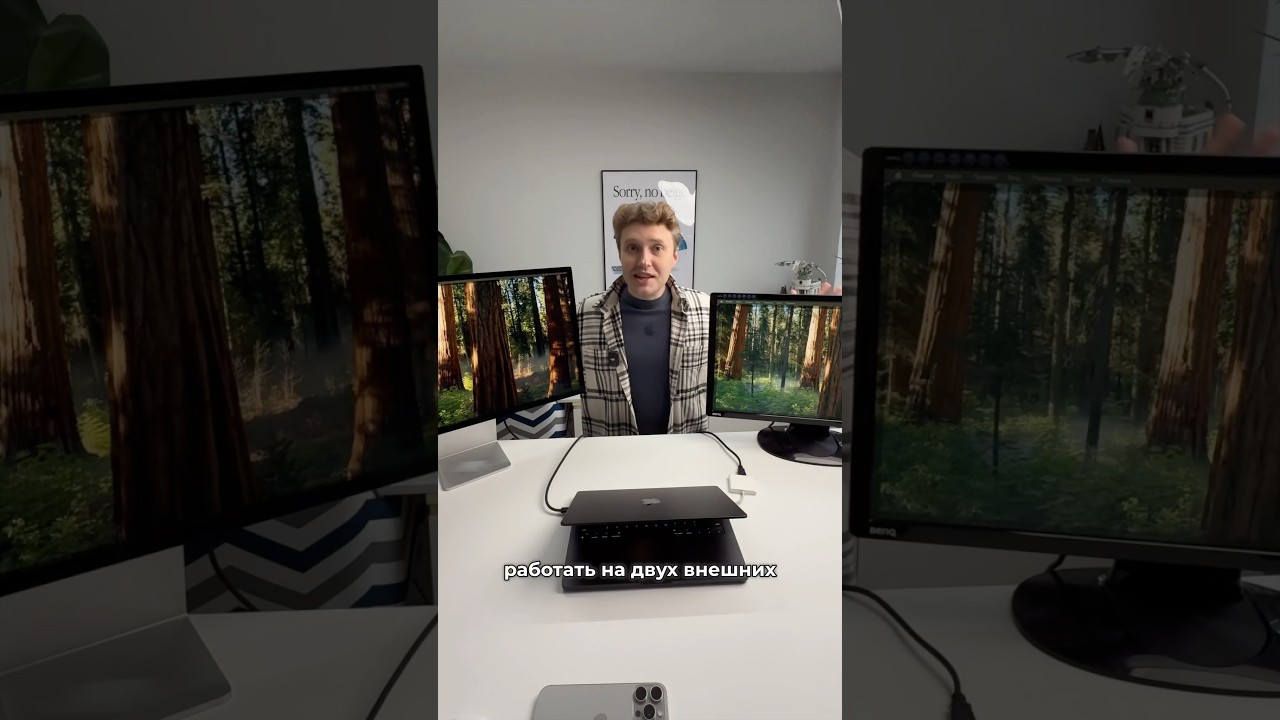
YouTube Short by romancev768 allegedly confirming the dual display support

Apple's existing M3 14-inch MacBook Pro comes with two Thunderbolt 3 USB-C ports, not three Thunderbolt 4 ports like the 14-inch and 16-inch MacBook Pro models powered by M3 Pro and M3 Max chips.

Apart from fewer USB-C ports, the lack of Thunderbolt 4 support on the 14-inch MacBook Pro with the base M3 chip means it only supports one display with up to 6K resolution at 60Hz (or one display with up to 4K resolution at 120Hz over HDMI) when the lid is open. Currently the only way to support to two external displays simultaneously is with the lid closed, based on the resolution (up to 6K) and refresh rate (up to 60Hz) of each external display.

However, assuming the alleged Russian leaks of Apple's unannounced 14-inch MacBook Pro with an M4 chip are reliable, the new M4 variant of Apple's entry-level 14-inch MacBook Pro will come with three Thunderbolt 4 ports, as opposed to the two Thunderbolt 3 / USB4 ports found on the current model. This would mean it can support two external displays with the lid open instead of just one.

While the upgrade from two TB3 ports to three TB4 ports has yet to be confirmed, such a change would better align the entry-level machine's capabilities with Apple's more powerful MacBook Pro models.

Here's a reminder of the different display configurations possible on the M3 Pro and M3 Max models:

M3 Pro MacBook Pro:

Supports up to two external displays:

  • Two 6K displays at 60Hz over Thunderbolt, or
  • One 6K display at 60Hz over Thunderbolt and one 4K display at 144Hz over HDMI

M3 Max MacBook Pro:

Supports up to four external displays:

  • Three 6K displays at 60Hz over Thunderbolt and one 4K display at 144Hz over HDMI, or
  • Two 6K displays at 60Hz over Thunderbolt and one 8K display at 60Hz over HDMI, or
  • Two 6K displays at 60Hz over Thunderbolt and one 4K display at 240Hz over HDMI

Additional features for both M3 Pro and M3 Max:

  • Native DisplayPort over USB-C support
  • HDMI port supports either:
    • One 8K display at 60Hz, or
    • One 4K display at 240Hz

We should know for certain what the specs are for the base M4 14-inch MacBook Pro before the month is out. Apple is expected to announce new iMac, Mac mini, and MacBook Pro models with M4 chips towards the end of October, with at least some of the new Macs rumored to be released on November 1.
Related Roundup: MacBook Pro
Buyer's Guide: MacBook Pro (Buy Now)
Related Forum: MacBook Pro

Popular Stories

Apple MacBook Pro with PROLED XDR Display family lineup feature

Apple Announces OLED MacBook Pro With Touch Display

Wednesday October 28, 2026 10:11 am PDT by
Apple today announced a new high-end MacBook Pro, which is available in 14-inch and 16-inch sizes. The new device has a PROLED XDR display that supports touch gestures, and a glowing rear Apple logo. Pricing on the MacBook Pro starts at $2,899 for the 14-inch model and $3,399 for the 16-inch model. Apple says the MacBook Pro has the "world's best display in a pro laptop." The PROLED...
Apple MacBook Pro 14 in with M6 hero

Apple Announces New 14-Inch MacBook Pro With M6 Chip

Tuesday October 27, 2026 6:01 am PDT by
Apple today announced a refreshed 14-inch MacBook Pro featuring the M6 chip, upgraded connectivity specifications, and more. The M6 chip in the MacBook Pro features a 12-core CPU with 2 super cores, 4 performance cores, and 6 efficiency cores, paired with a 12-core GPU. This is up from the M5 chip with a 10-core CPU with 4 super cores and 6 efficiency cores, paired with a 10-core GPU. M6...
World Travel Adapter Kit Feature with Charger

Apple Releases Redesigned Mac Chargers and 'World Travel Adapter Kit'

Wednesday October 28, 2026 11:29 am PDT by
Apple today began selling updated versions of its 70W Power Adapter, 140W Power Adapter, and Power Adapter Extension Cable, all with a new "AC Connector 2." The updated power adapters and extension cable are available on Apple's online store in the U.S. and many other countries around the world. Apple also released an updated version of its World Travel Adapter Kit that had disappeared...

Top Rated Comments

JackLeBoul Avatar
28 months ago
Yeah, it's not confusing at all.

After rereading it all, I would need a numbers spreadsheet to figure out which chip can power how many screens at what resolution at what Hz.
Score: 14 Votes (Like | Disagree)
28 months ago

Does using 2 displays require so much power? Or is it just a fake limitation?
It requires actual space on the chip for dedicated display engines, which was at a premium for M1/2/3. Apple took feedback and is willing to add more of them, but as usual with chip design, it took years to realize.
Score: 11 Votes (Like | Disagree)
springsup Avatar
28 months ago

Apart from fewer USB-C ports, the lack of Thunderbolt 4 support on the 14-inch MacBook Pro with the base M3 chip means it only supports one display with up to 6K resolution at 60Hz (or one display with up to 4K resolution at 120Hz over HDMI).

The M3 Pro-powered MacBook Pro models also support one external display with up to 6K resolution at 60Hz over Thunderbolt and one external display with up to 4K resolution at 144Hz over HDMI.
There is an important, subtle detail here: Apple seems to have intentionally degraded HDMI over USB-C, so it can’t do uncompressed 4K 120Hz 10-bit. That is only available via the built-in HDMI port, or DisplayPort over USB-C (albeit with compression that wouldn’t be needed over HDMI).

Users on these forums have discovered hacks to work around it ('https://forums.macrumors.com/threads/dp-usb-c-thunderbolt-3-4-to-hdmi-2-1-4k-120hz-rgb4-4-4-10b-hdr-with-apple-silicon-m1-m2-m3-now-possible.2381664/'). It involves buying a specific USB-HDMI adapter and flashing a custom firmware to trick the computer in to thinking it’s a DisplayPort adapter. So clearly there is no hardware limitation - it’s possible to do it, but you need to work around the fact that even as an Apple customer, Apple hates you for using a third-party monitor and will vindictively degrade your experience, and that external display support on macOS is utter trash in general. Go shopping for any USB/Thunderbolt dock and the product page will be full of caveats warning Mac users that they will have a far inferior experience than Windows users.

This should be a disclaimer on any post relating to MacBooks, especially those relating to external displays.
Score: 8 Votes (Like | Disagree)
AdmiralKirk Avatar
28 months ago
Finally. My wife’s Intel MacBook Air from early 2020 can support 2 external 4k monitors and its own.

Its not really acceptable that it has taken until q4 2024 for Arm based Mac’s to catch up 🫤
Score: 8 Votes (Like | Disagree)
F23 Avatar
28 months ago
we are in the golden era of MacBooks
Score: 8 Votes (Like | Disagree)
28 months ago

Apple seems to have intentionally degraded HDMI over USB-C, so it can’t do uncompressed 4K 120Hz 10-bit. That is only available via the built-in HDMI port, or DisplayPort over USB-C (albeit with compression that wouldn’t be needed over HDMI).
If DisplayPort needs compression for "4K 120Hz 10-bit" then no USB-C-to-HDMI device can officially do uncompressed 4K 120Hz 10-bit since HDMI Alt Mode is dead ('https://arstechnica.com/gadgets/2023/01/hdmi-to-usb-c-spec-axed-as-displayport-alt-mode-reigns-supreme/') and virtually everything has to go via DisplayPort alt mode or DisplayPort-over-Thunderbolt to a DP-to-HDMI converter instead - in which case any "4K 120Hz 10-bit" content has been compressed using "visually lossless" (i.e. not lossless, then) compression and anything "lost" in that process will stay lost after it is de-compressed: calling the result "uncompressed" is, well, like selling "fresh fish" when it has been previously frozen...

Not necessarily defending Apple here, but it sounds more like "nannying" by not supporting an unofficial kludge rather than an evil plan.
Score: 6 Votes (Like | Disagree)
Latest Stories
New Apple Store Opening in India, Download the Special Wallpaper Now
5 hours ago
Redesigned OLED MacBook Air Could Launch in 2027 or 2028
10 hours ago
AirPods Pro 3 for $149 is One of The Best Black Friday Deals This Year
11 hours ago
1Password Security Breach: What Was Accessed and What Wasn't
12 hours ago
WhatsApp Finally Adds Scheduled Messages
13 hours ago
Get Apple's Cheapest iPad for $379 During Amazon's Black Friday Sale
13 hours ago
Rumor: iOS 28 to Revamp Notifications
13 hours ago
iPhone 18 Pro Max Battery Exhausts a Toy Cyclops in New Apple Ad
16 hours ago
$799 Smart Glasses Promise Vision Pro-Style Controls in a 45g Frame
16 hours ago
How To Get an iPhone Duo or iPhone 18 Pro at No Cost Through T-Mobile for Black Friday
17 hours ago
Apple Has an iPhone Notifications Problem
17 hours ago
Amazon Sweetens Black Friday Deals on PROLED MacBook Pro
18 hours ago
Apple Has iPads Running macOS Internally, Says Gurman
20 hours ago
Apple Is Far From Done With 2026: Here's What's Still Coming
21 hours ago
Threads App for iPad Now Available
22 hours ago
Claude Now Lets You Install Artifacts as Desktop Apps
23 hours ago
Tidal Bans AI Music, While Apple Music Sticks to Labels
1 day ago
Add Holiday Lights and Snow to Your Mac With Festivitas
1 day ago
Meta's Muse AI Agent Comes to Instagram DMs
1 day ago
Google Says Apple's iOS Browser Rules Offer 'Choice on Paper, Not in Practice'
2 days ago
Walmart App Rolls Back Apple Pay Support After Just Weeks
2 days ago
Black Friday Discount Hits 512GB MacBook Neo at $699 ($100 Off)
2 days ago
Disney+ Black Friday Deal is Here: Bundle With Hulu for Just $4.99/Month for a Year
2 days ago
Signal Now Blocks AI Screen Access to Protect Chats
2 days ago
Things 3.25 for Mac Gains Touch Gestures
2 days ago
AirTag in (PRODUCT)RED?
2 days ago
M6 iMacs Get First Major Discounts With Up to $111 Off at Amazon
2 days ago
Apple to Celebrate 20 Years of (RED) With Special Event in New York
2 days ago
Hidden Coupon Deal Knocks M6 MacBook Pro to $1,779 on Amazon
2 days ago
Apple to Release Four (RED) Products by Next Week
2 days ago