Apple Releases Third iOS 18 and iPadOS 18 Public Betas - MacRumors
Skip to Content

Apple Releases Third iOS 18 and iPadOS 18 Public Betas

Apple today provided the third betas of iOS 18 and iPadOS 18 to public beta testers, bringing the new software to the general public. The third public beta comes a week after Apple released the second public beta.
Generic iOS 18 Public Beta Feature Real Mock
Public beta testers who have signed up for Apple's beta testing program can download the iOS 18 and iPadOS 18 updates by opening up the Settings app, going to General, tapping into the Software Update section and selecting the iOS 18 Public Beta option.

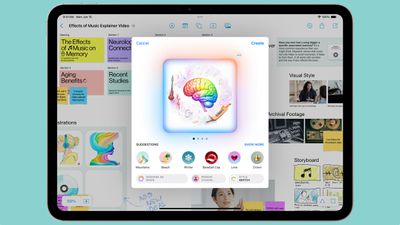
iOS 18 introduces Apple Intelligence, which are AI features deeply integrated into the operating system. Not all functionality is available at this time, but it brings Writing Tools for rewriting, polishing, proofreading, and summarizing text across apps, and you can generate custom images with Image Playground. There are custom emoji available through the Genmoji feature, and Siri is getting entirely overhauled. Note that ‌Apple Intelligence‌ isn't live in the public betas.

ipaos 18 image playground
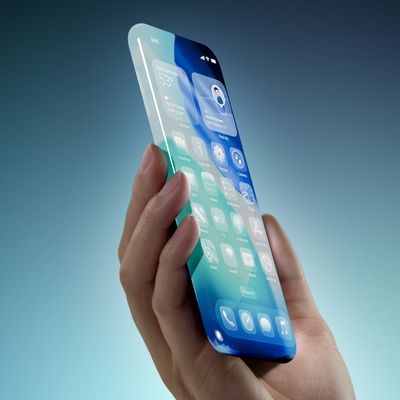
Along with the AI features (which will be limited to the iPhone 15 Pro models and M-series iPads), iOS 18 brings a redesigned Home Screen with the option to rearrange app icons and widgets with open spaces, plus there's a tint option and new darker colors for Dark Mode.
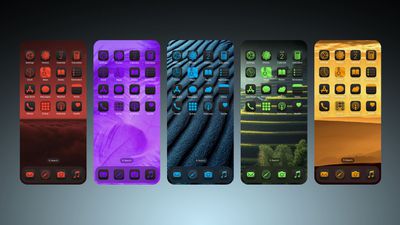
iOS 18 Home Screen Feature 1
Control Center has been revamped and you can pick and choose what you want to have front and center from the new Controls Gallery. There are multiple pages so you can group related controls, and you can customize sizes. As part of this update, the Flashlight and Camera icons on the Lock Screen can be swapped out, and you can also choose Control Center options for the iPhone 15 Pro Action Button.
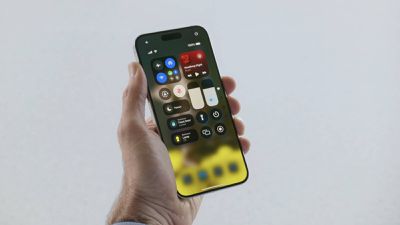
control center ios 18
The Messages app supports scheduling texts, you can use any emoji for the Tapback feature, and you can send messages via satellite. There are text effects you can use for any word, phrase, or emoji, plus formatting like bold and italic is an option. For texts with Android users, Apple now supports RCS, which basically means you won't run into issues with sending images and files, plus you can see typing indicators and read receipts and send texts over Wi-Fi.
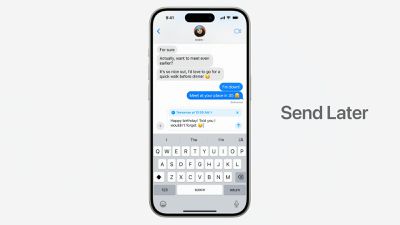
iMessage Send Later iOS 18
Safari is able to summarize webpages and show you important info at a glance, the Photos app has been overhauled to focus more on surfacing your best photos. A dedicated Passwords app makes it easier to get to your saved passwords and logins, and you can now lock any app with Face ID or Touch ID.
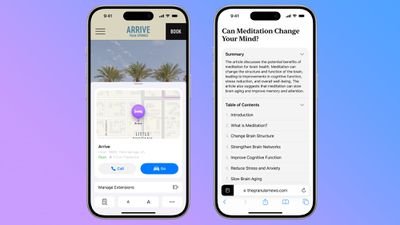
ios 18 safari app
With today's beta specifically, Apple is adding support Distraction Control, a feature that is designed to let you hide distracting elements like popups on webpages.

There are a ton of new features in iOS 18 and iPadOS 18 that aren't mentioned here, so for a more in-depth look make sure to check out our iOS 18 roundup and our iPadOS 18 roundup.

Related Forums: iOS 18, iPadOS 18

Popular Stories

macworld iphone 18 pro colors

iPhone 18 Pro's Four Rumored Colors Revealed, Including 'Dark Cherry'

Friday April 17, 2026 3:50 am PDT by
A source said to be familiar with Apple's supply chain today revealed the color options Apple is planning for the iPhone 18 Pro, iPhone 18 Pro Max, and the upcoming foldable iPhone. Image via Macworld. The information comes from Macworld, which says the signature new color for this year's Pro models will be Dark Cherry, a deep wine-like red. While other sources had previously reported on a...
macOS 27 on MacBook Pro

macOS 27 Will Mark the End of an Era

Saturday April 18, 2026 6:45 am PDT by
During its Platforms State of the Union segment at WWDC 2025, Apple revealed that macOS 26 Tahoe is the final major macOS version for Intel-based Macs. The upcoming macOS 27 release will be compatible with Apple silicon Macs only, meaning that you will need a Mac with an M-series chip or a MacBook Neo with an A18 Pro chip in order to install the software update. macOS 27 should be available...
ipad mini 7 feature red and blue

OLED iPad Mini: Release Date, Pricing, and What to Expect

Wednesday April 15, 2026 8:15 am PDT by
According to the latest rumors, Apple is close to launching its next-generation iPad mini. So what should we expect from the successor to the iPad mini 7 that Apple released over a year ago? Read on to find out. Processor and Performance Apple is working on a next-generation version of the iPad mini (codename J510/J511) that features the A19 Pro chip, according to information found in code...

Top Rated Comments

veeco3110 Avatar
22 months ago
My only issue so far with the PB is the battery draw on a iPhone 15 pro max
Score: 4 Votes (Like | Disagree)
krspkbl Avatar
22 months ago

My only issue so far with the PB is the battery draw on a iPhone 15 pro max
Have you had a look to see if any apps are running in the background? When I moved to beta on my 15 Pro Max the Translate app was running in the background for hours even though I’ve never used it. My battery was draining quickly because of it.

I uninstalled it and reinstalled which seemed to return battery life back to normal.
Score: 3 Votes (Like | Disagree)
jdawgnoonan Avatar
22 months ago
The public betas of 18 feel fully baked on my M4 iPad Pro.
Score: 3 Votes (Like | Disagree)
pepsijunky Avatar
22 months ago
So far on public beta 2 my only issues were in Carplay, hopefully this will fix those problems!
Score: 3 Votes (Like | Disagree)
bondr006 Avatar
22 months ago

How are people feeling about this recent developer/public beta? Is it still pretty buggy?
I personally have found the pb’s to be very stable. Only bug I found so far was in pb1. There was a glitch in my wallpaper settings. Other than that, and waiting for them to add the AI features, I am very happy with iPad OS 18.
Score: 3 Votes (Like | Disagree)
bondr006 Avatar
22 months ago

While I was pretty amazed by public beta 2 I’ve found several glitches with the most recent version (iOS 18 Public Beta 3) on my 15 Pro Max.
-> A whole page of apps has been killed from my home screen setup (just gone, no way to recover)
-> app icons are in dark mode when I open the search from the Home Screen (although system is not in dark mode, of course)
-> button “options” that shows up when editing pages on the Home Screen leads to the focus settings page in system settings

Anyone else experiencing these bugs?
(I’ve already filed reports within the feedback app for all three problems)
I know it's not the iPhone 15PM, but on my M1 iPad Pro 11, pb3 is not exhibiting any of those. In fact, since I installed iPad OS PB3 yesterday, I've only found one small bug. I will put it through its paces today and see if I can find any more.


Attachment Image

Attachment Image
Score: 1 Votes (Like | Disagree)