Skip to Content

Apple Releases Second macOS Sequoia Public Beta With iPhone Mirroring and More

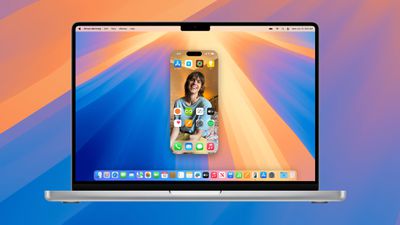
Apple today released the second beta of an upcoming macOS Sequoia update to its public beta testing group, giving the general public a chance to try out the new operating system's features ahead of its fall launch. The second public beta comes a bit over a week after the release of the first beta.
macos sequoia iphone mirroring
Public beta testers can download macOS Sequoia from the Software Update section of the System Settings app after signing up on Apple's beta testing website and opting into the public beta under the Beta Updates section.

macOS Sequoia's biggest feature is iPhone Mirroring, which is designed to let you control your ‌iPhone‌ from your Mac using your keyboard and mouse. You can see notifications and use your ‌iPhone‌ apps even when your ‌iPhone‌ is tucked away and locked, and later this year, you'll be able to use the feature to drag and drop apps from your Mac to your ‌iPhone‌ and vice versa.

Window tiling has been improved to make it easier to get multiple windows on your Mac in a way that works for you, Safari can summarize websites and show you highlights, and the Messages app supports scheduling messages and using the Tapback feature with any emoji.

There's a new Passwords app for managing your passwords, logins, and passkeys, the Photos app has a new design, the Notes app supports audio transcription and summarization, and you can also type in any equation and get it solved automatically.

macOS Sequoia supports all of the new Apple Intelligence features that are also coming to iOS 18, offering all kinds of quality of life improvements. Writing tools help you proofread and polish your writing across apps, you can create unique images with Image Playground, and make up your own emoji with Genmoji. ‌Photos‌ includes a Clean Up tool for removing unwanted images, and Siri will use AI for better language understanding and contextual relevance. ‌Siri‌ will even be able to consult ChatGPT for complicated queries.

There are a long list of additional features coming to macOS Sequoia, with more information available in our dedicated roundup.


Related Forum: macOS Sequoia

Popular Stories

MacBook Neo Feature Pastel 1

First MacBook Neo Benchmarks Are In: Here's How It Compares to the M1 MacBook Air

Thursday March 5, 2026 4:07 pm PST by
Benchmarks for the new MacBook Neo surfaced today, and unsurprisingly, CPU performance is almost identical to the iPhone 16 Pro. The MacBook Neo uses the same 6-core A18 Pro chip that was first introduced in the iPhone 16 Pro, but it has one fewer GPU core. The MacBook Neo earned a single-core score of 3461 and a multi-core score of 8668, along with a Metal score of 31286. Here's how the...
HomePod mini and Apple TV Sage

New Apple TV and HomePod Mini Are Still Missing, Here's Why

Thursday March 5, 2026 6:11 am PST by
Apple this week unveiled seven products, ranging from the iPhone 17e to the MacBook Neo, but new Apple TV and HomePod mini models were not among them. Given that there have been rumors about the next-generation Apple TV and HomePod mini since all the way back in late 2024, some customers are wondering why the devices have yet to launch, and the answer likely relates to Siri. In September, ...
MacBook Neo Feature Pastel 1

Apple Announces $599 'MacBook Neo' With A18 Pro Chip

Wednesday March 4, 2026 6:15 am PST by
Apple today announced the "MacBook Neo," an all-new kind of low-cost Mac featuring the A18 Pro chip for $599. The MacBook Neo is the first Mac to be powered by an iPhone chip; the A18 Pro debuted in 2024's iPhone 16 Pro models. Apple says it is up to 50% faster for everyday tasks than the bestselling PC with the latest shipping Intel Core Ultra 5, up to 3x faster for on-device AI workloads,...

Top Rated Comments

21 months ago
On my iPad, I am liking the "new" Passwords app. It's not really new of course, but having it in front of me has made me change all my simple, easy to hack and repeated passwords to complex ones.
Score: 5 Votes (Like | Disagree)
Realityck Avatar
21 months ago

I only downloaded Public Beta to my iPad. Seems pretty stable. How's it been with MacOS?
Been working pretty well. The iPhone Mirroring can be dragged anywhere on desktop and now has three sizes of magnification. I haven't had any apps unexpectedly quit lately. Various browsers been using running fine with many tabs opened at once.
Score: 5 Votes (Like | Disagree)
Realityck Avatar
21 months ago
Next day after dev seeding is a good sign for PB testing.


* iOS 18 beta 4 (22A5316j) - July 23, 2024
* iPadOS 18 beta 4 (22A5316j) - July 23, 2024
* [B]macOS 15 beta 4 (24A5298h) - July 23, 2024[/B]
* tvOS 18 beta 4 (22J5324f) - July 23, 2024
* visionOS 2 beta 4 (22N5286g) - July 23, 2024
* watchOS 11 beta 4 (22R5318h) - July 23, 2024
Score: 3 Votes (Like | Disagree)
21 months ago
Wow usually there is a week delay on the first Public Betas. They are going fast this year.
Score: 2 Votes (Like | Disagree)
21 months ago

Can someone confirm if iPhone mirroring is working in the UK?
it is
Score: 2 Votes (Like | Disagree)
Realityck Avatar
21 months ago

does it only work in portrait? What happens if you play a YouTube video and go full screen
In some instances it actually switches from portrait to landscape. But that is the exception it depends on the app, that also applies to display a video playing. Most video playing from a VoD is not working yet. Tubi is the example that works looking at their ITV channels. It shows portrait then hit zoom and it switches to landscape. This like is a WIP capability that isn't working yet really. For example several VoD only play sound no video. Viki switches to landscape but only sound. Youtube app works when you zoom it goes landscape also. No full screen yet. Only choice of three sizes.
Score: 1 Votes (Like | Disagree)