iPhone 15's Braided USB-C Cable Could Be 50% Longer
The iPhone 15 lineup could come with a braided USB-C charging cable that is 50% longer than the Lightning cable that comes with current iPhone models, according to new reports.
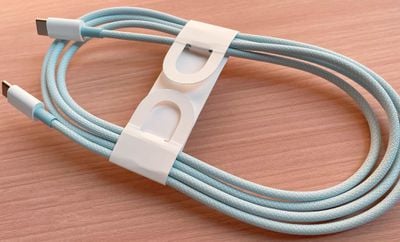
The length of the cables seen in recent reporting led some to speculate that they would be too long for an iPhone, but the latest information suggests that Apple plans to offer a substantially longer charging cable with the iPhone for the first time.
Apple device collector "Kosutami," who has revealed most of the details about the color-matched and braided USB-C to USB-C cables allegedly accompanying the iPhone 15 models, now says that the cable is 1.5m in length. The rumor was also shared by "Majin Bu," who added that the new cables should be much more durable. The longer cable will presumably necessitate redesigned packaging.
The Lightning cable packed with current iPhone models is rubberized, white, and just one meter in length. The new braided cables are expected to come in black, white, yellow, blue, and orange, at minimum, mirroring a new selection of color options for the iPhone 15 series.
Popular Stories
Apple is launching five new products on Friday, November 6, following pre-orders that opened last week, including its first touchscreen MacBook Pro models.
The following new products will be available from today:
iPad mini with OLED display and A20 Pro chip
iMac with M6 chip
14-inch MacBook Pro with M6 chip
14-inch MacBook Pro with OLED touchscreen
16-inch MacBook Pro with OLED...
Apple today announced that its Festival Place store in Basingstoke, England will be permanently closing on Saturday, November 21.
Apple Festival Place
Apple had already announced that the store would be closing in November, but it had not provided the public with a specific date until now.
Apple's store inside the Festival Place shopping center opened in 2011, so it had a 15-year run....
Apple is sending email surveys to some iPhone Duo buyers to get feedback on display size, crease, under-display camera, and other features.
The first question asks why the buyer chose the iPhone Duo now, with answers like "I wanted to try Apple's first foldable," "It was an impulse purchase," and "I expect smartphone prices to increase."
Other questions ask about the size of the iPhone...






/https://forums.macrumors.com/attachments/2249096/)