

macOS Sonoma Public Beta Now Available - MacRumors
Skip to Content

macOS Sonoma Public Beta Now Available

Apple today provided the first beta of the upcoming macOS Sonoma update to its public beta testing group, allowing non-developers to test the new operating system ahead of its fall launch.
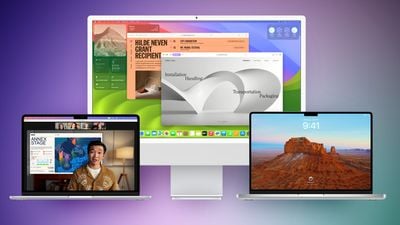
macos sonoma feature purple green
Public beta testers can download the macOS 14 Sonoma update from the Software Update section of the System Preferences app after signing up on Apple's beta testing website and opting into the public beta under the Beta Updates section.

macOS Sonoma introduces interactive widgets for the desktop, making widgets more useful and more prominent. You can even use your iPhone widgets on your Mac's desktop through a new Continuity feature.

There are updated screensavers that are similar to the high-resolution animated screensavers available on the Apple TV, and for video calls and presenting, there's a Presenter Overlay option that lets you move, walk, and talk in front of content you're sharing from your Mac.

Safari supports web apps so you can add your favorite websites to your Dock, plus there are new Profiles to separate your work browsing and personal browsing. iCloud Keychain supports sharing passwords with others, and private browsing windows are locked when they are not in use.

Enhanced AutoFill is available for PDFs so you can quickly fill in information like names, addresses, and emails, plus users can collaborate on PDFs and see real-time updates through the Notes app.

For more on what's new in macOS Sonoma, including a new Game mode, we have a detailed macOS Sonoma roundup that highlights all of the features in the update.


Related Forum: macOS Sonoma

Popular Stories

Apple Event Logo

Apple Just Released a New Accessory

Monday May 4, 2026 8:13 am PDT by
Apple today released a new Pride Edition Sport Loop for the Apple Watch. The band features a rainbow design with 11 colors of woven nylon yarns. The new Pride Edition Sport Loop is available to order now on Apple.com and in the Apple Store app in 40mm, 42mm, and 46mm sizes, and it will be available at Apple Store locations starting later this week. In the U.S., the band costs $49. There...
Instagram Feature 2

PSA: Instagram Encrypted Messaging Ends on Friday, May 8

Tuesday May 5, 2026 8:24 am PDT by
Instagram will remove end-to-end encryption for direct messages between users from May 8, 2026. When the date comes around, Meta will potentially be able to see the contents of all messages between users on the social media platform. Encrypting messages has been an optional feature in Instagram since 2023, but in March of this year the social media platform quietly updated a help page to say ...
iOS 26

Apple Says iOS 26.5 Adds Three New Features to Your iPhone

Tuesday May 5, 2026 7:36 am PDT by
iOS 26.5 includes three new features for iPhones, according to Apple's release notes for the update, which is expected to be released next week. As discovered during beta testing, iOS 26.5 enables end-to-end encryption for RCS messaging between iOS and Android devices. Apple says this security upgrade is limited to supported carriers around the world and will continue to roll out....

Top Rated Comments

Realityck Avatar
37 months ago

How's stability been with the betas? Thinking of diving in but wary of breakage.

We had really four releases, the DB1, DB2, first DB3 build, and yesterday's DB3 build which is what you will use. I would say it's pretty stable comparably.

Occasionally I see Safari 17 show some animation like it's still trying to load a URL even though it did that. Just do a reload the page again if that happens. Currently using it on a M1 24" IMac, and M1 Max 16" MBP without any real issues.

macOS 14 beta 3 (23A5286i)

* Safari Version 17.0 (19616.1.20.11.3)
* System Firmware Version: 10151.0.172.0.3 (M1 based Macs)
* Darwin Kernel Version 23.0.0: Fri Jun 30 17:48:23 PDT 2023; root:xnu-10002.0.168.505.3~1/RELEASE_ARM64_T8103 arm64

Should be the same beta 3 build from yesterday

* iOS 17 beta 3 (21A5277j) - July 11, 2023
* iPadOS 17 beta 3 (21A5277j) - July 11, 2023
* macOS 14 beta 3 (23A5286i) - July 11, 2023
* tvOS 17 beta 3 (21J5303h) = July 11, 2023
Score: 6 Votes (Like | Disagree)
nathansz Avatar
37 months ago

How's stability been with the betas? Thinking of diving in but wary of breakage.
The smoothest macos betas I can ever recall
Score: 4 Votes (Like | Disagree)
jonnysods Avatar
37 months ago
Temptation level is high on this one...
Score: 4 Votes (Like | Disagree)
Apple Fan 2008 Avatar
37 months ago

How's stability been with the betas? Thinking of diving in but wary of breakage.
It's worked very well for me. I LOVE the Game Porting Toolkit.
Score: 3 Votes (Like | Disagree)
zorinlynx Avatar
37 months ago
How's stability been with the betas? Thinking of diving in but wary of breakage.
Score: 3 Votes (Like | Disagree)
stigman Avatar
37 months ago

Get ready for Widgets, an absolute game changer, at least for me. I've been waiting for widgets to come to a desktop environment for over a decade (Windows almost did it with Tiles).

I have quadruple monitors and just 1 single monitor itself is used for Widgets only. I've got widgets for:
Stock prices for different stocks I own (Apple, AMD, etc), not just prices but news stories too, etc.
Apple News feeds for different topics I like (Tesla, Gaming, etc)
Agenda/Productivity like Calendar/Date/Reminders/To-Do and Events
Batteries of various devices
Shortcuts for easy 1-click things (open certain apps, turn off lights, etc)
Weather for different cities/states I often visit
Still a work in progress but adding more as I think of stuff! I wish I could put a Camera feed widget to view my Cameras at a glance.

I used to have my iPhone and iPad on stands on my desk so I can always, at a glance, see info from widgets (mostly iPad), but with Sanoma, it feels so good that I do NOT need my iPhone/iPad near me anymore! More desk space, less wires, it's such a good feeling.

Here's an example of what it looks like for me:

Geez...What a mess, I mean, I would be distracted.
Score: 2 Votes (Like | Disagree)





































