

Apple Releases macOS Monterey 12.3 With Universal Control, Spatial Audio Dynamic Head Tracking on M1 Macs and More - MacRumors
Skip to Content

Apple Releases macOS Monterey 12.3 With Universal Control, Spatial Audio Dynamic Head Tracking on M1 Macs and More

Apple today released macOS Monterey 12.3, the third major update to the macOS Monterey operating system that launched in October 2021. macOS Monterey 12.3 comes more than a month after the launch of macOS 12.2, an update that addressed a Safari vulnerability.
macOS Monterey on MBP Feature
The ‌‌‌‌macOS Monterey‌ 12.3‌‌ update can be downloaded on all eligible Macs using the Software Update section of System Preferences. Apple has also released macOS Big Sur 11.6.5 for users who have not yet upgraded to macOS Monterey.

macOS Monterey 12.3 introduces several new features, the biggest of which is Universal Control. ‌Universal Control‌ is designed to allow you to use a single mouse/trackpad and keyboard across multiple Macs and iPads (with iPads running iPadOS 15.4). After updating your devices to macOS 12.3 and iPadOS 15.4, ‌Universal Control‌ works automatically, allowing your Mac's cursor and keyboard to work on the iPad and vice versa.
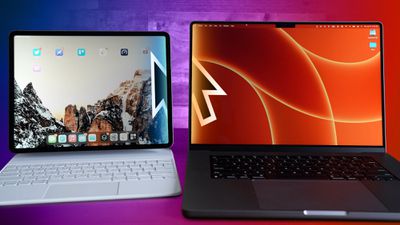
Universal Control Colored Feature

The update adds new emoji characters that include melting face, biting lip, heart hands, bubbles, beans, face with diagonal mouth, palm up hand, eggs, troll, low battery, coral, lotus, and more, plus it brings support for adding notes to iCloud Keychain entries and it adds dynamic head tracking for the Spatial Audio feature on M1 Macs when wearing supported AirPods.
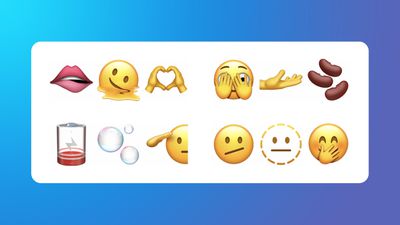
iOS 15

maOS Monterey 12.3 also adds support for updating the AirPods firmware when the earbuds are connected to a Mac, plus it deprecates kernel extensions used by Dropbox and Microsoft OneDrive, and it eliminates Python 2, with Apple instructing developers to use an alternative scripting language like Python 3 going forward.

Apple's full release notes for the macOS 12.3 update are below:

macOS 12.3 adds Universal Control so you can use a single mouse and keyboard across your Mac and iPad. This release also includes new emoji, dynamic head tracking for Music, and other features and bug fixes for your Mac.

Universal Control (beta)
- Universal Control allows you to use a single mouse and keyboard across iPad and Mac
- Text can be typed on either Mac or iPad and you can drag and drop files between them

Spatial Audio
- Dynamic head tracking is available in Music with supported AirPods on Mac computers with the M1 chip
- Customizable spatial audio settings for Off, Fixed, and Head Tracked are now in Control Center with supported AirPods on Mac computers with the M1 chip

Emoji
- New emoji including faces, hand gestures, and household objects are available in emoji keyboard
- Handshake emoji allows you to choose separate skin tones for each hand

This release also includes the following enhancements for your Mac:
- Siri now includes an additional voice, expanding the diversity of options
- Podcasts app adds episode filter for seasons, played, unplayed, saved, or downloaded episodes
- Safari webpage translation adds support for Italian and Chinese (Traditional)
- Shortcuts now supports adding, removing, or querying tags with Reminders
- Saved passwords can now include your own notes
- Battery capacity readings have improved accuracy

This release also includes bug fixes for your Mac:
- News widgets in Today View may not open articles when clicked
- Audio may sound distorted while watching video in the Apple TV app
- Some photos and videos may be unintentionally moved when organizing albums in Photos

Some features may not be available for all regions or on all Apple devices. For information on the security content of Apple software updates, please visit this website: https://support.apple.com/kb/HT201222

For more on macOS Monterey, make sure to check out our dedicated roundup.

Related Forum: macOS Monterey

Popular Stories

iOS 27 Next to iPhone

Here's When iOS 27 Rolls Out Today in Every Time Zone [Update: It's Out]

Sunday September 13, 2026 3:00 am PDT by
Update 10:04 a.m.: iOS 27 is rolling out now, though it may take a bit for all users to see it, so keep checking! Apple is about to release iOS 27, which will finally deliver more advanced Siri AI capabilities as well as a variety of other refinements, improvements, and new features to iPhones. It's Apple's biggest software update of the year, and Apple announced at Wednesday's iPhone event...

iOS 27 Icon iPhone

iOS 27 Available Today With These 8 New Features

Monday September 14, 2026 9:00 am PDT by
Update: Apple has released iOS 27. During its iPhone 18 Pro and iPhone Duo event last week, Apple announced that iOS 27 will be released widely on Monday, September 14. iOS 27 should be available around 10 a.m. Pacific Time / 1 p.m. Eastern Time today via the Settings app, under General → Software Update. Below, we have highlighted eight new features and changes coming with iOS...
deep black iphone 18 pro

Apple Says iPhone 18 Pro Max Sold in U.S. Differs in One Way

Saturday September 12, 2026 3:27 pm PDT by
As noted by Nicolas Lellouche, who writes for the French tech website Numerama, Apple has updated its tech specs pages for the iPhone 18 Pro and iPhone 18 Pro Max to clarify which models are equipped with its new C2 cellular modem and where. Apple now says the iPhone 18 Pro has a C2 modem worldwide, while the iPhone 18 Pro Max uses the chip in every country except for the U.S. According...

Top Rated Comments

59 months ago
Hello there, pilgrim. I have absolutely no comment to make about Mac OS 12.3's release. I'm just writing to let you know that if you're reading this, you are a wonderful person and you are loved. I wish you all the happiness for the future and let's try to make this world a better place. For you, for I, for life. Godspeed.

*dramatic pause*

HAS IT FIXED THE MEMORY LEAKING
Score: 26 Votes (Like | Disagree)
FlavorfulTreat Avatar
59 months ago
Well, 12.3 - I guess it is time to leave Big Sur behind.

Hopefully this is enough releases to have all the bugs squashed…
Score: 13 Votes (Like | Disagree)
blazerunner Avatar
59 months ago
Monterey completely SCREWS people with 5000 and 6000 series GPUs, halving their performance, both in benchmarks and real world usage (games, blender, etc).

This NEEDS to be made a huge headline on MacRumors, Apple's really dropped the ball on this. Anyone whos got a dGPU should avoid 12.3 like the plague.
Score: 9 Votes (Like | Disagree)
nortonandreev Avatar
59 months ago
macOS 12.3 comes with Safari 15.4, which is a quite big update!


With over 70 additions to WebKit, Safari 15.4 is packed with new web technologies, updates, and fixes.
You can read more here ('https://developer.apple.com/documentation/safari-release-notes/safari-15_4-release-notes') and here ('https://webkit.org/blog/12445/new-webkit-features-in-safari-15-4').
Score: 8 Votes (Like | Disagree)
59 months ago

wait. I just thought of something, I have a 2017 imac i7 27" 5K. as my backup machine. my main mac is a MacBook pro max 14"

when they first announced this it looked like this imac did not make the cut for Universal control.

Does anyone know if they support more macs now?
Most of these features they’re reserving for M1 Macs because Apple.
Score: 6 Votes (Like | Disagree)
idark77 Avatar
59 months ago
I found a bug:

* click on Apple icon (top left corner)
* click on “About This Mac”
* click on “System Report”
* System information Window appears
* But System information menus missing from Menu Bar

If I open System Information app the menus appear in Menu Bar correctly…

Please can you try and let me know?
Score: 5 Votes (Like | Disagree)











































