Tweetbot 6 Gains Support for Timeline Widgets, Multiple Windows on iPad, Shortcuts, Handoff and More
Tweetbot 6 designed for the iPhone and the iPad today received a major update, with Tapbots introducing several significant new features that are designed to make the app experience better than ever.
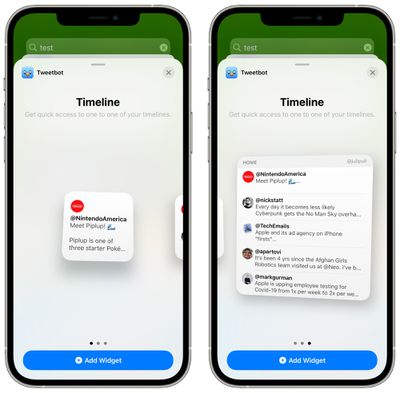
There's now a Tweetbot 6 widget that can be added to the Today View or the Home Screen, and it shows the Twitter timeline. A single tweet can be shown in the smallest widget view, but there are also larger options that show more tweets at a glance.
When using the Tweetbot 6 update on iOS devices, there's now support for Handoff, so you can resume what you were doing on one device on another device using the built-in Handoff feature. Handoff does not yet work on the Mac, but support will be added later.
Tweetbot 6 now supports Shortcuts so Tweetbot actions can be used in the shortcuts created on iOS devices, plus on the iPad, multiple Tweetbot windows are now supported for multitasking purposes. There are also additional app icons to choose from.
Tweetbot 6 can be downloaded from the App Store for free, but a subscription costs $5.99 per year or $0.99 per month. [Direct Link]
Popular Stories
Apple has temporarily removed Keynote, Pages, and Numbers from the App Store, just after releasing an update that added iPhone Duo support and a new Intelligent Assistant.
It is not clear if the apps were removed intentionally, or if it is a bug. Apple has not said when the apps will be reinstated, but if it was in error, they should return soon.
Update: The Mac versions are back without...
With just three days to go until the iPhone Duo is released, Apple is getting ready for the launch. Behind the scenes, the App Store now has screenshots of Apple's built-in apps running on the Duo. We've seen some apps in marketing materials, but images of the ones we haven't seen give us an idea of what it will be like using the iPhone Duo day to day.
Many apps are shown in landscape...
Apple Music has a 404 page easter egg on the web: a functional iPod that appears when you load a page that does not exist, such as music.apple.com/macrumors.
"Page Not Found," says Apple. "Give this a spin instead."
Apple is clever with this. If you navigate to music.apple.com/ipod instead, the page says "Looking for something?" instead of "Page Not Found."
The easter egg is only...














































![Apple Pulls Keynote, Pages and Numbers From App Store [Update: Back]](https://images.macrumors.com/t/Okb7kitB_gNr6qe5Pex9nQIysD8=/112x112/article-new/2026/01/Apple-Creator-Studio-iWork-suite.jpg)



