macOS Monterey Tidbits: Animated Memoji on Login Screen, Change the Color of the Mouse Pointer, and More - MacRumors
Skip to Content

macOS Monterey Tidbits: Animated Memoji on Login Screen, Change the Color of the Mouse Pointer, and More

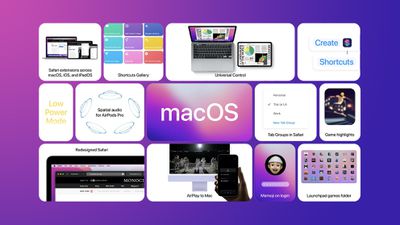
We've highlighted several new features coming in macOS Monterey, such as Low Power Mode and the option to erase a Mac without reinstalling the operating system, but there are some smaller tidbits that we wanted to share.
macos monterey tidbits feature copy

Animated Memoji on Login Screen

One small but fun new feature in macOS Monterey is the addition of a personalized Memoji on the login screen, complete with animated facial expressions.

Change the Color of the Mouse Pointer

A new Accessibility feature added to macOS Monterey is the ability to customize the outline and fill color of the mouse pointer so it's easier to recognize when it moves or changes to an insertion point, crosshair, hand, or other shape. The pointer can be customized in System Preferences under Accessibility > Display > Pointer.

'Go to Folder' Redesign in Finder

On macOS Monterey, the "Go to Folder" window in Finder has been redesigned and now features an improved autocompletion engine to help you get to the files or folder you're looking for more quickly, according to Apple. "Go to Folder" can be found under "Go" in the Finder menu bar, or by using the ⌘⇧G keyboard shortcut.

File Copying Enhancements

macOS Monterey features a new pie chart progress indicator when copying files. It is also now possible to stop or cancel a copy session and resume it later.

macOS Monterey is available now in beta for developers, with a public beta to follow in July. The software update will be released in the fall.

Related Forum: macOS Monterey

Popular Stories

iPhone 18 Pro Rumored Colors

What's Coming in September: New iPhones, Apple Watches and More

Thursday August 13, 2026 4:20 pm PDT by
Apple will introduce at least five new devices at its iPhone-centric event next month, and it's also possible we'll get devices waiting on Siri AI like the Apple TV. iPhone 18 Pro The iPhone 18 Pro is going to look like the iPhone 17 Pro, but with a smaller Dynamic Island. It's getting some internal updates, including a new Wide camera with a variable aperture for more control over lighting ...
Everything New Your iPhone Can Do on iOS 27 Feature 1

30 New Things Your iPhone Can Do in iOS 27

Friday August 14, 2026 6:24 am PDT by
Apple will release iOS 27 in September, and despite the company's focus this year on refining its flagship operating system and nixing bugs, there are still many additional features on the way, not least of which is Apple's new context-aware Siri, re-tooled for the generative AI era. This year's major iPhone software update isn't all about AI, though, as the following feature list...
iPhone 17 One Year Later Thumb 1

Should You Buy an iPhone 17 Now or Wait for iPhone 18?

Friday August 14, 2026 12:15 pm PDT by
For the first time since Apple started selling standard and "Pro" iPhones, we're not going to get an entry-level iPhone model this fall. Apple doesn't plan to release an iPhone 18 in September, and will only launch the iPhone 18 Pro, iPhone 18 Pro Max, and foldable iPhone Ultra. The lower-cost iPhone 18 won't come out until spring 2027. Subscribe to the MacRumors YouTube channel for more ...


Top Rated Comments

Digital Dude Avatar
68 months ago
I'm soOoo sick of this Memoji craze. When I saw the WWDC splash page full of those damn things' I was embarrassed that I'm an Apple guy. Made me feel like we should all be about eight years old to appreciate them. Okay, let the poison pens fly.
Score: 18 Votes (Like | Disagree)
68 months ago

Memoji at login. Why? It's stupid stuff like this that make macos bloated. Again, my 9 year old rMBP shouldn't run Windows 10 better than Catalina.
Not everything in computing needs to be so serious. I enjoy fun things to make my computing experience enjoyable. You saying it makes the system bloated? Where's your proof on that?
Score: 14 Votes (Like | Disagree)
Bug-Creator Avatar
68 months ago
Well lets see:

- the code to display short animations is used elsewhere, so a whole lotta nothing
- if you created no Memoji there is no Memoji
- displaying that Meomji on the login-screen, about 10 lines of Swift (being generous) resulting in 10k of extra binary size (which hopefully gets discarded after you logged in)
- whatever 1st year entry level developer did it in about 30min wouldn't have been of much use in areas that matter anyways

Yeap, 3 metric tons of bloat on this one....
Score: 13 Votes (Like | Disagree)
68 months ago

Memoji at login. Why? It's stupid stuff like this that make macos bloated. Again, my 9 year old rMBP shouldn't run Windows 10 better than Catalina.
Does Apple force you to use it? And what exactly about it makes macos bloated?
Score: 11 Votes (Like | Disagree)
Apple Knowledge Navigator Avatar
68 months ago

Memoji at login. Why? It's stupid stuff like this that make macos bloated.
Could you explain, in purely technical terms, how a small animated image on the login screen 'bloats' the operating system?
Score: 10 Votes (Like | Disagree)
68 months ago

Does Apple force you to use it? And what exactly about it makes macos bloated?
no.
There's extra superfluous code for "eye candy" things, therefore the codebase has got larger. I think most of the users would like to to see bugs fixed and more useful features added to the system.
Score: 9 Votes (Like | Disagree)