macOS Monterey Allows You to Erase a Mac Without Needing to Reinstall the Operating System - MacRumors
Skip to Content

macOS Monterey Allows You to Erase a Mac Without Needing to Reinstall the Operating System

It's been a few days since Apple announced macOS Monterey, and we continue to dig through new features that weren't mentioned during the WWDC keynote, including a much more convenient way of erasing a Mac.
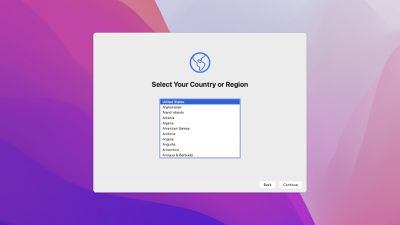
macos monterey setup assistant
Following in the footsteps of the iPhone and iPad, the Mac has gained an "Erase All Content and Settings" option on macOS Monterey. The option allows you to erase all user data and user-installed apps from your Mac without needing to reinstall the macOS operating system, making it far easier to restore a Mac to like-new factory settings.

From the macOS Monterey features page on Apple's website:

Erase all contents and settings
System Preferences now offers an option to erase all user data and user-installed apps from the system, while maintaining the operating system currently installed. Because storage is always encrypted on Mac systems with Apple silicon or the T2 chip, the system is instantly and securely "erased" by destroying the encryption keys.

In the macOS Monterey beta, the new option can be found by opening the System Preferences app, clicking on System Preferences in the menu bar at the top of the screen, and clicking on "Erase All Content and Settings" in the drop-down menu. An administrator password is required to proceed with restoring the Mac to factory settings.

Erasing a Mac running an earlier version of macOS requires formatting the startup disk and reinstalling macOS, so this new option will make it far more convenient to restore your Mac to factory settings, whether you simply want to start fresh with your Mac or are planning to sell or gift the Mac to another person. After erasing a Mac, it will display the Setup Assistant and be ready to be set up like new.

macOS Monterey is available now in beta for developers, with a public beta to follow in July.
Related Forum: macOS Monterey

Popular Stories

macOS 27 on MacBook Pro

Apple Says macOS 27 Won't Be Compatible With These Macs

Wednesday June 3, 2026 8:29 am PDT by
During WWDC 2025, Apple revealed that macOS 26 Tahoe would be the final major macOS version for Intel-based Macs. macOS 27 will be compatible with Apple silicon Macs only, meaning that you will need a Mac with an M-series chip or a MacBook Neo with an A18 Pro chip in order to install the software update. Apple will unveil macOS 27 during its WWDC 2026 keynote this Monday, June 8, and the...
MacBook Neo on Yellow Feature

MacBook Neo is So Popular That Apple Reportedly Doubled Production

Wednesday June 3, 2026 9:24 am PDT by
On an earnings call in late April, Apple's CEO Tim Cook said that customer response to the MacBook Neo was "off the charts," and the popularity of the laptop has reportedly led the company to significantly boost production. Apple supply chain analyst Ming-Chi Kuo this week said he believes that MacBook Neo shipments to Apple were doubled from an initial target of 5 million units to 10...
iphone 18 pro blue%402x

iPhone 18 Pro: Dark Cherry, Light Blue, and Dark Gray Chassis Leaked [Update]

Thursday June 4, 2026 5:18 am PDT by
Update: Since publication, new information has come to light suggesting the images have been AI-manipulated and are not in fact iPhone 18 Pro chassis parts. The original article follows. The color options Apple is reportedly planning for the upcoming iPhone 18 Pro and ‌iPhone 18 Pro‌ Max have appeared online today in the form of images of chassis parts of unknown authenticity....

Top Rated Comments

65 months ago

Insta-deleting all personal files seems very useful for certain criminals.
It’s also useful for those of us who are not criminals!
Score: 57 Votes (Like | Disagree)
turbineseaplane Avatar
65 months ago
This is perhaps the best thing I've heard about Monterey honestly
Score: 21 Votes (Like | Disagree)
FightTheFuture Avatar
65 months ago
This is a welcome feature. But I would still feel more secure reformatting the disk under recovery mode.
Score: 20 Votes (Like | Disagree)
PatriotInvasion Avatar
65 months ago
I’ve only been waiting for a feature like this since Tiger in 2006. I’ll take it 15 years later!
Score: 17 Votes (Like | Disagree)
nouvejetzt Avatar
65 months ago
Nice! I had to erase my mac two days ago. This would’ve made things easier.
Score: 15 Votes (Like | Disagree)
Apple_Robert Avatar
65 months ago
This is awesome news. :D So glad to see this. Will it replace using Configurator 2 on the M1 to restore / revive?

Great coverage on the new OS releases, MR. I appreciate the hard work.
Score: 14 Votes (Like | Disagree)