Apple Explains Why 'Allow Apps to Request to Track' May Be Grayed Out on iOS 14.5

Starting with the iOS 14.5, iPadOS 14.5, and tvOS 14.5 software updates released this week, apps must ask for permission before tracking your activity across other companies' apps and websites for targeted advertising purposes.
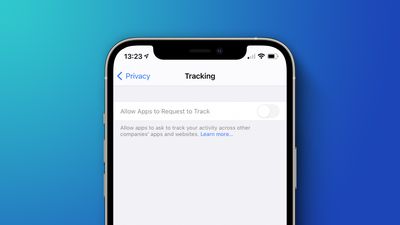
Allow Apps Request Track Feature
On an iPhone or iPad, users can manage tracking permissions on an app-by-app basis in the Settings app under Privacy > Tracking, and there is also an "Allow Apps to Request to Track" setting that applies to all apps. Each app that asks for permission to track while this setting is toggled off will be treated as if you tapped "Ask App Not to Track."

In a new support document, Apple said there are a few circumstances where the "Allow Apps to Request to Track" setting is grayed out, however, including:

  • For users with child accounts or under age 18 by birth year, signed in with their Apple ID
  • If your Apple ID is managed by an educational institution or uses a configuration profile that limits tracking
  • If your Apple ID was created in the last three days

9to5Mac previously reported that some users are still seeing the toggle grayed out even when the first two circumstances listed above do not apply to them, suggesting that there could be a bug or other issue going on. Apple has yet to respond to requests for comment.

Some users suspect there might be a correlation between the "Personalized Ads" setting and whether "Allow Apps to Request to Track" is grayed out.


On devices with the "Allow Apps to Request to Track" setting grayed out, all apps that request to track are denied permission by default and cannot access the device's random advertising identifier, known as the IDFA, according to Apple. Apps are also not permitted to track your activity using other information that identifies you or your device, such as your email address, although this policy is not enforced at a technical level.

Apple recently shared a video with more details about its new App Tracking Transparency requirement for those interested in learning more.

Related Forum: iOS 14

Popular Stories

maxresdefault

Apple Shows Off a Key Reason to Upgrade to the iPhone 17

Saturday February 7, 2026 9:26 am PST by
Apple today shared an ad that shows how the upgraded Center Stage front camera on the latest iPhones improves the process of taking a group selfie. "Watch how the new front facing camera on iPhone 17 Pro takes group selfies that automatically expand and rotate as more people come into frame," says Apple. While the ad is focused on the iPhone 17 Pro and iPhone 17 Pro Max, the regular iPhone...
apple wallet drivers license feature iPhone 15 pro

Apple Says These 7 U.S. States Plan to Offer iPhone Driver's Licenses

Monday February 9, 2026 6:24 am PST by
In select U.S. states, residents can add their driver's license or state ID to the Apple Wallet app on the iPhone and Apple Watch, and then use it to display proof of identity or age at select airports and businesses, and in select apps. The feature is currently available in 13 U.S. states and Puerto Rico, and it is expected to launch in at least seven more in the future. To set up the...
m5 macbook pro deal

Why You Shouldn't Buy the Next MacBook Pro

Tuesday February 10, 2026 4:27 pm PST by
Apple is planning to launch new MacBook Pro models as soon as early March, but if you can, this is one generation you should skip because there's something much better in the works. We're waiting on 14-inch and 16-inch MacBook Pro models with M5 Pro and M5 Max chips, with few changes other than the processor upgrade. There won't be any tweaks to the design or the display, but later this...
iOS 26

Apple Releases iOS 26.3 and iPadOS 26.3

Wednesday February 11, 2026 10:07 am PST by
Apple today released iOS 26.3 and iPadOS 26.3, the latest updates to the iOS 26 and iPadOS 26 operating systems that came out in September. The new software comes almost two months after Apple released iOS 26.2 and iPadOS 26.2. The new software can be downloaded on eligible iPhones and iPads over-the-air by going to Settings > General > Software Update. According to Apple's release notes, ...
Apple Logo Zoomed

Apple Expected to Launch These 10+ Products Over the Coming Months

Tuesday February 10, 2026 6:33 am PST by
It has been a slow start to 2026 for Apple product launches, with only a new AirTag and a special Apple Watch band released so far. We are still waiting for MacBook Pro models with M5 Pro and M5 Max chips, the iPhone 17e, a lower-cost MacBook with an iPhone chip, long-rumored updates to the Apple TV and HomePod mini, and much more. Apple is expected to release/update the following products...

Top Rated Comments

AngerDanger Avatar
63 months ago

Who remembers the days pre ios7 when ios was so simple and intelligently designed nothing needed an explanation?
I too remember when iOS was so lacking in features that it didn't need as many explanations for those features.

One way to look at it is that if you want to use iOS 14.5 like you used iOS 6 and below, none of these preferences matter anyway because they're for features that didn't exist at the time.

Technically, iOS is just as simple but has added complexity for those who want it. :)
Score: 21 Votes (Like | Disagree)
cableguy84 Avatar
63 months ago
Who remembers the days pre ios7 when ios was so simple and intelligently designed nothing needed an explanation?
Score: 15 Votes (Like | Disagree)
63 months ago
none of the 3 points apply but it is still grayed out ;)

However personalized adds it turned off grayed out too
Score: 14 Votes (Like | Disagree)
63 months ago
As a developer, I've never liked disabling or graying out an option without explaining in the UI why it is disabled.
Otherwise you end up with issues like this that require press release, lol. Much easier to add text describing why it's disabled or not have the option appear at all.
Apple used to be good about this.
Score: 8 Votes (Like | Disagree)
NPC Compliant Avatar
63 months ago
Perfectly reasonable safeguards
Score: 7 Votes (Like | Disagree)
BvizioN Avatar
63 months ago

Who remembers the days pre ios7 when ios was so simple and intelligently designed nothing needed an explanation?
You most be referring to the dull/boring stitched-leather all over iOS versions! How much I do not miss these.
Score: 4 Votes (Like | Disagree)