Apple Releases Second Betas of iOS 14.2 and iPadOS 14.2 to Developers With Music Recognition Toggle for Control Center - MacRumors
Skip to Content

Apple Releases Second Betas of iOS 14.2 and iPadOS 14.2 to Developers With Music Recognition Toggle for Control Center

Apple today seeded the second betas of upcoming iOS 14.2 and iPadOS 14.2 updates to developers, two weeks after seeding the first betas and a little over two weeks after releasing the iOS 14 and iPadOS 14 updates.
iOS 14
iOS and iPadOS 14.2 can be downloaded through the Apple Developer Center or over the air after the proper developer profile has been installed.

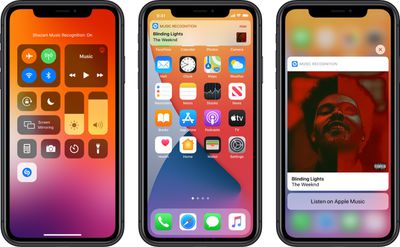
The iOS 14.2 update brings a new Music Recognition control for the Control Center, which enhances the integration of the Apple-owned Shazam app in the iOS operating system. Music Recognition lets you discover music playing around you and it can recognize music playing in apps even when you're wearing AirPods.
musicrecognitioncontrol
The Shazam Music Recognition feature can be added to Control Center through the Control Center options in the Settings app. To use the feature, open up Control Center and then tap on the Shazam icon to initiate a single recognition. While Apple devices have been able to use Shazam through Siri or the Shazam app for some time, the Control Center option makes it easier to get to the music recognition tool.


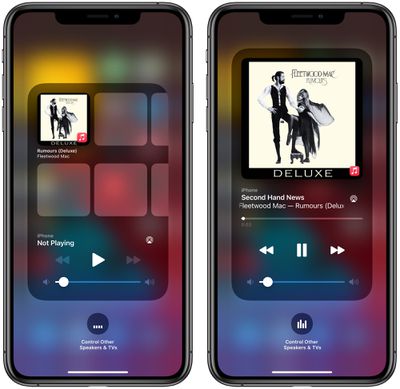
The new update also includes a redesigned Now Playing widget for the Control Center, which lists recently played albums that you might want to tap into and listen to when you have no music playing. There's also a redesigned interface for AirPlay, making it easier to play music across multiple ‌AirPlay‌ 2-enabled devices in the home.

applemusicsuggestions
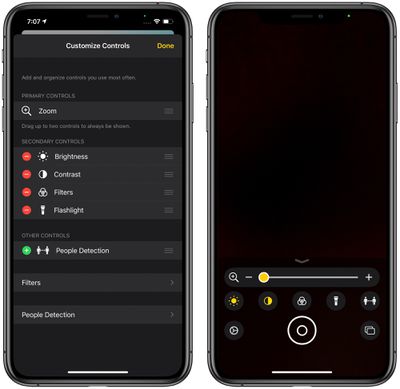
For those who have low vision, Apple added a "People Detection" feature in the Magnifier app that uses the camera to let iPhone users know how far away other people are, which can be useful for social distancing purposes.
magnifierpeopledetection
The new iOS 14.2 beta will likely be in testing for some time as Apple works on releasing new iPhones, with the new iPhones expected to debut sometime in October.
Related Forum: iOS 14

Popular Stories

Four iPhone 18 Pro Colors Mock Feature

iPhone 18 Pro Launching in September With These 10 New Features

Monday April 20, 2026 7:13 am PDT by
While the iPhone 18 Pro and iPhone 18 Pro Max are not launching until September, there are already plenty of rumors about the devices. It was initially reported that the iPhone 18 Pro models would have fully under-screen Face ID, with only a front camera visible in the top-left corner of the screen. However, the latest rumors indicate that only one Face ID component will be moved under the...
Tim Cook Rainbow

Apple CEO Tim Cook Stepping Down, John Ternus Taking Over

Monday April 20, 2026 1:33 pm PDT by
Apple CEO Tim Cook is stepping down as Apple's chief executive officer, and hardware engineering chief John Ternus is set to take over, Apple announced today. Cook will continue on as Apple CEO through the summer, with Ternus set to join Apple's Board of Directors and take over as CEO on September 1, 2026. Cook is going to transition to executive chairman, and he will "assist with certain...
iphone 17 ceramic shield

Leaker: Apple Downgrading iPhone 18 to Cut Costs

Monday April 20, 2026 9:12 am PDT by
Apple is downgrading the planned specifications of the standard iPhone 18 to cut costs, a leaker claims. In a new post on Weibo, the user known as "Fixed Focus Digital" said that the iPhone 18 features "certain manufacturing downgrades" that bring it more into line with the low-cost iPhone 18e model. The decision is said to be "a cost-cutting measure." Apple has apparently chosen to...

Top Rated Comments

sniffies Avatar
73 months ago
I hope it enables OxyMeter for Apple Watch
Score: 9 Votes (Like | Disagree)
Ingo Brocksom Avatar
73 months ago

It's alive :) 14.2 beta 2


Waiting for the public Beta 14.2 beta 2 👌
Score: 3 Votes (Like | Disagree)
73 months ago
It's alive :) 14.2 beta 2


Attachment Image
Score: 3 Votes (Like | Disagree)
73 months ago

I hope it enables OxyMeter for Apple Watch

I updated to 14.2 before my Apple Watch series 6 arrived, so I have yet to try the awesome new features. I hope Beta 2 merges the blood oxygen level feature from stable release candidate to the beta releases. 🤞🏻

Did the re enable the blood o2 in the apple watch app?
Looks like that's there:
https://forums.macrumors.com/threads/ios-14-2-beta-2-bug-fixes-changes-and-improvements.2257729/post-28965927
Score: 3 Votes (Like | Disagree)
73 months ago

I hope it enables OxyMeter for Apple Watch
I updated to 14.2 before my Apple Watch series 6 arrived, so I have yet to try the awesome new features. I hope Beta 2 merges the blood oxygen level feature from stable release candidate to the beta releases. 🤞🏻
Score: 3 Votes (Like | Disagree)
GtrDude Avatar
73 months ago
Still more completely useless Apple updates.
How about fixing some of the existing bugs?
Apple needs to:
1. redesign the notification center. It's ridiculous.
2. add haptic feedback to the keyboard, and make it possible to customize different intensities to your heart's content. It's crazy that you have no feedback whatsoever if you're typing and have the phone on mute.Those who are concerned with battery can just turn it off.
3. make it possible to adjust volume for independent apps and settings and not this general thing they're doing, forcing you to do it while the thing is being played, such as separate volume control for keyboard volume, music volume, ring volume, system volume.
4. add suggestions from the address book when you're dialing a phone number. Common now Apple.
5. make it possible to customize the texting app in every conceivable way. Font size, bubble size shape color.
6. make it possible to schedule a message to be sent at a certain time/date.
7. make it possible to move the icons anywhere you want to.
8. Use an OS-wide clipboard and make it not expire. You should be able to copy text now and paste it tomorrow if you want to.
9. Give us an option to NOT go to the next email but back to inbox after deleting an email.


Hope it fixes the laggy keyboard typing!
It doesn't. Not on my phone at least. Xs-Max.
Nor does it fix the dimming of the screen where you have to turn it off and on again to get it to its correct brightness.
Score: 2 Votes (Like | Disagree)