In this week's App Recap, we've highlighted music app "Concertino" and finance app "Outgoing" as new apps worth checking out. We've also both highlighted older apps worth checking out and compiled a list of apps that received major updates this week.
New Apps
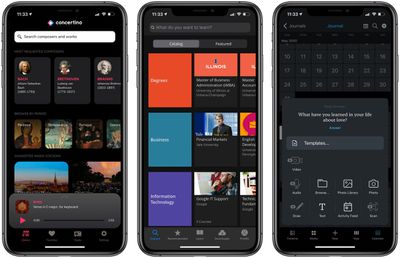
- Concertino (iOS, Free) - Apple Music client app Concertino was recently released for iOS, and it works by combining information from the Open Opus library with "an automated analysis of Apple Music metadata." The app can conveniently organize music from A to Z, by popularity, by time period, and more. Users can also organize songs by either setting them as favorites or creating playlists, and these can also be used to create a radio station. Although the app is free to download, an active Apple Music subscription is required for full music playback.
- Outgoings (iOS, $1.99) - Outgoings, a new expense tracking app, allows users to track recurring expenses to gain insight as to how much is being spent on subscriptions over time. Users have the ability to set icons for individual "outgoings," which are individual subscription fees for services. Outgoing features a wide range of colors that can be used around the app. Users also have the ability to customize the app's icon by choosing from four different icons. The app allows users to create custom tags to group subscriptions, which is helpful when analyzing monthly subscriptions by type.
Older Apps to Check Out
- Coursera (iOS, Free) - Coursera is an education app that offers online courses in over ten different subjects. The app is great for those looking to either simply learn more about a certain subject or enroll in a specific course to bolster a career path. Users can access over 3,500 online courses in which corresponding video lectures can be streamed from anywhere and downloaded for offline viewing. The app also features discussion forums, which can be used either to connect with other learners or to post questions. Although free to download, Coursera offers both free and paid course options, but users must take a paid course in order to unlock quizzes and obtain a Certificate. Users have the option to select several different course options at a variety of price points.
- Day One (iOS & Mac, Free) - Day One, a journaling app marketed as "your journal for life," allows users to add photos, videos, drawings, and audio recordings to materialize their entries. It's simple interface makes it easy to navigate the app's many unique capabilities. Additionally, the app offers an On This Day feature that allows users to jump back to entries written in the past. The app's free version allows for unlimited journal entires, but users looking for more features such as a cloud backup and a sync across multiple devices can subscribe to Day One Premium, which is priced at $34.99 per year.
App Updates
- Apple Research - Apple this week updated its Apple Research app to introduce updates for its Apple Hearing Study and its Apple Heart & Movement Study. There's a new "Speech in Noise" test that's available in the Apple Hearing Study, which is designed to help researchers understand participants' hearing ability under various circumstances. For the Apple Heart & Movement Study, there's a new survey available that will help researchers understand the impact of COVID-19 on daily life.
- Gmail - The Gmail app's long-awaited dark mode feature appears to have finally completed on iPhone and iPad. Google announced dark mode for its Gmail app back in September 2019, but rollout since then has been limited on iOS, as some users managing to activate dark mode in the app had the feature vanish on the next restart.
- Peloton - Peloton this week introduced an Apple TV app that provides access to live and on-demand workouts now on the big screen. The app is free to download, but it does require a Peloton membership.
- Signal - Encrypted messaging app Signal this week announced the rollout of a new face-blurring feature that automatically locates and blurs faces in images shared over the platform. According to Signal cofounder Moxie Marlinspike, all processing involved in the new blur feature happens locally on the device to maintain privacy.
Tag: App Recap