

App Recap: Edison Mail, Here Kitty!, Whisk, and Major App Updates

In this week's App Recap, we've highlighted three new apps that are worth checking out. We've also compiled a list of apps that received major updates this week.
App Recap 4

New Apps

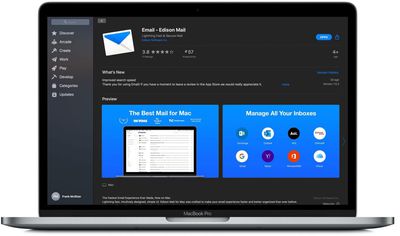
  • Email - Edison Mail (Free) - Popular mobile app Edison Mail is now available on Mac App Store for the very first time. With its fast and simple user interface, the app touts the ability to make your email experience both fast and better organized than ever before. Some of its notable features include the ability to block email read receipts, convenient shortcuts and gestures, and a built in AI powered search. This week, Mac users gained a new primary inbox which focuses on important emails and an option to mute email notifications from selected senders.
  • Here Kitty! (Free) - Here Kitty! is a new interactive game that will children will love to play while at home. The game works by hiding an iPhone face down in a good hiding spot. Children can then try to find the "Kitty" either by calling out for it or by clapping, and the "Kitty" will respond with a meow. The app also records the amount of time it took to find the "Kitty," so it can even be played competitively. In addition, a new character will join the game each Saturday, so kids will enjoy getting to meet a new friendly creature each week.

  • Whisk (Free) - Whisk is a web page editor with a live preview that updates as you type. The app, formerly named HyperEdit in its first version, was recently revived after several years and brought to the Mac App Store for the first time. Some of the app's main features include the ability to render HTML and PHP as typed, previewing to other browsers, and live HTML W3C-based validation. Whisk can be used for crafting HTML, writing blog posts, running and debugging JavaScript, creating entire websites, and more. Although the app is free to download, it is worth noting that the initial download only contains a document viewer mode and a 14 day trial of the full version, so users looking to gain access to all of the app's functionality must pay a one-time fee of $29.99.

App Updates

  • Google Drive - Google this week updated its Google Drive app with a new Privacy Screen feature that allows users to enable either Face ID or a passcode authentication whenever the app is opened on their device. The app gives users the options to activate the new Privacy Screen feature either immediately when the app is opened or 10 seconds, one minute, or 10 minutes later.
  • Microsoft Outlook - Microsoft this week updated its Outlook app with a new Ignore Conversations feature that allows users to remove repetitive multi-reply email threads from their inbox. Although the feature has been available on other devices for quite some time, the feature was just added to the Outlook app for iPhone and iPad.
  • Stack - Stack, a popular web browser, released version 3.0 of its browser this week. The update introduces a subscription based pro version of Stack, a full redesign of the sidebar, and more. Stack's isn't like a traditional web browser, as its main purpose is to separate web apps from less important web pages and organize them in one place to enhance efficiency.

  • Twitter - Although not a specific update, Twitter announced this week that it would be testing a new threaded conversations layout for some iOS and web users. Twitter mentioned that users who do see the change will notice new lines and indentations to make it clearer as to who is replying. Additionally, the change will allow for more of a conversation to be displayed at once.

Popular Stories

maxresdefault

Where's the New Apple TV?

Monday December 22, 2025 11:30 am PST by
Apple hasn't updated the Apple TV 4K since 2022, and 2025 was supposed to be the year that we got a refresh. There were rumors suggesting Apple would release the new Apple TV before the end of 2025, but it looks like that's not going to happen now. Subscribe to the MacRumors YouTube channel for more videos. Bloomberg's Mark Gurman said several times across 2024 and 2025 that Apple would...
iPhone Top Left Hole Punch Face ID Feature Purple

iPhone 18 Pro Launching Next Year With These 12 New Features

Tuesday December 23, 2025 8:36 am PST by
While the iPhone 18 Pro and iPhone 18 Pro Max are not expected to launch for another nine months, there are already plenty of rumors about the devices. Below, we have recapped 12 features rumored for the iPhone 18 Pro models. The same overall design is expected, with 6.3-inch and 6.9-inch display sizes, and a "plateau" housing three rear cameras Under-screen Face ID Front camera in...
maxresdefault

Hands-On With a Rough iPhone Fold Mockup

Monday December 29, 2025 10:55 am PST by
Apple is rumored to be introducing a foldable iPhone in September 2026, and since it will bring the biggest form factor change since the iPhone was introduced in 2007, curiosity about the design is high. A 3D designer created an iPhone Fold design based on rumors, and we printed it out to see how it compares to Apple's current iPhones. Subscribe to the MacRumors YouTube channel for more ...
apple fitness 2026 1

Apple Teases 'Something Big' Coming Soon to Apple Fitness+

Tuesday December 30, 2025 2:11 pm PST by
The Apple Fitness+ Instagram account today teased that the service has "big plans" for 2026. In a video, several Apple Fitness+ trainers are shown holding up newspapers with headlines related to Apple Fitness+. What's Apple Fitness+ Planning for the New Year? Something Big is Coming to Apple Fitness+ The Countdown Begins. Apple Fitness+ 2026 is Almost Here 2026 Plans Still Under ...
apple intelligence black

Report: Apple's AI Strategy Could Finally Pay Off in 2026

Tuesday December 30, 2025 9:01 am PST by
Apple's restrained artificial intelligence strategy may pay off in 2026 amid the arrival of a revamped Siri and concerns around the AI market "bubble" bursting, The Information argues. The speculative report notes that Apple has taken a restrained approach with AI innovations compared with peers such as OpenAI, Google, and Meta, which are investing hundreds of billions of dollars in data...
iOS 26

iOS 26.2 Adds These 8 New Features to Your iPhone

Monday December 22, 2025 8:47 am PST by
Earlier this month, Apple released iOS 26.2, following more than a month of beta testing. It is a big update, with many new features and changes for iPhones. iOS 26.2 adds a Liquid Glass slider for the Lock Screen's clock, offline lyrics in Apple Music, and more. Below, we have highlighted a total of eight new features. Liquid Glass Slider on Lock Screen A new slider in the Lock...
iphone 17 pro dark blue 1

iPhone 17 Pro and Pro Max Users Report Static Speaker Noise While Charging

Tuesday December 30, 2025 10:39 am PST by
iPhone 17 Pro and Pro Max owners are having trouble with the speakers of their devices, and have complained about a static or hissing noise that occurs when the iPhone is charging. There are multiple discussions about the issue on Reddit, the MacRumors forums, and Apple's Support Community, where affected users say there is a noticeable static noise "like an old radio." Some people report...
airpods color prototypes

Apple Tested AirPods in Bright Colors

Saturday December 27, 2025 6:06 am PST by
Apple reportedly tested a version of the first-generation AirPods with bright, iPhone 5c-like colored charging cases. The images, shared by the Apple leaker and prototype collector known as "Kosutami," claim to show first-generation AirPods prototypes with pink and yellow exterior casings. The interior of the charging case and the earbuds themselves remain white. They seem close to some...

Top Rated Comments

Rigby Avatar
74 months ago
Another notable feature of the Edison app is that it scans your mailbox and sells your data to the highest bidder ...

https://www.vice.com/en_us/article/pkekmb/free-email-apps-spying-on-you-edison-slice-cleanfox
Score: 14 Votes (Like | Disagree)
Rigby Avatar
74 months ago

Edison also allows you to turn Data Sharing off.

In app: Settings: Manage Privacy: Opt-out to Data Sharing
Even if that does what they claim it does, they still scan your mailbox for their "assistance" features. All your mails go through their servers, and they store your email account password as well. They are essentially a man-in-the-middle with full control over your account. And they have been caught doing shady things ('https://www.macrumors.com/2018/07/02/third-party-email-apps-reading-user-emails/') before.

Given how many things today depend on your email (including many other online accounts, banking etc.), you have to have a lot of trust to give what is essentially a marketing company complete access like that. And all for some gimmicky assistance features. Personally I don't understand how anyone would consider this a reasonable trade-off.
Score: 8 Votes (Like | Disagree)
Mick-Mac Avatar
74 months ago
I would never use a "free" app like a mail reader because it'll just be data mined.
Score: 7 Votes (Like | Disagree)
Rigby Avatar
74 months ago

I know most won't read past the headline but the story details:

"Return Path, Edison, and other developers of apps that work with Gmail and similar email services don't appear to have misused customer information"
And you coveniently cut off the second part of the sentence:

"but many customers are likely to be concerned about the fact that employees at some email companies are reading their emails"
and "In a written statement, Google said that it provides data to outside developers who have been vetted and who have been granted permission by users to access their email."
Edison does not need Google's permission, since they don't use their offical API access. If you use their app, they can scan your mailbox regardless of what email provider you use.
It's too late for paranoia! ?
Corporate surveillance is very real and has nothing to do with paranoia. Incredible that after all the breaches and scandals like Cambridge Analytica some are still trying to downplay the risks.
Score: 6 Votes (Like | Disagree)
Erehy Dobon Avatar
74 months ago

Can you do that before setting up your accounts? Would be a bit pointless otherwise as it’s probably already scanned and shared your data before you turn of the setting.
Yes, you will be prompted to opt-out during the setup process. Read the prompts slowly and carefully.

A wise person would also use an e-mail account that has no messages/no archive/no notes/no address book for the initial setup. I have several such IMAP accounts. No data = no data mining = no ad revenue fodder. Give them valid login credentials for an empty account.

The first post-setup step would be to open up the application settings and go through them thoroughly a few times to make sure to turn off features, etc. that you don't want to be involved with. Review these periodically to make sure they don't try to sneak in new undesirable "features."

Personally I would never use my primary e-mail account with a brand new e-mail client.

Trust is EARNED.
Score: 3 Votes (Like | Disagree)
Morgenland Avatar
74 months ago
Never tried Apple's Mail? There's nothing missing.
Muting email notifications from selected senders is always a hassle in any IT company. This is never easy to do in reality, therefore Apple has deliberately not integrated such an idea.
Score: 3 Votes (Like | Disagree)

















