Apple Releases tvOS 13 With Multi User Support, Control Center, Ocean Screensavers and More - MacRumors
Skip to Content

Apple Releases tvOS 13 With Multi User Support, Control Center, Ocean Screensavers and More

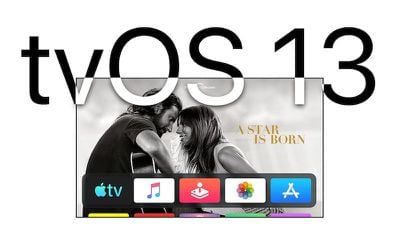
Apple today released tvOS 13, the latest operating system designed for the fourth and fifth-generation Apple TV models. tvOS 13 comes after several months of beta testing.

tvOS 13 can be downloaded over the air through the Settings app on the ‌Apple TV‌ by going to System -> Software Update. ‌Apple TV‌ owners who have automatic software updates turned on will be upgraded to tvOS 13 automatically. Apple has also released an ‌Apple TV‌ Software 7.4 update (actually version 8.4.3) for the third-generation ‌Apple TV‌.

tvos13
The tvOS 13 update brings an updated Home screen aimed at making it easier to discover new content. Apps are now able to play full-screen video previews on the Home screen, similar to Netflix, once developers have implemented support.

Multiple users are supported for the first time, letting more than one profile exist on the ‌Apple TV‌ so each family member can have their own customized ‌Apple TV‌ interface with separate recommendations, music playlists, and Watch Now lists.

Switching between profiles can be done with the new Control Center, which offers up profiles, the time and date, search, a Now Playing widget, AirPlay controls, and a sleep option.
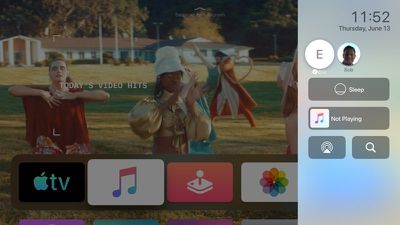
tvos13controlcenter
tvOS 13 brings Apple Arcade, Apple's new gaming service that's already available for the iPhone. ‌Apple Arcade‌ will offer unlimited access to more than 60 new and exclusive games, for one $4.99 per month subscription fee.
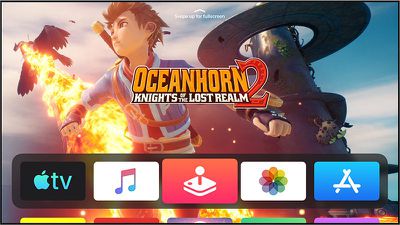
tvos13applearcade
For ‌Apple Arcade‌, Apple has implemented support for the Xbox Wireless Bluetooth Controller and the PlayStation DualShock 4 Controller, both of which can be connected to an ‌Apple TV‌ over Bluetooth.

game controllers ps4 xbox
Sign in with Apple, a feature also available on the iPhone, iPad, and coming to Macs, is included in tvOS 13. With tvOS 13, apps that support Sign in with Apple will let you sign in with your Apple ID rather than requiring you to create a user name and password.
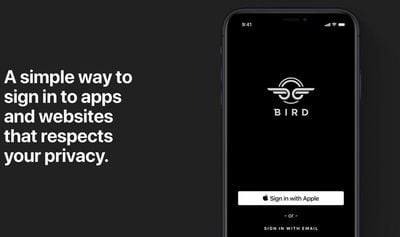
signinwithapple
Apple can even obscure your real email address and provide a fake one, which keeps your data and information safer than ever.

There are new under the sea themed screensavers created in partnership with the BBC Natural History Unit, which also created "Blue Planet."

tvos 13 underwater
With a new Picture-in-Picture feature, you can continue to watch TV shows or movies while using a different app, adjusting settings, or otherwise navigating through the tvOS 13 operating system.

For more on what's new in the tvOS 13 update, make sure to check out our tvOS 13 roundup.

Related Roundup: Apple TV
Buyer's Guide: Apple TV (Don't Buy)

Popular Stories

Apple iCloud Plus expansion hero

iCloud+ Now Includes Apple TV, Apple Arcade, and Curated Apple Music Stations in Over 100 Countries

Tuesday September 15, 2026 1:43 am PDT by
Apple today announced a new subscription initiative that turns paid iCloud+ subscriptions into a broader services bundle in more than 100 countries. In select countries, Apple says every paid iCloud+ plan, including the cheapest 50GB tier, now includes Apple TV and Apple Arcade "at no additional cost," while family sharing extends the storage, TV and Arcade access to up to five people....
Where is the New Apple TV Feature

Next Apple TV's Chip Revealed in Latest Leak

Tuesday September 8, 2026 10:19 am PDT by
The next Apple TV 4K will be equipped with an A19 or A19 Pro chip, according to evidence in Apple's code uncovered by MacRumors contributor Aaron Perris. In particular, the device's model identifier points towards the A19 generation of chips. Accordingly, the next Apple TV would have 8GB or 12GB of RAM, up from 4GB in the current 2022 model with the A15 Bionic chip. Other rumored upgrades for...


iOS 27 Feature Cool

Apple Releases New iOS 27, iPadOS 27, macOS 27, and tvOS 27 Public Betas

Monday August 31, 2026 2:13 pm PDT by
Apple today released the sixth public betas of iOS 27, iPadOS 27, tvOS 27, and macOS Golden Gate, allowing anyone with a compatible device to download and test the new software. The sixth betas come a week after Apple seeded the fifth betas and a few hours after the eighth developer betas. You can get started by signing up on Apple's beta website and then opting in to the public beta by...

Top Rated Comments

pooryou Avatar
91 months ago
I don’t want “Netflix-like” forced video previews!

Sure hope we can disable that nonsense.
Score: 16 Votes (Like | Disagree)
Solomani Avatar
91 months ago
Xbox and DualShock controller support for Apple TV! A step in the right direction, Apple.
Score: 8 Votes (Like | Disagree)
91 months ago

Did you check under Accessibility? Sometimes they hide stuff like that there.
You, Sir, are a genius. ;) Under Accessibility/Motion the video previews can be turned off. The apps still rotate through still images, but that’s less annoying.
Score: 7 Votes (Like | Disagree)
91 months ago
Just updated one of my ATVs and encountered the first UI annoyance already: in the previous version, the "top shelf" of the TV app on the home screen would show the first few entries of may watch list. Now it shows some random movie poster fullscreen in the background (essentially an ad), so I can no longer directly jump to an item on the watchlist. Is there any way to configure this? Not a fan of the new home screen so far.
Score: 6 Votes (Like | Disagree)
unfunfionn Avatar
91 months ago
I've been on the public beta for a couple of months. When I first saw the top shelf ads, I thought it can't be serious, but surely they'll make it optional by the GM. Turns out they were serious and they didn't listen. I'm sure some users will like this feature, but there is an ethical concern that makes me a little worried. This is a €200 device, the premium device in this market, and they're putting advertisements on the home screen. As long as that content is stuff you have to spend additional money on, they're ads. I was already annoyed that my Samsung TV makes it impossible to remove TV Plus (and keeps pinning it to my Home menu no matter how often I remove it), but it mostly stays out of the way. The tvOS ads are far worse.

But honestly it annoys me with the Music app more than the TV app. The TV app was barely useful to begin with. Its only useful feature for me was Up Next in the top shelf. Now it can just go into a folder and die. But I use Music heavily and instead of having a shortcut into albums I deliberately added to my library, I get video previews for Taylor Swift, the Jonas Brothers and Ariana Grande. I don't listen to any of those artists and have no intention to. They're not recommendations based on my listening behaviour either.

It's business goals being brute-forced onto a paying customer base. Yes, worse things can happen in an OS update, but this approach feels quite concerning.
Score: 5 Votes (Like | Disagree)
tonywalker23 Avatar
91 months ago

Did you check under Accessibility? Sometimes they hide stuff like that there.
Would there be a way to disable the preview completely (video AND still image)? I updated yesterday, in my church office, and you can imagine the quickness I rearranged icons when the top half of my tv was a lady in a silver outfit (obviously I don't keep up with new music stars:)
Score: 4 Votes (Like | Disagree)
Latest Stories
OpenAI's New GPT-6 Sol and Luna Models Bring Astra Improvements to Cheaper Tiers
1 hour ago
Apple Park Visitor Center Just Lost an Attraction Offered Since 2017
3 hours ago
Shazam App for iPhone Updated With New Icon and iMessage Stickers
3 hours ago
Anthropic Launches Claude Opus 5.5 With Fable-Level Performance at a Lower Price
3 hours ago
Apple Releases Firmware Update for Beats 360
4 hours ago
Beats 360 Pre-Orders Open at Amazon With Cushion Kits on Sale, Plus More Beats Deals
5 hours ago
Apple Puts AirTag-Sized AI Pin on Hold
5 hours ago
Beats 360 Ear Cushion Kits Just $9.99 Each Until the End of October
5 hours ago
Apple Testing Prototypes of Whoop-Like Screenless Fitness Band
6 hours ago
Apple Will Soon Announce an All-New Operating System
6 hours ago
Apple Watch Series 10 vs. Series 12 Buyer's Guide: Should You Upgrade?
6 hours ago
Apple's Smart Glasses to Enter a Rapidly Growing Market
7 hours ago
Apple Event This October? These 7 New Products Expected Next Month
7 hours ago
Beats 360 Deliver Customizability and a Revamped Over-Ear Headphone Design
8 hours ago
Massive Discounts Hit 2026 MacBook Pro, Save Up to $600 on Amazon
9 hours ago
Apple Planning to Bring iPhone Duo Display Tech to Pro in 2029
9 hours ago
Apple Announces 'Tap to Pay on iPhone' Availability in 8 More Countries
9 hours ago
New Mac Mini and Mac Studio Now Available for Same-Day Pickup at Apple Stores
10 hours ago
Apple Still Working on Anti-Snatching Feature That Locks Stolen iPhones
11 hours ago
Apple Quietly Excludes Older iPhones From New Camera Feature
12 hours ago
App Switcher Returns in watchOS 27.2 Beta With New Launch Gesture
14 hours ago
Apple Music Hall Spatial Audio Venue Opens in Battersea Power Station
14 hours ago
Apple CEO John Ternus Talks iPhone Duo Design, Siri AI, and Becoming CEO
23 hours ago
You Can No Longer Downgrade From iOS 27 to iOS 26
1 day ago
macOS 27.2 Beta Brings New Volume and Brightness Sliders
1 day ago
GM Wants You to Know It Still Plans to Ditch Apple CarPlay in Future EVs
1 day ago
iPhone 14 Pro vs. iPhone 18 Pro Buyer's Guide: Should You Upgrade?
1 day ago
Apple Seeds Second macOS Golden Gate 27.2 Beta to Developers
1 day ago
Apple Releases Second iOS 27.2 Beta
1 day ago
Apple Releases Second watchOS 27.2, tvOS 27.2 and visionOS 27.2 Betas
1 day ago