

Apple today unveiled iPadOS, a new version of iOS that's designed to take advantage of the larger screens in the iPad family. iPadOS will incorporate several features that recognize the tablet's function as a computer replacement, including a new Home screen, an updated Split View to enhance multitasking, improved Apple Pencil support, and additional keyboard shortcuts for use with physical keyboards.
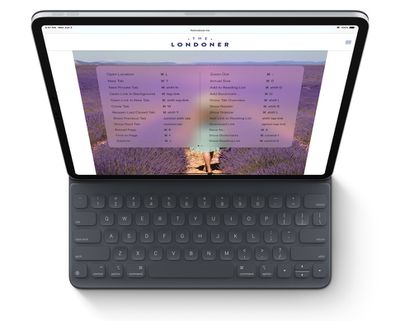
During its WWDC keynote, Apple revealed that Safari for iPadOS will include about 30 additional shortcuts, including the following:
- Use default font size in Reader (Command + 0)
- Open link in background (Command + tap)
- Toggle downloads (Command + Alt/Option)
- Open link in new window (Command + Alt + tap)
- Use selection for Find (Command + E)
- Email this page (Command + I)
- Open link in new tab (Command + Shift + tap)
- Decrease Reader text size (Command + -)
- Zoom in (Command + +)
- Zoom out (Command + -)
- Save webpage (Command + S)
- Change focused element (Alt/Option + tab)
- Focus Smart Search field (Command + Alt/Option + F)
- Dismiss web view in app (Command + W)
- Increase Reader text size (Command + +)
- Download linked file (Alt + tap)
- Add link to Reading List (Shift + tap)
- Close other tabs (Command + Alt/Option + W)
- Scroll around screen (arrow keys)
- Paste without formatting (Command + Shift + Alt/Option + V)
- New Private tab (Command + Shift + N)
- Actual size (Command + 0)
- Open search result (Command + Return)
- Toggle bookmarks (Command + Alt/Option + 1)
The keyboard shortcuts will work with Apple's Smart Keyboard or any third-party Bluetooth connected keyboard, which should make web browsing and managing files even easier on an iPad.
In addition, iPadOS automatically presents the desktop version of a website, scaled appropriately for the iPad display, and optimizes it for touch. Safari for iPadOS also comes with a download manager and enhancements to tab management.
Due to be released in the fall, iPadOS will be compatible with the iPad Air 2 and later, all iPad Pro devices, the fifth-generation iPad and later, and the iPad mini 4 and later.














































![Apple Watch Ultra 3 Hits New Low Price With Amazon's $299 Discount [Updated]](https://images.macrumors.com/t/BXKI27vT0hWfumJQpYzf41rH3Mw=/112x112/article-new/2026/10/apple-watch-ultra-3-milanese.jpeg)

Top Rated Comments
[edit]: I scrolled a couple more inches down, and saw that mouse support was going to be offered as an “accessibility” option.
Well, count me among the differently-abled when it comes to “smeary-finger-oil-that-even-creates-stylus-friction-on-my-display-but-is-inevitable-due-to-the-zen-ish-buttonless-simplicity-of-the-Apple-Pencil-aversion”!