

overcastOvercast has been updated with support for sharing video and audio clips of podcasts, streamlining the process for both podcast creators and listeners.

In a blog post on his website, Overcast developer Marco Arment explains why he created the clip-sharing feature:

Podcast sharing has been limited to audio and links, but today's social networks are more reliant on images and video, especially Instagram. Podcasts need video clips to be shared more easily today.

I've seen some video clips from tools specific to certain podcast networks or hosts, but they were never available to everyone, or for every show. So people mostly just haven't shared podcast clips, understandably, because it has been too hard.

Not anymore.

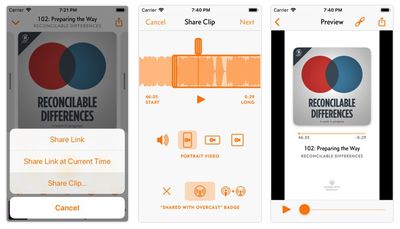
The new clip-sharing feature can be found in the Share menu, accessed by tapping the share icon in the top-right corner of the player interface.
overcast clip sharing feature

Image via Marco.org

Tapping Share Clip... brings up options to generate an audio clip, or portrait, landscape, or square video, up to a minute long using the current Overcast theme setting. Adding a "Shared with Overcast" badge is optional.

Overcast 2019.4 is available as a free ad-supported app for iPhone and iPad from the App Store. [Direct Link]


Top Rated Comments

tom5304 Avatar
87 months ago
After PocketCasts blew itself up with its disastrous version 7 “upgrade”, I settled on Castro podcast app and never looked back.

I paid for an annual subscription to both Overcast and Castro, but Castro won out on features and UX. Also, the Castro devs seem like nice people. The developer of Overcast seems like a... not so nice person.
Score: 2 Votes (Like | Disagree)
RoobyRoobyRoo Avatar
87 months ago
The developer of Overcast seems like a... not so nice person.
What are you basing that judgement on? I've listened to Marco on podcasts since he was doing Build & Analyze in 2011 and I think he's a good guy. He can be strong-headed and opinionated, but I've noticed that over the years he seems to be doing better and better about recognizing that he doesn't always have all the answers.

He also seems to genuinely care about the medium of podcasts and the podcasting community, and he has put his money where his mouth is many times in regards to that.
Score: 2 Votes (Like | Disagree)
haruhiko Avatar
87 months ago
My Twitter feed has been filled with these clips. Great success for overcast app.
Score: 1 Votes (Like | Disagree)
macduke Avatar
87 months ago
All I want is an option to automatically delete all of my podcasts with a minute or two left on them (usually when they say thanks again to our sponsor, make sure to share and rate the podcast) and I skip to the next one. It stores all of these huge audio files that take up many gigabytes of storage because it never marks them as finished and removes them. It should do this automatically.

It would also be nice to have an option to just remove any podcast older than a certain amount of time. Chances are, at least for what I listen to (mainly news relating to politics, tech, movies, etc), it becomes stale and I'm not likely to finish my half-listened to podcast a month later.

So some kind of customizable auto clean feature is all I really want out of Overcast at this point. The only options currently are to delete manually, delete when completed, or delete 24 hours after completed. Maybe I don't want to complete an episode of the Tech Meme Ride Home that started playing one time from February, Marco Arment! There are also settings to limit to a certain number of unlistened episodes, but often it will start another episode and even though I only listened to 10 seconds of it before skipping, it marks it as listening in progress and never deletes it. Then every month I have to go through and delete many gigabytes worth of content.

Maybe it's my fault for having so much content I don't listen to, but I actually don't subscribe to many podcasts. I just subscribe to podcasts that put out frequent content (some 7 days a week), and the ones that are weekly content are usually several hours long, so there are lots of things that are half listened to and never go away.
Score: 1 Votes (Like | Disagree)
JTravers Avatar
87 months ago
Yeah, I might try some others sometime. I just like the overall Overcast UI/UX, the Apple Watch app, the controls to speed up individual pods, the ability to shorten pauses and non-vocal content (which is especially great for news pods where they're just recapping things), some of the nitpicky controls such as adjusting forward/backward skip length, Siri integration, and the true black dark mode.
Pocket Casts has all those things except for Watch playback without the phone (PC watch app requires the phone for playback). Not trying to push you one way or the other. OC is great and has great audio quality. Personally, I prefer Castro and PC’s UI/UX far more than OC.
Score: 1 Votes (Like | Disagree)
JTravers Avatar
87 months ago
All I want is an option to automatically delete all of my podcasts with a minute or two left on them (usually when they say thanks again to our sponsor, make sure to share and rate the podcast) and I skip to the next one. It stores all of these huge audio files that take up many gigabytes of storage because it never marks them as finished and removes them. It should do this automatically.

It would also be nice to have an option to just remove any podcast older than a certain amount of time. Chances are, at least for what I listen to (mainly news relating to politics, tech, movies, etc), it becomes stale and I'm not likely to finish my half-listened to podcast a month later.

So some kind of customizable auto clean feature is all I really want out of Overcast at this point. The only options currently are to delete manually, delete when completed, or delete 24 hours after completed. Maybe I don't want to complete an episode of the Tech Meme Ride Home that started playing one time from February, Marco Arment! There are also settings to limit to a certain number of unlistened episodes, but often it will start another episode and even though I only listened to 10 seconds of it before skipping, it marks it as listening in progress and never deletes it. Then every month I have to go through and delete many gigabytes worth of content.

Maybe it's my fault for having so much content I don't listen to, but I actually don't subscribe to many podcasts. I just subscribe to podcasts that put out frequent content (some 7 days a week), and the ones that are weekly content are usually several hours long, so there are lots of things that are half listened to and never go away.
Marco has admitted that the current cleanup algorithm is a mess, but he hasn't committed to fixing it, yet. Hopefully, it gets taken care of relatively soon.

Using Pocket Casts or Castro would solve these problems for you…but introduce different ones, of course.
Score: 1 Votes (Like | Disagree)

Popular Stories

iOS 26

iOS 26.4 and iOS 27 Features Revealed in New Leak

Friday December 12, 2025 10:56 am PST by
Macworld's Filipe Espósito today revealed a handful of features that Apple is allegedly planning for iOS 26.4, iOS 27, and even iOS 28. The report said the features are referenced within the code for a leaked internal build of iOS 26 that is not meant to be seen by the public. However, it appears that Espósito and/or his sources managed to gain access to it, providing us with a sneak peek...
iOS 26

iOS 26.2 Coming Soon With These 8 New Features on Your iPhone

Thursday December 11, 2025 8:49 am PST by
Apple seeded the second iOS 26.2 Release Candidate to developers earlier this week, meaning the update will be released to the general public very soon. Apple confirmed iOS 26.2 would be released in December, but it did not provide a specific date. We expect the update to be released by early next week. iOS 26.2 includes a handful of new features and changes on the iPhone, such as a new...
iOS 26

Apple Releases iOS 26.2 With Alarms for Reminders, Lock Screen Changes, Enhanced Safety Alerts and More

Friday December 12, 2025 10:10 am PST by
Apple today released iOS 26.2, the second major update to the iOS 26 operating system that came out in September, iOS 26.2 comes a little over a month after iOS 26.1 launched. ‌iOS 26‌.2 is compatible with the ‌iPhone‌ 11 series and later, as well as the second-generation ‌iPhone‌ SE. The new software can be downloaded on eligible iPhones over-the-air by going to Settings >...
AirPods Pro Firmware Feature

Apple Releases New Firmware for AirPods Pro 2 and AirPods Pro 3

Thursday December 11, 2025 11:28 am PST by
Apple today released new firmware designed for the AirPods Pro 3 and the prior-generation AirPods Pro 2. The AirPods Pro 3 firmware is 8B30, up from 8B25, while the AirPods Pro 2 firmware is 8B28, up from 8B21. There's no word on what's include in the updated firmware, but the AirPods Pro 2 and AirPods Pro 3 are getting expanded support for Live Translation in the European Union in iOS...
macOS Tahoe 26 Thumb

Apple Releases macOS Tahoe 26.2 With Edge Light

Friday December 12, 2025 10:08 am PST by
Apple today released macOS Tahoe 26.2, the second major update to the macOS Tahoe operating system that came out in September. macOS Tahoe 26.2 comes five weeks after Apple released macOS Tahoe 26.1. Mac users can download the macOS Tahoe update by using the Software Update section of System Settings. macOS Tahoe 26.2 includes Edge Light, a feature that illuminates your face with soft...
AirTag 2 Mock Feature

Apple AirTag 2: Four New Features Found in iOS 26 Code

Thursday December 11, 2025 10:31 am PST by
The AirTag 2 will include a handful of new features that will improve tracking capabilities, according to a new report from Macworld. The site says that it was able to access an internal build of iOS 26, which includes references to multiple unreleased products. Here's what's supposedly coming: An improved pairing process, though no details were provided. AirTag pairing is already...
ipados 26 1 slide over

Apple Releases iPadOS 26.2 With Multitasking Improvements

Friday December 12, 2025 10:09 am PST by
Apple today released iPadOS 26.2, the second major update to the iPadOS 26 operating system released in September. iPadOS 26.2 comes a month after iPadOS 26.1. The new software can be downloaded on eligible iPads over-the-air by going to Settings > General > Software Update. iPadOS 26.2 continues with the multitasking improvements that were added with iPadOS 26.1. You can now drag and...
bug security vulnerability issue fix larry

Update Now: iOS 26.2 Fixes 20+ Security Vulnerabilities

Friday December 12, 2025 11:11 am PST by
Apple today released iOS 26.2, iPadOS 26.2, and macOS 26.2, all of which introduce new features, bug fixes, and security improvements. Apple says that the updates address over 20 vulnerabilities, including two bugs that are known to have been actively exploited. There are a pair of WebKit vulnerabilities that could allow maliciously crafted web content to execute code or cause memory...















