

Despite the lack of a big design refresh in iOS 12 this year, Apple recently updated Apple Music with new features like revamped artist pages, coming soon albums, and UI fixes to the way albums and singles are displayed. One of the features that remains unavailable to Apple Music subscribers, however, is a way to view a history of your listening statistics on the streaming music service.
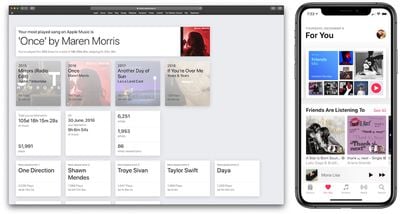
Following Apple's recently launched Data and Privacy portal, which lets customers download a copy of their Apple-related data, developer Pat Murray has built a browser-based app aimed at visualizing your Apple Music activity. With the download of one file on Apple's Data and Privacy portal, Murray's app organizes your complete Apple Music listening history since you first started using the service.
The developer promises that none of your data ever leaves your computer in the process, and explained to me that once it's loaded, the web app will even work offline and still be able to run all computations and present users with their data. The full source of the app is available to read on GitHub, and it's worth pointing out that Murray's app is only asking for access to a single CSV file related to your Apple Music activity, and nothing else.
Follow the steps below to get your Apple Music-related data from Apple:
- Visit Apple's Data and Privacy web portal
- Click "Request a copy of your data"
- Check the box next to "Apple Media Services information"
- Scroll down, click continue
- Select 1GB (which should be big enough), and click "Complete Request"
- A few days later, click "Get your data" in the email Apple sends to you once the retrieval is complete
- Click the small downwards facing arrow to download the data and open the ZIP file on your Mac
- Click the Apple Media Services Information folder within the ZIP file
- In this folder, open the ZIP file titled "App_Store_iTunes_Store_iBooks_Store_Apple_Music"
Then follow these steps to use Murray's tool and visualize the data:
- Visit Murray's Apple Music Analyzer website
- Click "Choose File"
- Navigate to Downloads and in the search field, search for "Apple Media Services Information" and double click on it
- Find the "App_Store_iTunes_Store_iBooks_Store_Apple_Music" folder, and underneath that find "Apple Music Activity"
- Find "Apple Music Play Activity.csv" and open it
With your Apple Music data open in Murray's web app, you'll be presented first with your most played song overall on Apple Music, including the number of times you've listened to it, hours spent listening to it, and hours spent skipping it. Below that, you'll be able to find your most played songs of each year that you've been subscribed to the service, the total amount of time you've spent listening to music, the day you've listened to the most music, and total library song/artist count.
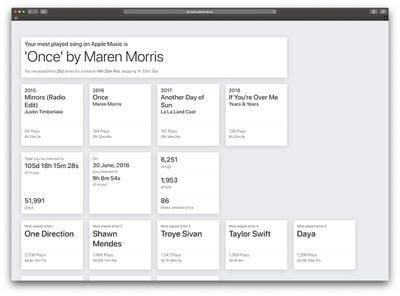
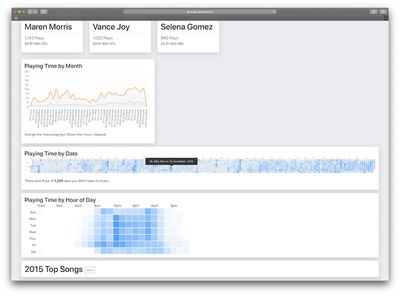
Murray also presents your most played artists in descending order, detailing the number of plays and total time spent listening to each. Below that are a few interesting charts and graphs. The first shows the "Playing Time by Month," allowing you to visualize the months you listened to Apple Music the most versus ones with lower activity.
With the "Playing Time by Date" tool, Murray has created a miniature calendar that shows your total Apple Music play time for every day you've had the service, and lets you know out of those days how many you didn't listen to any music. Similarly, "Playing Time by Hour of Day" shows the most frequent times on average that you listen to Apple Music based on the time of day.
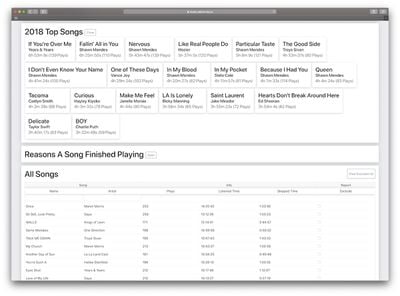
The Apple Music Analyzer also provides specific sections for each year you've used Apple Music. When you click "Open" on any of these, you'll see your top 20 most played songs for the year with the usual hours listened to and play count stats.
Below this, Murray has created a "Reasons A Song Finished Playing" section, offering the amount of times a song ended normally, a song was paused, skipped, scrubbed to the end, a session timed out, and more. Lastly, the web app provides a simple and straightforward list of all the songs you've ever listened to on Apple Music. With this tool, you can reorganize the list to prioritize listening time or play count in ascending or descending order.
For anyone who has ever been a fan of sites like Last.fm or personal stat breakdowns in general, Murray's web app is a fun and intriguing dive into your Apple Music history. Apple has not indicated if even a rudimentary feature such as listening history will ever come to Apple Music, and in this area some of its rivals do offer at least some form of personalized listening history.
Spotify, for example, creates a mini website towards the end of every year with a breakdown of each user's most listened to tracks, artists, and genre for the past 12 months. Spotify began the 2018 Wrapped campaign today, and will reveal its subscribers' listening stats for the year on December 6. Apple Music users have found creative alternatives to this feature using Smart Playlists and even the new Shortcuts app, but these still only result in a single playlist that usually detail most played songs and not much else.
Earlier this year, graphic designer Álvaro Pabesio envisioned an update for Apple Music that included listening history stats, among many other tweaks to the service. In Pabesio's vision, Apple Music would be able to track your play count, music discovery, play time, and more, and you could break it down by the past week, month, year, etc. This information would also fuel the social aspects of Apple Music, giving you an approximate taste comparison with other people on the service to see if you listen to the same genres and artists.
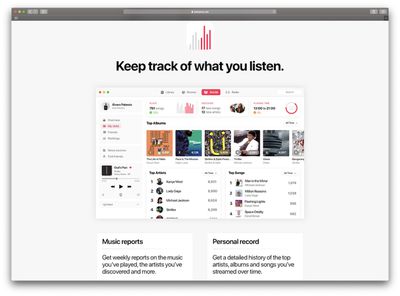
If you're interested in reading about your own Apple Music listening history, be sure to check out Pat Murray's web tool and follow the steps above to get your music stats. Murray is the developer behind numerous other projects, including the iOS app Live Memories [Direct Link], which creates a miniature movie from Live Photos, and GitHub projects like Share Your Rings, which lets you export a GIF or video of your personal Apple Watch move rings to send to your friends.
Update 12/12: Murray updated the web app recently with a new card that displays "My Music - 2018", in a similar style to the Spotify Wrapped cards shared across social media. With the information you can see your minutes of music listened in 2018, top artists, and top songs.
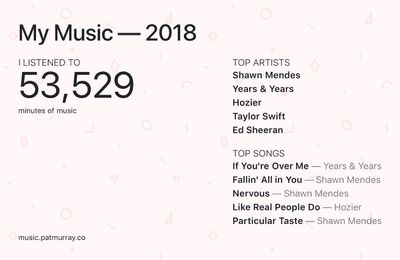
To find the new section, follow the above steps and once your Apple Music play activity is loaded into Murray's Apple Music Analyzer, scroll down and below your top artists you'll find the new 2018 card.



















Top Rated Comments
Or you can easily pre download the music you know you listen to the most. I live in nyc and ride the subway daily so I outside of the house I rarely stream music