PSA: If You Upgrade to macOS High Sierra 10.13.1, You'll Need to Reinstall Apple's Root Security Fix - MacRumors
Skip to Content

PSA: If You Upgrade to macOS High Sierra 10.13.1, You'll Need to Reinstall Apple's Root Security Fix

Mac owners who are still running macOS High Sierra 10.13 and who have already installed Apple's root security fix on that version of the operating system will need to install it once again upon upgrading to macOS 10.13.1, reports Wired.

Security researchers running a patched version of the original macOS High Sierra update, 10.13.0, told Wired that the root bug was reintroduced upon installing the macOS 10.13.1 update. After updating, they needed to install Apple's security patch again. Even that didn't fix the issue until their machines were rebooted.
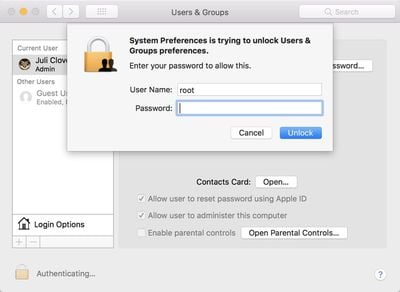
rootbug

Those who had not yet upgraded their operating system from the original version of High Sierra, 10.13.0, to the most recent version, 10.13.1, but had downloaded the patch, say the "root" bug reappears when they install the most recent macOS system update.

And worse, two of those Mac users say they've also tried re-installing Apple's security patch after that upgrade, only to find that the "root" problem still persists until they reboot their computer, with no warning that a reboot is necessary.

The root fix, released on Wednesday for macOS High Sierra 10.13.0 and 10.13.1, addresses a serious vulnerability that was first discovered a day earlier on Tuesday. The bug enabled the root superuser on a Mac with a blank password and no security check, letting anyone bypass the security of an admin account with the username "root" and no password.

While the security update successfully fixes the issue, it appears Apple may not have releases a modified and patched version of macOS 10.13.1, so customers who installed the update on 10.13 might think they're protected upon updating to 10.13.1, but they're not. Instead, the bug is fully re-introduced.

Apple may fix this problem now that the oversight has been pointed out, but in the meantime, customers upgrading from macOS High Sierra 10.13 to 10.13.1 should make sure to download the security update a second time and restart to be certain the root vulnerability is patched.

This won't be an issue when the macOS High Sierra 10.13.2 update is released, as Apple patched the bug in the macOS High Sierra 10.13.2 beta that was released this morning.

Related Forum: macOS High Sierra

Popular Stories

Foldable iPhone 2023 Feature 1

Gurman: iPhone Ultra Wows Early Testers, Except for Its Camera

Sunday August 23, 2026 11:19 am PDT by
Apple's upcoming foldable iPhone Ultra is winning over the few people who have had hands-on time with the device, though the camera setup may leave some users wanting, according to Bloomberg's Mark Gurman. Writing in his latest Power On newsletter, Gurman says people who have used the device – which is reportedly referred to internally as the iPhone Ultra – like how it fits in your...
iPhone 18 Pro Dark Cherry Feature

iPhone 18 Pro and iPhone Ultra: When Will Apple Event Be Announced?

Monday August 24, 2026 6:45 am PDT by
It is now late August, meaning that Apple's annual iPhone event is just around the corner. Below, we take a look at when the event might be held this year. This September, Apple is expected to unveil the iPhone 18 Pro, iPhone 18 Pro Max, and an all-new foldable iPhone that will reportedly be named the iPhone Ultra. The regular iPhone 18, a lower-end iPhone 18e, and the iPhone Air 2 are not...
apple magic keyboard with glyphs 2026 refresh

Apple Quietly Refreshes Magic Keyboards

Tuesday August 25, 2026 7:22 am PDT by
Apple today quietly introduced updated Magic Keyboard models with revised U.S. English key labeling. On the new keyboards, the tab, caps lock, shift, return, and delete keycaps are labeled with glyphs rather than edge text. On the full-size models with a numeric keypad, the change goes further, with the home, page up, page down, end, clear, and enter keys also swapping their text labels for...

Top Rated Comments

114 months ago
I am speechless
Score: 14 Votes (Like | Disagree)
velocityg4 Avatar
114 months ago
how much worse can High Sierra get?
27 pages of people with this issue.
https://discussions.apple.com/thread/8097885?start=0&tstart=0

I've noted it as well and it is quite serious. I setup a new Mac Pro and updated it to High Sierra. It crashed constantly. Got a replacement unit from the vendor. It came with High Sierra already installed and does the exact same thing. It seems to be exacerbated if you have numerous windows open and multiple high resolution displays.

There was a reason why Steve Jobs gave up on the yearly OS X updates. It forced shoddy releases. They need to go back to releasing OS X version when they are ready. Not to hit a yearly mark. The best OS is one you don't even notice is there.
Score: 13 Votes (Like | Disagree)
114 months ago
how much worse can High Sierra get?
Score: 13 Votes (Like | Disagree)
antiprotest Avatar
114 months ago
For a while I have been irritated at Apple, but their incompetence has reached a point that I am beginning to be impressed.
Score: 12 Votes (Like | Disagree)
thadoggfather Avatar
114 months ago
It just works:

After applying patch, then a patch to fix the patch’s issues.

Then go .1, rinse and repeat

Just in case it doesnt you can run some terminal commands

Weeee
Score: 10 Votes (Like | Disagree)
chrfr Avatar
114 months ago
I don't excuse Apple for this one, but I have a hard time getting worked up over it. This bug brings the current version of MacOS (unpatched) to the level of Windows without UAC enabled, which is basically the norm. After that, I really don't intend to allow others physical access to my systems to exploit this. Seriously, we can stop the arm waving
For the typical home computer, this is not a real big concern. For computers in shared environments, or in environments where the users are given limited privileges, this is a huge problem.
Score: 7 Votes (Like | Disagree)