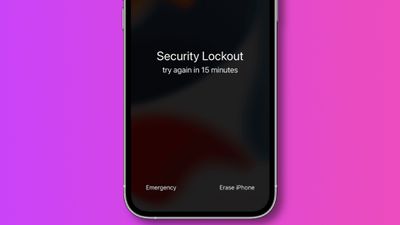
iOS 15.2, released this week, introduces the ability for customers to reset and erase their locked iPhone or iPad without needing to connect to a Mac or Windows PC.
As outlined in a support document (via 9to5Mac), iOS and iPadOS 15.2 add a new "Erase Device" option for when a device is locked out as a result of multiple failed attempts to enter the device's password. By pressing "Erase Device," users are prompted to confirm their identity with their Apple ID password, which results in the device being entirely erased and reset.
The new option is a welcome addition and a departure from the previous method, which required customers to put their iPhone or iPad into DFU mode and restore via Finder on the Mac or iTunes on Windows.
One caveat is that under the new method in iOS 15.2, the device must already have an active Wi-Fi or cellular connection before it is locked out. If not, users cannot connect to a network and will be forced to revert to the prior technique.
iOS 15.2 and iPadOS 15.2 include a host of new features, including a new App Privacy Report, the Apple Music Voice Plan, Legacy Contacts, and more. Catch up on all the latest features and additions with our round-up.
Tuesday February 10, 2026 4:27 pm PST by Juli Clover
Apple is planning to launch new MacBook Pro models as soon as early March, but if you can, this is one generation you should skip because there's something much better in the works.
We're waiting on 14-inch and 16-inch MacBook Pro models with M5 Pro and M5 Max chips, with few changes other than the processor upgrade. There won't be any tweaks to the design or the display, but later this...
Wednesday February 11, 2026 10:07 am PST by Juli Clover
Apple today released iOS 26.3 and iPadOS 26.3, the latest updates to the iOS 26 and iPadOS 26 operating systems that came out in September. The new software comes almost two months after Apple released iOS 26.2 and iPadOS 26.2.
The new software can be downloaded on eligible iPhones and iPads over-the-air by going to Settings > General > Software Update.
According to Apple's release notes, ...
Tuesday February 10, 2026 6:33 am PST by Joe Rossignol
It has been a slow start to 2026 for Apple product launches, with only a new AirTag and a special Apple Watch band released so far. We are still waiting for MacBook Pro models with M5 Pro and M5 Max chips, the iPhone 17e, a lower-cost MacBook with an iPhone chip, long-rumored updates to the Apple TV and HomePod mini, and much more.
Apple is expected to release/update the following products...
Tuesday February 10, 2026 1:51 pm PST by Joe Rossignol
Apple plans to announce the iPhone 17e on Thursday, February 19, according to Macwelt, the German equivalent of Macworld.
The report said the iPhone 17e will be announced in a press release on the Apple Newsroom website, so do not expect an event for this device specifically.
The iPhone 17e will be a spec-bumped successor to the iPhone 16e. Rumors claim the device will have four key...
Apple acquired Canadian graph database company Kuzu last year, it has emerged.
The acquisition, spotted by AppleInsider, was completed in October 2025 for an undisclosed sum. The company's website was subsequently taken down and its Github repository was archived, as is commonplace for Apple acquisitions.
Kuzu was "an embedded graph database built for query speed, scalability, and easy of ...
So, anyone can reset my iPhone without my consent?
That's been possible for years. Since I've been an iPhone user since 2017.
All one needs to do, put it in DFU mode and connect to a computer with iTunes.
Do a reset & restore iPhone.
It won't remove your activation lock or FindMy on your phone. but your data and Information will be completely erased from the phone (other than activation lock and FindMy)
Very welcome addition, working as tech support I know this new feature helps a lot normal users.
@HQuest Nope, after a force reset with recovery or DFU, iOS ask you your AppleID, but the APpleID is not completely visible. This is just another simple way to reset, but I'm quite sure the AppleID will not displayed entirely. Anyway your ID is protected by password and 2FA btw.
Nice! Now not only stolen devices can be taken for parts, thieves would know some of its previous owner information.
Hope I am not the only one to see a problem in this.
Incorrect.
Let’s just say I’m a technician who deals with customer’s forgotten passcodes on iPhones on a regular basis.
There is literally no difference between this new update and the procedure prior. This just takes out the middle man. (The computer)
Previously, if the iPhone was stolen, it could already be (DFU) resorted and taken apart.
Find My also stays on, so device activation is locked to owner’s Apple ID still.
Does this turn the "Find My iPhone" setting off or is this only to be used for a reset of the current owner (not getting rid of the phone).
Find My is still enabled after (if it was already on). Device will still be locked to Apple ID/owner.
So, anyone can reset my iPhone without my consent?
People already could by putting your iPhone into DFU mode with the computer and restoring it.
I thought iPhones required a password to be reset.
No password required.
This is an extreme big welcome addition to iOS. To be honest, should’ve been here years ago.
Being a tech who deals with this on a constant basis, this is an amazing time saver for people who tend to forget passwords and have to hunt down a computer for the passcode removal.
I’ve even met tons of people in different households who purposely don’t even own a computer.
Keep in mind, resetting from DFU / recovery or fro ma working device unlocked is differente. BTW don't know why you leave me a angry face about an informative post how it works.
Don't worry about it, he does that for everyone. I think he's just an angry guy in general.