macOS Tahoe Finder Bug Underscores Apple's Slipping UI Polish - MacRumors
Skip to Content

macOS Tahoe Finder Bug Underscores Apple's Slipping UI Polish

Apple released macOS Tahoe last September, but despite two point updates since then, it is still struggling to resolve an embarrassing interface issue in Finder that appears to have been introduced with its Liquid Glass redesign.

macOS Tahoe Finder Bug Underscores Apples Slipping UI Polish Feature
If you updated your Mac to macOS Tahoe and you prefer to work in Finder's column view, there's a good chance you've been frustrated by the glitch, which developer Jeff Johnson has been admirably tracking over on his blog.
finder

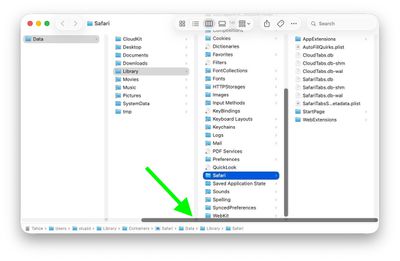
Scroll bar blocking column resize handles (Original image: Jeff Johnson)

At the bottom of each Finder column are handy little resize handles allowing you to expand or reduce each column as you see fit. But in macOS 26 and macOS 26.2, when scroll bars are set to "always show," the horizontal scroll bar at the bottom overlaps and covers those handles, so you can't click them to adjust column widths the way you could in earlier macOS versions like Sequoia.
finder

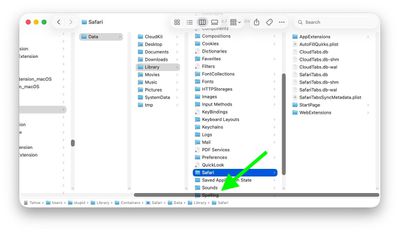
Scroll bar occluding column content (Original image: Jeff Johnson)

With the recent release of macOS 26.3, Apple attempted a fix. The vertical scrollers were shortened so the resizing widgets now sit above the horizontal bar and are technically clickable again. Unfortunately though, as Johnson points out, the horizontal scroll bar still overlaps file names in the view, causing it to regularly obscure content. Moreover, if you hide the path bar and status bar, the layout leaves a weird amount of empty space below the scrollers, making the whole thing look unfinished (see image below).
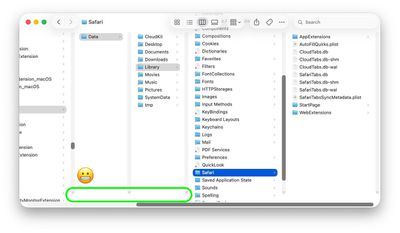
finder

Column resize handles suspended in mid-air (Original image: Jeff Johnson)

Johnson's take is basically that while the most disruptive bug is less bad now, the overall column view layout still feels half-baked – especially for anyone who keeps scroll bars always visible.

As Daring Fireball's John Gruber points out, it's an embarrassing fudge for a company that used to pride itself on pixel-perfect settings across its Mac operating system.

At this point, it's unclear when Apple will manage to iron out the UI irregularities introduced by Liquid Glass. macOS Tahoe‌ 26.4 is likely to be released in March or April, and could introduce some new Siri features, though at least some of the capabilities that we were expecting may have been delayed, depending on who you believe. The update is also expected to introduce new emoji characters.


Related Roundup: macOS Tahoe
Related Forum: macOS Tahoe

Popular Stories

macOS Tahoe 26 Feature

Apple Releases macOS Tahoe 26.6.1 With Security Fixes

Thursday August 6, 2026 10:34 am PDT by
Apple today released macOS Tahoe 26.6.1, an update to the macOS Tahoe operating system that came out last year. macOS Tahoe 26.6.1 comes a little over a week after Apple released macOS Tahoe 26.6. Mac owners can download the software by opening the System Settings app and then navigating to the Software Updates section. According to Apple's security support document, macOS Tahoe 26.6.1...
macOS Tahoe 26 Feature

Apple Releases macOS Tahoe 26.6.2 Beta With Security Fixes

Monday August 10, 2026 10:27 am PDT by
Apple today released a new beta of macOS Tahoe 26.6.2, which is available to developers and public beta testers. The macOS Tahoe 26.6.2 beta comes just a few days after Apple released macOS Tahoe 26.6.1, a security update. Developers and public beta testers can download the software by opening the System Settings app and then navigating to the Software Updates section. According to...
apple lock security bug vulnerability fix privacy

iOS 26.6.1 and macOS Tahoe 26.6.2 Fix Nearly 30 Security Vulnerabilities

Monday August 17, 2026 12:11 pm PDT by
The iOS 26.6.1, iPadOS 26.6.1, and macOS Tahoe 26.6.2 updates Apple released today fix almost 30 security vulnerabilities, according to Apple's security support document. This is Apple's third security release in three weeks as AI surfaces bugs faster than the company's typical release schedule can absorb. Apple says the software includes security fixes that were previously added to the iOS...

Top Rated Comments

AppleMatt Avatar
7 months ago
Once upon an Apple, they polished every last pixel. It’s very strange to witness the lack of care they have now.
Score: 76 Votes (Like | Disagree)
Populus Avatar
7 months ago
I completely agree. Liquid Glass on macOS Tahoe looks quite unfinished…

It’s like they focused mainly on iOS, as well as iPadOS, but macOS was rushed without a clear concept…

Let’s hope they focus a bit more on Mac’s Liquid Glass for macOS 27. The UI needs a lot of fixes and polish.
Score: 34 Votes (Like | Disagree)
cicalinarrot Avatar
7 months ago
My main concern about the new Finder is how ugly those huge rounded window corners are.
When Mac OS X came out, it was the first system with decent anti-aliasing that could afford slightly rounded corners to make windows feel more friendly.
Other developers started to imitate it, misunderstanding the whole intention of that solution and using comically large rounded corners. I remember how dumb Real Player felt, as an application that was supposed to show rectangles and put it inside a very rounded interface.

So how did we get here now?
Apple needed a different interface for iOS to differentiate it from Android with some useless graphic effects than could never be imitated on cheap Android phones.
Those glassy effects need rounded corners to look decent, and that's ok on phones where the interface already has the device's rounded corners on the screen and you click with your rounded fingertips.
macOS needed to feel consistent with iOS and just used the same solution that makes no sense on a computer.

Sorry for the off-topic rant.

Edit: thought my grumpy-old-man and off-topic rant would have been ignored but apparently many other people hate this too 😁
Score: 30 Votes (Like | Disagree)
7 months ago
It feels like macOS has become Apple’s lowest-priority product. Lately, many of the updates seem mostly cosmetic rather than meaningful improvements. In some cases, it even feels like stability has declined, with more bugs and small issues creeping in. Safari keeps crashing almost every day and some websites are not even working properly in Safari. Every Mac user needs Chrome installed as well as Sarfari is so useless following web-standards.

How about the bug where you save a file/screenshot on the desktop and the icon/file not appearing until you "Reboot" Finder och save another file to the desktop so it "refreshes" the view. Insane!

QuickTime is another example, it feels like a relic from decades ago. Why hasn’t Apple replaced it with a modern, unified “Video Player” app? What person born after year 2000 knows what "Quicktime" is? There are still many legacy elements throughout macOS that make the system feel dated, especially when compared to the polish and cohesion of iPadOS.
Score: 24 Votes (Like | Disagree)
nortonandreev Avatar
7 months ago
Not just that, many minor UI inconsistencies here and there that make the UI look far from polished.
Score: 18 Votes (Like | Disagree)
7 months ago
Am I doing something wrong? I use column mode all the time but I don't have or need those resize handle, I can just grab the column anywhere and resize it...
Score: 18 Votes (Like | Disagree)