'Air Display' to Let You Use the New iPad as a HiDPI 'Retina' Display for Your Mac

Avatron, the makers of the popular Air Display app for iOS, revealed today that they will be updating their utility to fully support the 3rd Generation iPad.

Air Display allows you to use your iPad (or iPhone/iPod Touch) as an extra display for your Mac or Windows computer. This old video shows how the app works.


The iPad acts as a wireless second screen that can be used by OS X in the same manner as any other monitor.

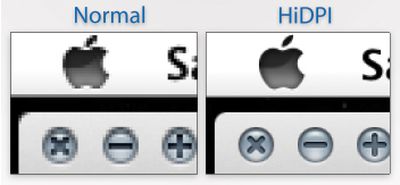
The developers were able to get their screen-extending app working with the new iPad with good performance. But using a 2048x1536 iPad as a secondary screen computer screen would result in very small windows, text and user interface elements. So, the team has also included support for Lion's new HiDPI mode. We've covered HiDPI mode in the past. HiDPI mode allows OS X to support high resolution monitors while retaining the same relative size for user interface elements, such as windows and buttons.
tumblr m17x2zcevC1r6vkzl
HiDPI mode will let the new iPad act like a 1024x768 point screen where each point is made up of 4 pixels. Apple has already built in support for HiDPI and some of their Apps, such as Messages, already include Retina-sized artwork that work in this mode. Users simply have to choose "1024x768 (HiDPI)" mode in their System Preferences to take advantage of the new mode.

Air Display is a $9.99 Universal App in the App Store. [iTunes] The Retina-enabled version will be included in a forthcoming update.


Popular Stories

Foldable iPhone 2023 Feature 1

Apple to Make More Foldable iPhones Than Expected

Tuesday December 9, 2025 9:59 am PST by
Apple has ordered 22 million OLED panels from Samsung Display for the first foldable iPhone, signaling a significantly larger production target than the display industry had previously anticipated, ET News reports. In the now-seemingly deleted report, ET News claimed that Samsung plans to mass-produce 11 million inward-folding OLED displays for Apple next year, as well as 11 million...
iOS 26

15 New Things Your iPhone Can Do in iOS 26.2

Friday December 5, 2025 9:40 am PST by
Apple is about to release iOS 26.2, the second major point update for iPhones since iOS 26 was rolled out in September, and there are at least 15 notable changes and improvements worth checking out. We've rounded them up below. Apple is expected to roll out iOS 26.2 to compatible devices sometime between December 8 and December 16. When the update drops, you can check Apple's servers for the ...
Google maps feaure

Google Maps Quietly Added This Long-Overdue Feature for Drivers

Wednesday December 10, 2025 2:52 am PST by
Google Maps on iOS quietly gained a new feature recently that automatically recognizes where you've parked your vehicle and saves the location for you. Announced on LinkedIn by Rio Akasaka, Google Maps' senior product manager, the new feature auto-detects your parked location even if you don't use the parking pin function, saves it for up to 48 hours, and then automatically removes it once...
iPhone 14 Pro Dynamic Island

iPhone 18 Pro Leak Adds New Evidence for Under-Display Face ID

Monday December 8, 2025 4:54 am PST by
Apple is actively testing under-screen Face ID for next year's iPhone 18 Pro models using a special "spliced micro-transparent glass" window built into the display, claims a Chinese leaker. According to "Smart Pikachu," a Weibo account that has previously shared accurate supply-chain details on Chinese Android hardware, Apple is testing the special glass as a way to let the TrueDepth...
iOS 26

Apple Seeds Second iOS 26.2 Release Candidate to Developers and Public Beta Testers

Monday December 8, 2025 10:18 am PST by
Apple today seeded the second release candidate version of iOS 26.2 to developers and public beta testers, with the software coming one week after Apple seeded the first RC. The release candidate represents the final version iOS 26.2 that will be provided to the public if no further bugs are found. Registered developers and public beta testers can download the betas from the Settings app on...
iPhone 17 Pro Cosmic Orange

10 Reasons to Wait for Next Year's iPhone 18 Pro

Monday December 1, 2025 2:40 am PST by
Apple's iPhone development roadmap runs several years into the future and the company is continually working with suppliers on several successive iPhone models at the same time, which is why we often get rumored features months ahead of launch. The iPhone 18 series is no different, and we already have a good idea of what to expect for the iPhone 18 Pro and iPhone 18 Pro Max. One thing worth...
Johny Srouji

Apple's Chipmaking Chief Johny Srouji Responds to Report About Him Potentially Leaving

Monday December 8, 2025 9:23 am PST by
Apple's chipmaking chief Johny Srouji has reportedly indicated that he plans to continue working for the company for the foreseeable future. "I love my team, and I love my job at Apple, and I don't plan on leaving anytime soon," said Srouji, in a memo obtained by Bloomberg's Mark Gurman. Here is Srouji's full memo, as shared by Bloomberg:I know you've been reading all kind of rumors and...


google pixel 10

Switching Between iPhone and Android Will Get Easier With New Apple and Google Collaboration

Monday December 8, 2025 11:10 am PST by
Apple and Google are teaming up to make it easier for users to switch between iPhone and Android smartphones, according to 9to5Google. There is a new Android Canary build available today that simplifies data transfer between two smartphones, and Apple is going to implement the functionality in an upcoming iOS 26 beta. Apple already has a Move to iOS app for transferring data from an Android...
Apple Fitness Plus expansion hero

Apple Fitness+ Coming to 28 New Regions With Digital Voice Dubbing

Monday December 8, 2025 6:19 am PST by
Apple today announced that Fitness+ is expanding to 28 new markets on December 15 in the service's largest international rollout since launch, accompanied by new language dubbing and a K-Pop music genre. Apple Fitness+ will become available in Chile, Hong Kong, India, the Netherlands, Singapore, Taiwan, and additional regions on December 15, with Japan scheduled to follow early next year....
ipad blue prime day

iPad 12 Rumored to Get iPhone 17's A19 Chip, Breaking Apple Tradition

Wednesday December 10, 2025 12:22 pm PST by
The next-generation low-cost iPad will use Apple's A19 chip, according to a report from Macworld. Macworld claims to have seen an "internal Apple code document" with information about the 2026 iPad lineup. Prior documentation discovered by MacRumors suggested that the iPad 12 would be equipped with an A18 chip, not an A19 chip. The A19 chip was just released this year in the iPhone 17, and...

Top Rated Comments

distemp Avatar
179 months ago
I have Air Display, but my stupid ass didn't read the description fully and I didn't realize that my Macbook Pro isn't compatible with it. BLAH!
Score: 6 Votes (Like | Disagree)
Macman45 Avatar
179 months ago
Bring this to me NOW!!!:)
Score: 5 Votes (Like | Disagree)
garylapointe Avatar
179 months ago
This is one of those apps that need to be free and have an in app purchase to activate it.

It could have a huge flashing watermark in the middle of the screen, but at least you'd know if it worked or not. If you minded the refresh rate or not.

Then, they'd probably only get good feedback.

I'd try it if it was free, but otherwise $10 for something I might not be happy with?

(And if it used USB, wouldn't that be faster than WiFi and it would charge your device at the same time?)

Gary
Score: 3 Votes (Like | Disagree)
MRU Avatar
179 months ago
I just wish they could increase the refresh rate and reduce the noticeable lag that the app has.

I would use it a lot more if it wasn't so laggy.
Will pushing more pixels to it over the air result in further lag ?
Score: 3 Votes (Like | Disagree)
aardwolf Avatar
179 months ago
Just what I need... a 9.5" third monitor for my Mac :p
Score: 3 Votes (Like | Disagree)
///M5 Avatar
179 months ago
I use this all the time. Whenever I'm not accessing iOS my iPad is a secondary, portable touchscreen display for OSX, and it's hugely useful.

...however, wifi can barely handle the bandwidth of the 1024x768 display streaming over it. I can't imagine how it's going to cope with 4 times as many pixels. It requires a clean ad-hoc connection as it is.

Jailbroken + a jumble of tricky tweaks, you can get AirDisplay to run via the cable, and it is perfectly fast. The lag is gone and the performance is smooth and steady. If Apple would get over their impractical wireless fetish and allow Avatron access to the USB bus, this app could be the most useful app in the store. + it'd leave your net connection open to proper network traffic.

But no, instead we have another "could be awesome" with the iPad. It's selling great, sure, but Apple's still content to restrict its usefulness...

I'd be interested in such tweaks. Please do share them.
Score: 2 Votes (Like | Disagree)