iOS 15: How to Enhance Photos App Memories With 'Memory Looks' - MacRumors
Skip to Content

iOS 15: How to Enhance Photos App Memories With 'Memory Looks'

by

In iOS 15, Apple's native Photos app features a considerable update to Memories, including a new design, integration with Apple Music, a more interactive interface, and "Memory Looks." This article explains what Memory Looks are and how you can apply them to your own Memories in the ‌Photos‌ app.

iOs 15 Photos Feature
In the latest version of the ‌Photos‌ app, Apple has added the ability for users to customize the look of photos and videos that feature in its auto-generated Memories. These "Memory Looks" are basically photo/video filter and can add a particular mood to the content of Memories.

There are 12 Memory Looks that you can choose from. Each one works by analyzing each photo and video, and applying the correct amount of contrast and color adjustment for a consistent look. Here's how you can add them to your Memories in iOS 15.

  1. Launch the Photos app on your iPhone or iPad.
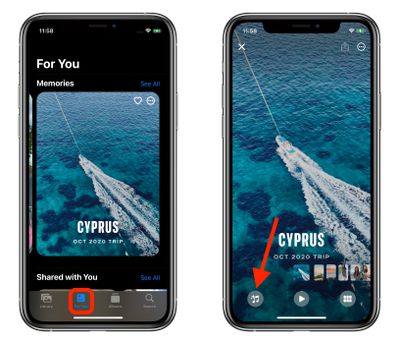
  2. Tap the For You tab.
  3. Under the Memories section, select a Memory you want to edit.
  4. Tap the playing Memory and pause it, then tap the Memory Mixes icon in the lower left corner (it looks like a musical note with stars).
    photos

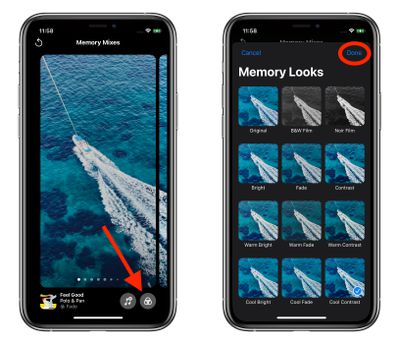
  5. Tap the Memory Looks icon in the lower right corner (it looks like three overlapping circles or a Venn diagram).

  6. Tap a Memory Look thumbnail preview to select it.
  7. Tap Done in the upper right corner to apply your selection.photos

Tip: On the Memory Mixes screen, if you swipe left or right, the ‌Photos‌ app will use machine learning to marry suggested music tracks from ‌Apple Music‌ with different Memory Looks that may go together.

Related Forum: iOS 15

Popular Stories

Apple Event Far Out Banner

NASA Shares Photos Shot on iPhone 17 Pro Max During Artemis II Mission to the Moon

Sunday April 5, 2026 6:39 pm PDT by
NASA has shared three incredible photos shot on the iPhone 17 Pro Max by astronauts during the Artemis II mission to the Moon. Shot on iPhone 17 Pro Max (Wiseman) In February, NASA announced that the iPhone had been fully qualified for extended use in orbit, with reports indicating that each of the four crew members aboard the Orion are equipped with an iPhone 17 Pro Max for personal photos...

iphone 17 pro orange

Apple Highlights Photos Shot on iPhone During NASA's Mission to Moon

Saturday April 11, 2026 8:17 am PDT by
As we previously reported, astronauts aboard NASA's Orion spacecraft used the iPhone 17 Pro Max to take selfies of themselves with the Earth in the background during the Artemis II mission around the far side of the Moon last week. Now that the crew members have safely returned to Earth, Apple's CEO Tim Cook and marketing chief Greg Joswiak have both turned to social media to congratulate...
app store monthly sub commitment

Apple Introduces App Store Monthly Subscriptions With 12-Month Commitment

Monday April 27, 2026 12:52 pm PDT by
Apple today announced the launch of a new subscription option for App Store developers: monthly subscriptions with a 12-month commitment. The new option allows developers to offer subscribers discounted pricing typically associated with an annual subscription but paid on a monthly basis to keep payments more affordable. This new payment option allows you to offer subscribers more affordable...