In iOS 17 and iPadOS 17, Apple has added the ability to securely share passwords and passkeys with people in your contacts using a new shared password function. It's called Family Passwords, and here's how to use it.

Family Passwords allows you to create a group of trusted contacts that you can share passwords and passkeys with across devices. (Passkeys let users sign in to apps and sites the same way they unlock their devices: With a fingerprint, a face scan or a screen lock PIN.)
Using the new feature, passwords and passkeys for shared media accounts, utilities, bills, and more can be provided to multiple people, and each person in the group can access, add to, and change passwords that are shared.
You can add people to your shared passwords group from your contacts, so they don't necessarily have to be family at all. You may want to share passwords for streaming services with a flat mate, for example, or login credentials for a business partner to access a particular website.
Here's how to create a shared passwords group in iOS 17 and iPadOS 17.
- Open the Settings app on your iPhone or iPad.
- Scroll down and tap Passwords.
- Under the "Family Passwords" card, tap Get Started.
- Tap Continue.
- Add a Group Name for your shared group, then tap the Add People option to select trusted people from your contacts.
- When you're done, tap Create.
- Choose the passwords and passkeys you would like to move to the newly created group, then tap Move.
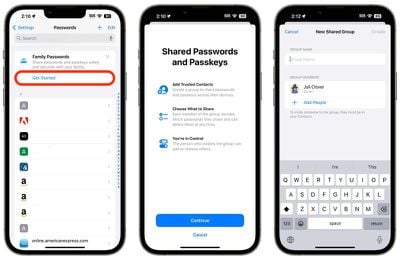
Once you've moved passwords to the group, you can access them any time on your device by going to Settings -> Passwords -> Family Passwords. Here you can also manage the shared passwords, add or remove people from the group, and delete the group if it's no longer needed.
Note that the contacts you add to the group will need to have their devices updated to iOS 17 or iPadOS 17 and later before they can access Shared Password Groups.