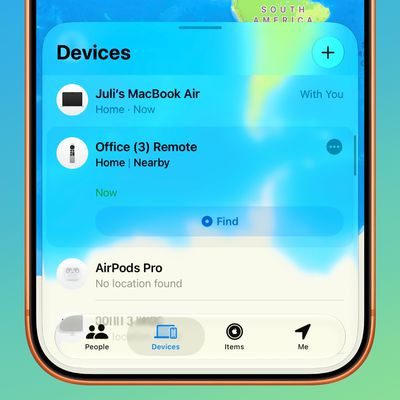
 In iOS 13 and iPadOS, Apple combined the earlier Find My Friends and Find My iPhone apps into a single app called "Find My," a sort of catch-all place on your iOS device that you can use for finding whatever you need to find.
Find My works much like the apps it replaces. For example, the new app lets you share your location with friends and family members, and allows them to share their location in kind.
The following steps show you how to share your location with friends using the Find My app.
- Launch the Find My app on your iPhone or iPad. (The Find My app is available by default on all new iOS devices, but if you've deleted it, you need to download the free app from the App Store.)
- Tap the Me tab at the bottom of the screen.

- Drag up the Me card onto the screen with a swipe of your finger to reveal all the sharing options.
- Make sure the toggle switch next to Share My Location is in the green ON position – simply tap the toggle to change its status if needed.
- Tap Name Current Location... to mark your whereabouts as Home, Work, School, Gym, or add your own custom label.
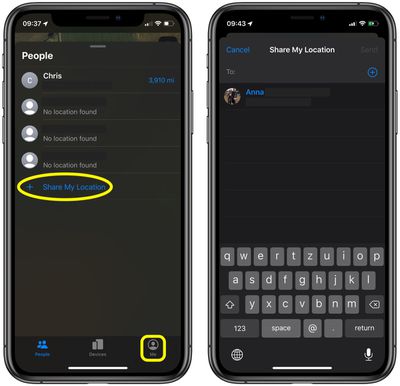
- Now, tap the People tab.
- Tap Share My Location to add a specific friend with whom you want to share your location, then type in their phone number/email address or pick a person from your contacts.
- Hit Send.
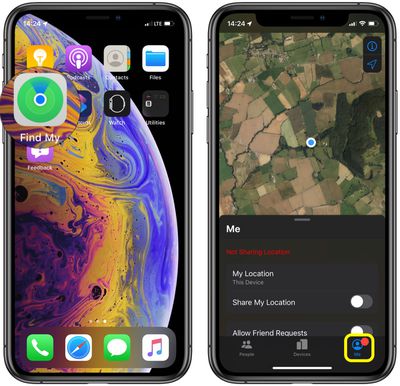
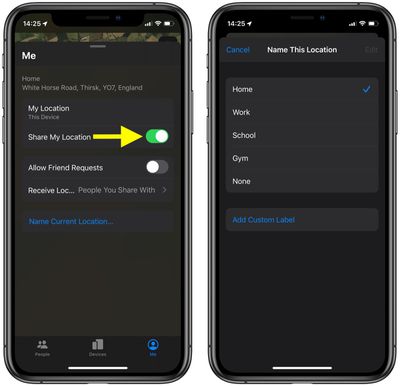
Remember to toggle on the switch next to Allow Friend Requests in the Me tab if you want friends to be able to ask to see your location.
Tag: Find My Guide
Related Forum: iOS 13