Skip to Content

Set a Custom Vibration Alert for a Contact on iPhone

by

You can create custom sounds and ringtones for text alerts, phone calls, and more on your iPhone, but did you know the same functionality exists for vibrations? Setting a special vibration alert for someone in your Contacts app enables you to recognize when a specific person is calling you or has sent you a text, without you even having to look at your ‌‌iPhone‌‌ or ‌iPad‌ screen.

contacts
Receiving a haptic alert for incoming calls and/or messages can be handy to have if, say, you're in a quiet environment and don't want to disturb the peace. A custom vibration alert can be useful if your ‌iPhone‌ is on silent in your pocket and you're currently in a meeting, for instance. Recognizing the vibration as someone specific means you can decide if you need to leave the room to take the call.

Follow these steps to set up a custom vibration for the person you have in mind.

How to Assign a Custom Vibration to a Contact

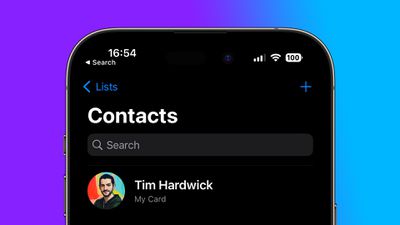
  1. Launch the Contacts app on your ‌iPhone‌.
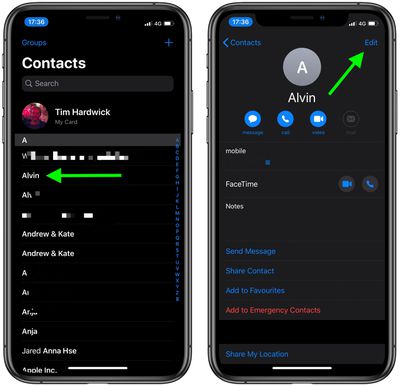
  2. Select a contact from the list.
  3. Tap Edit in the top-right corner of the screen.
    contacts

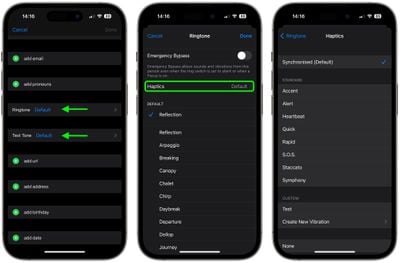
  4. Tap Ringtone or Text Tone, depending on what your vibration to be associated with.
  5. Tap Haptics.
  6. Select a custom vibration under the Standard list, or tap Create New Vibration under Custom. If you chose the latter, tap the screen to create a vibration pattern, and when you're happy with it, tap Save.
    contacts

  7. Tap Ringtone or Text Tone in the top-left corner of the screen to go back.
  8. Tap Done in the top-right corner of the screen.
  9. Tap Done again.

Did you know that you can assign custom alert tones for WhatsApp contacts? Check out our guide to learn how.


Popular Stories

MacBook Neo Feature Pastel 1

First MacBook Neo Benchmarks Are In: Here's How It Compares to the M1 MacBook Air

Thursday March 5, 2026 4:07 pm PST by
Benchmarks for the new MacBook Neo surfaced today, and unsurprisingly, CPU performance is almost identical to the iPhone 16 Pro. The MacBook Neo uses the same 6-core A18 Pro chip that was first introduced in the iPhone 16 Pro, but it has one fewer GPU core. The MacBook Neo earned a single-core score of 3461 and a multi-core score of 8668, along with a Metal score of 31286. Here's how the...

HomePod mini and Apple TV Sage

New Apple TV and HomePod Mini Are Still Missing, Here's Why

Thursday March 5, 2026 6:11 am PST by
Apple this week unveiled seven products, ranging from the iPhone 17e to the MacBook Neo, but new Apple TV and HomePod mini models were not among them. Given that there have been rumors about the next-generation Apple TV and HomePod mini since all the way back in late 2024, some customers are wondering why the devices have yet to launch, and the answer likely relates to Siri. In September, ...
MacBook Neo Feature Pastel 1

Apple Announces $599 'MacBook Neo' With A18 Pro Chip

Wednesday March 4, 2026 6:15 am PST by
Apple today announced the "MacBook Neo," an all-new kind of low-cost Mac featuring the A18 Pro chip for $599. The MacBook Neo is the first Mac to be powered by an iPhone chip; the A18 Pro debuted in 2024's iPhone 16 Pro models. Apple says it is up to 50% faster for everyday tasks than the bestselling PC with the latest shipping Intel Core Ultra 5, up to 3x faster for on-device AI workloads,...