

All Apple iPhones and iPads include accelerometers that enable them to detect which way they are being held and automatically adjust the screen orientation to fit.

The feature is particularly handy for viewing certain types of content that benefit from the wider landscape orientation, like media or web pages for example.
If your iPhone or iPad screen doesn't rotate into landscape mode when you hold it lengthways, then you've likely got the Portrait Orientation Lock turned on. Here's how you can disable it.
- Holding your iOS device in portrait orientation, launch Control Center: To open Control Center on an iPad with a Home button, double-tap the Home button; on iPhone 8 or earlier, swipe up from the bottom of the screen; and on a 2018 iPad Pro or iPhone X/XR/XS/XS Max, swipe down from the upper right corner of the screen.
- Tap the whitened Orientation Lock button to disable it.
- Tap on a blank area of the screen to hide Control Center.

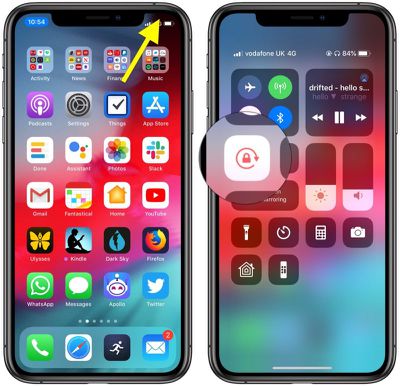
If the screen still won't rotate, try a different app, like Safari or Notes – some apps and screens only support portrait or landscape mode. If that doesn't work, try restarting your device. If you still have no joy, it's time to contact Apple Support.
If you want your iOS device to remain in Portrait orientation – if you're using it while lying in bed, say – simply tap the Orientation Lock button in Control Center again to enable it.












































![Apple Pulls Keynote, Pages and Numbers From App Store [Update: Back]](https://images.macrumors.com/t/Okb7kitB_gNr6qe5Pex9nQIysD8=/112x112/article-new/2026/01/Apple-Creator-Studio-iWork-suite.jpg)

