In iOS 17.1, Apple has added the ability for users to customize playlist artwork in Apple Music using a selection of preset options. Keep reading to learn how it's done.
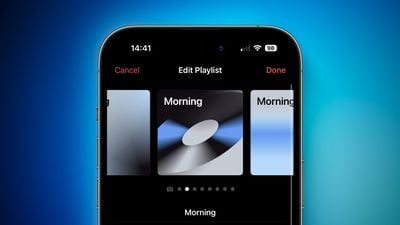
Previously in iOS, when creating a custom playlist, you had to use a basic tiled image made up of track album artwork, or upload a custom image. Given that you custom graphics or relevant photos aren't always readily available for playlists and the default tiled artwork is relatively simple, playlists could be difficult to identify and look fairly generic.
Thankfully, Apple in iOS 17.1 now provides eight different artwork styles to choose from, featuring geometric shapes and gradients, with the title of your playlist displayed in the top left corner. The colors used in the artwork are picked from the album artwork of whatever song is first in your playlist.
If you don't choose a custom artwork style for your playlist, the default artwork will be the tiled album artwork of the first four songs in the playlist, but you do have the option to choose a custom image from your photo library or the Files app.
The following steps show you how to use the new playlist artwork in iOS 17.1, which was released on October 25, 2023.
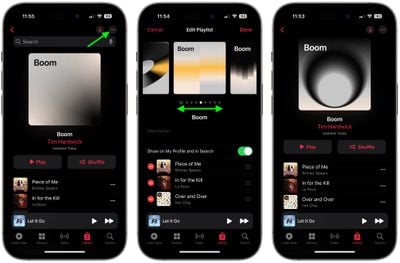
- In the Music app, select the Library tab, then tap Playlists ➝ New Playlist.
- Give your playlist a name, then add some tracks from your library.
- To create your playlist artwork, tap the ellipsis (three dots) button in the top-right corner of the screen, then choose Edit from the dropdown menu.
- Swipe left to preview the available artwork options, then center the one you want to use.
- Tap Done to apply your artwork choice.
That's all there is to it. The iOS 17.1 update also adds other Apple Music changes and improvements, including the ability to favorite songs from the Lock Screen and suggested songs in playlists.