How to Hide Your Instagram Online Status - MacRumors
Skip to Content

How to Hide Your Instagram Online Status

by

Most social media networks and chat platforms these days include a feature that shows when a user was last online or last active on the service, which can be either helpful or a hindrance, depending on your personal or business situation.

Instagram Feature 2
WhatsApp includes an optional "Last Seen" status for the person you're chatting with in a conversation thread, while Instagram tells you how long it was since a user was active when you're viewing messages from them in your Direct inbox. Instagram also shows a green dot next to their profile picture and name if the person is currently interacting with the app.

Sometimes though, for whatever reason, you might not want someone – or indeed anyone – to know when you were last active on social media. Fortunately, WhatsApp and Instagram both allow you to hide your activity status in the app. Here our focus is on how to hide your Instagram status, but you can find how to do the same thing in WhatsApp in our dedicated how-to article.

Hiding Your Instagram Online Status

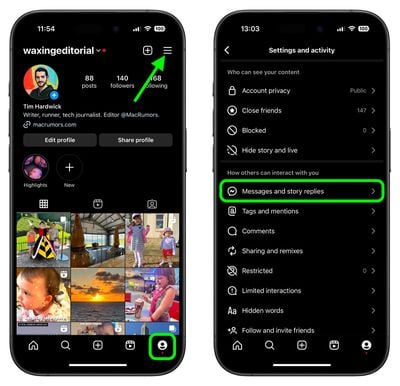
  1. Open the Instagram app and tap the Profile icon in the bottom-right corner.
  2. Tap the More (three lines) icon in the top-right corner.
  3. Under "How others can interact with you," tap Messages and story replies.
    instagram

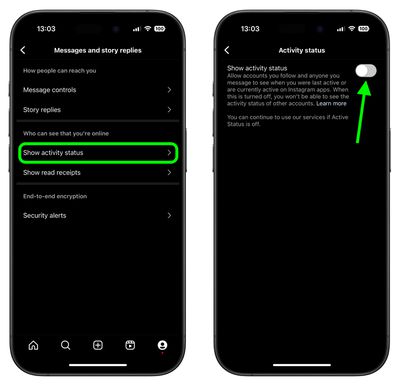
  4. Tap Show activity status.
  5. Tap the switch next to Show activity status to toggle it on or off.
    instagram

Did you know you can also hide Like and View counts on Instagram posts, too? Check out our dedicated tutorial to learn how.


Popular Stories

Meta

Meta Agrees to Limit Teens' Time on Facebook and Instagram, Calls on TikTok and YouTube to Match

Wednesday August 26, 2026 3:28 pm PDT by
Meta today said it will implement major changes to Facebook and Instagram's child safety features as part of a settlement agreement with almost all U.S. states. Here's what will change for users under 18 on Instagram and Facebook if the agreement is approved. Time Limit - Teens will have a two-hour daily time limit on Facebook and Instagram, though it can be overridden by a parent. The...

Apple Event Logo

Apple Unveiled Four New Products Today

Tuesday August 25, 2026 8:39 am PDT by
Apple today unveiled a new Mac mini with M6 and M5 Pro chip options, a new Mac Studio with M5 Max and M5 Ultra chip options, a new version of the Polishing Cloth with a lower price, and updated Magic Keyboards for Macs. To learn more about these products, read our coverage below: Apple Announces New Mac Mini With M6 and M5 Pro Chips and More Apple Unveils New Mac Studio With M5 Max and M5...
apple magic keyboard with glyphs 2026 refresh

Apple Quietly Refreshes Magic Keyboards

Tuesday August 25, 2026 7:22 am PDT by
Apple today quietly introduced updated Magic Keyboard models with revised U.S. English key labeling. On the new keyboards, the tab, caps lock, shift, return, and delete keycaps are labeled with glyphs rather than edge text. On the full-size models with a numeric keypad, the change goes further, with the home, page up, page down, end, clear, and enter keys also swapping their text labels for...