How to Hide Your 'Last Seen' Status in WhatsApp - MacRumors
Skip to Content

How to Hide Your 'Last Seen' Status in WhatsApp

by

For a long time now, WhatsApp has included a feature that shows when a user was last online or last active on the messaging platform, which can be either helpful or a hindrance, depending on your personal or business situation.

Whatsapp Feature
As regular WhatsApp users will know, the "Last Seen" status of a contact sits atop the conversation thread, informing you when that contact last opened the app and was active on the platform. But if you don't want people to know when you were last active, WhatsApp includes a setting to hide your Last Seen status or limit its visibility to certain users.

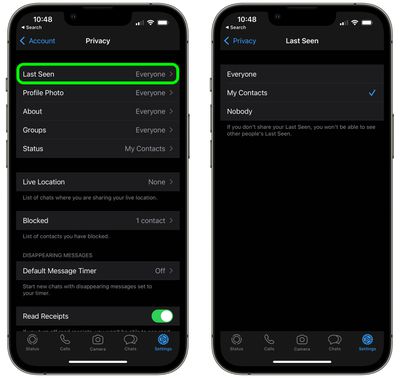
You can set it so that your Last Seen status can be seen by everyone, no-one, or only your contacts. Just bear in mind that if your Last Seen is hidden from another person, you won't be able to see their Last Seen either. Here's how it works.

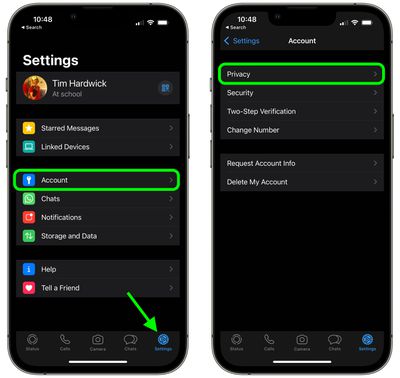
  1. Open the WhatsApp app on your iPhone.
  2. Tap the Settings icon in the bottom-right.

  3. Tap Account.
  4. Tap Privacy.
    whatsapp

  5. Tap Last Seen.
  6. Tap to select Everyone, My Contacts, or Nobody.
    whatsapp

WhatsApp is currently working on giving users the option to adjust the visibility of their Last Seen status on a contact-by-contact basis, according to a September 2021 report, although the option has yet to be rolled out as of writing.

At the end of 2021, WhatsApp also made a privacy change to prevent people on its messaging platform from viewing the Last Seen status of users whom they have never chatted with, however people and businesses a user knows or has previously messaged are not affected by the change.


Popular Stories

Whatsapp Feature

WhatsApp Rolls Out Redesigned Message Bubbles for iOS

Tuesday July 28, 2026 3:50 am PDT by
WhatsApp is rolling out a new design for message bubbles on iOS, reports WaBetaInfo. Old design (left) vs. new design (Image: WaBetaInfo) The platform's message bubbles are rounder than before with a softer shape – similar to iMessage – while shared media files appear without the original borders, giving them a cleaner look. The message bubble update follows several Liquid...
Whatsapp Feature

WhatsApp Rolls Out Web Calling, Call Transfer Across Devices, and More

Wednesday July 29, 2026 3:05 am PDT by
WhatsApp has announced a handful of enhancements for group calling over the encrypted platform, including seamless call transfers across devices and a new web calling feature. It's now possible to make and receive audio and video calls, including both one-on-one and group calls, directly from WhatsApp Web. The new browser-based service provides access to common features available on other...


Whatsapp Feature

WhatsApp Adds '@ all' Mentions and Poll Upgrades to Group Chats

Tuesday August 4, 2026 7:00 am PDT by
WhatsApp today announced a series of updates to group chats, including an "@all" mention feature, three new poll upgrades, and a faster way to spin off new groups from existing ones. The most notable addition is @all, which lets a group member alert everyone in a chat at once instead of tagging people individually. WhatsApp says the feature is meant for important, time-sensitive messages,...