How to Hide External Drives on Your Mac's Desktop - MacRumors
Skip to Content

How to Hide External Drives on Your Mac's Desktop

by

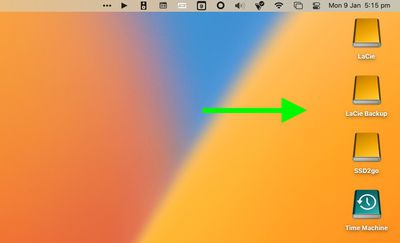
Whenever you have external drives connected or volumes mounted on your Mac, by default macOS displays them as icons on your desktop. If you'd rather not see these drives on the desktop, there's a setting you can change in macOS that will hide them.
macOS
With the setting enabled, the drives will not appear on your desktop, providing you with a more minimalist visual experience, and you'll still be able to access the drive contents via Finder. The following steps show you how it's done.

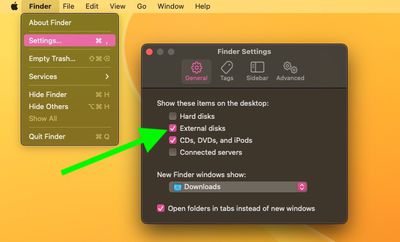
  1. Click the Finder icon in the Dock to make sure it's active, then click the Finder menu bar and select Settings... (or Preferences... in older versions of macOS) from the dropdown menu.
  2. Click the General tab if it's not already selected.
  3. Uncheck the box next to External disks. (You can also uncheck the box next to CDs, DVDs, and iPods if you don't want them to appear on the desktop when connected.)
  4. Close Finder Settings by clicking the red traffic light.
finder

The change should take effect immediately – any external drives connected to your Mac will no longer show up on the desktop. To access any connected drives or media, open a Finder window and you will be able to select them in the sidebar.

On a separate note, there's a simple Terminal command that turns the Dock into more of a straightforward app switcher by making it display only apps that are currently running on your Mac. If you like having a minimalist desktop, why not try it out.


Popular Stories

Four iPhone 18 Pro Colors Mock Feature

iPhone 18 Pro Launching in September With These 10 New Features

Monday April 20, 2026 7:13 am PDT by
While the iPhone 18 Pro and iPhone 18 Pro Max are not launching until September, there are already plenty of rumors about the devices. It was initially reported that the iPhone 18 Pro models would have fully under-screen Face ID, with only a front camera visible in the top-left corner of the screen. However, the latest rumors indicate that only one Face ID component will be moved under the...
Apple TV Thumb 3

Here's What's Coming in the 2026 Apple TV

Thursday April 23, 2026 12:08 pm PDT by
There are a lot of folks waiting for a new version of the Apple TV because the set-top box hasn't been updated since 2022. There is an update coming this year, but people will need to wait a bit longer because Apple is holding the next Apple TV until the new version of Siri comes out this fall. Design Apple TV design updates don't happen often, and that's not changing in 2026. The next...
Sad iPhone 18 Feature

Leaker: Apple to Downgrade iPhone 18 in Two Ways

Wednesday April 22, 2026 8:02 am PDT by
Following the emergence of a rumor that Apple is planning to downgrade the iPhone 18 to cut costs, further detail has emerged suggesting that display and chip specifications will see downgrades. Earlier this week, the leaker known as "Fixed Focus Digital" said that the iPhone 18 features "certain manufacturing downgrades" that bring it more into line with the low-cost iPhone 18e model. The...