How to Enable Dark Mode in iOS 13 - MacRumors
Skip to Content

How to Enable Dark Mode in iOS 13

by

In iOS 13, Apple has included a system-wide Dark Mode option similar to the one it brought to the Mac in 2018 with the release of macOS Mojave.
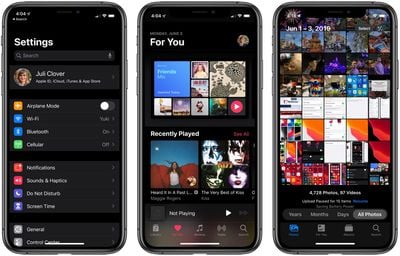
darkmodesettingsmusicphotos
‌Dark Mode‌ is designed to be easier on the eyes by providing less harsh display brightness in situations where ambient lighting is lower, while maintaining contrast and vibrancy.

If you have an OLED iPhone, such as an iPhone X, iPhone XS, or iPhone XS Max, enabling ‌Dark Mode‌ may also conserve battery life whenever true blacks are on screen, since black pixels in an OLED panel basically switch off and consume far less power.

Enabling ‌Dark Mode‌ in iOS 13 is easy – simply follow the steps below.

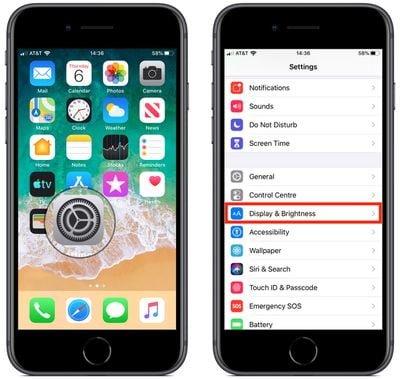
  1. Launch the Settings app on your iPhone or iPad.how to enable dark mode in ios 13 0
  2. Tap Display & Brightness.how to enable dark mode in ios 13 1
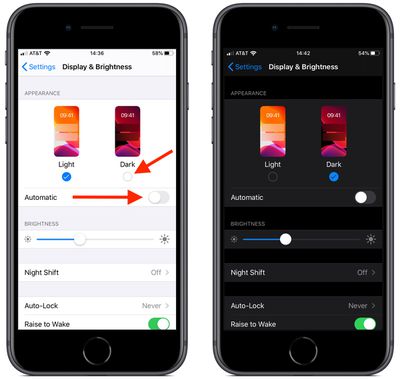
  3. Under Appearance, tap Dark to switch to ‌Dark Mode‌.

Note that the Display & Brightness settings screen also includes an Automatic switch that you can toggle – doing so will cause your device to automatically enable ‌Dark Mode‌ at sunset, and Light Mode at sunrise.

Alternately, you can set a custom schedule for the display change by using the Options menu that appears when you toggle on the Automatic switch.
Related Forum: iOS 13

Top Rated Comments

Chazzle Avatar
92 months ago
Also, through Control Center. Long press or force touch on the brightness controls, then toggle light or dark mode.
Score: 19 Votes (Like | Disagree)
TMRJIJ Avatar
92 months ago
Batman and I are very pleased with this feature.


Attachment Image
Score: 9 Votes (Like | Disagree)
QCassidy352 Avatar
92 months ago
Used dark mode for about a day on mojave, then forgot it existed. I’m glad it’s there for those who want it, but I really don’t see the big deal.
Score: 6 Votes (Like | Disagree)
92 months ago
I’m very happy to hear it can be activated by sunset. Did they add that function to Catalina?
Yes.
Score: 6 Votes (Like | Disagree)
92 months ago
You know it’s official when MR makes a how to on it. Long time coming!
Especially when it’s not even available yet for the masses in September.....
Score: 6 Votes (Like | Disagree)
DogHouseDub Avatar
92 months ago
I feel the same way about dark mode as I do about condiment bottles that stand on the lid. Awesome, but aren’t we a little embarrassed about how long it took?
Score: 5 Votes (Like | Disagree)

Popular Stories

Apple Event Logo

Apple to Release These 15 New Products Later This Year

Friday June 12, 2026 7:45 am PDT by
Apple's annual WWDC developers conference is drawing to a close, but there is still a lot to look forward to in the second half of the year. Apple is expected to release at least 15 more products later this year. Now that the more intelligent and personal version of Siri has finally arrived in beta, a full two years after Apple first previewed it at WWDC 2024, we should begin to see some new ...
Apple Lists 250 Changes Across iOS 27 and More Feature

Apple Shares List of 250 Changes Across iOS 27, macOS Golden Gate, and More

Wednesday June 10, 2026 1:34 pm PDT by
During its WWDC 2026 keynote on Monday, Apple briefly showed a slide with hundreds of new features and enhancements coming across iOS 27, macOS 27 Golden Gate, watchOS 27, tvOS 27, and visionOS 27. All of the software updates are currently available as developer betas, and they are expected to be released to all users in September. We already highlighted some of the key new features from the ...
liquid glass app icon

Apple Maps to Get These 10 New Features in iOS 27

Thursday June 11, 2026 5:45 am PDT by
Apple Maps is getting a range of new features in iOS 27, headlined by an upgraded Flyover experience that uses AI to improve the realism and detail of its aerial imagery. Flyover is a longstanding feature of Apple Maps and lets users explore more than 350 cities in 3D with detailed landmarks, roads, parks, and buildings. Apple described the enhanced Flyover in iOS 27 as combining aerial...