How to Customize Default Mail and Message Replies on Apple Watch - MacRumors
Skip to Content

How to Customize Default Mail and Message Replies on Apple Watch

by

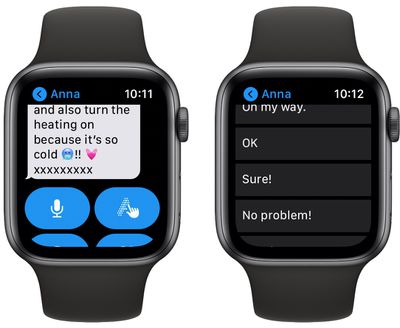
Whenever you receive a message or email on your Apple Watch, you'll see a selection of options that you can use to respond to it with a few quick taps.
watch
You can use voice dictation, scribble, send an emoji, draw a picture, or respond with a preset default reply to an incoming message or email, without the need to open up your iPhone.

It may not be immediately obvious, but you can customize the default replies that you see on Apple Watch whenever an email or message comes in. The following steps show you how it's done.

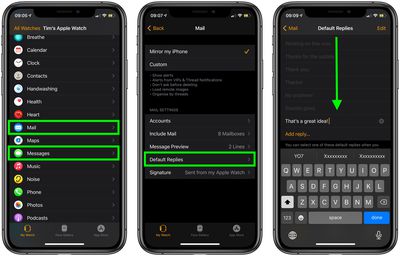
  1. Open the iOS Watch app on your iPhone.
  2. Tap Mail or Messages, depending on which set of default replies you want to customize.
  3. Tap Default Replies.
  4. Swipe past the existing default replies, down to the bottom of the menu, then select Add reply....
  5. Type your custom default reply using the on-screen keyboard.
  6. Tap Done.

watch

Note that you can also remove individual Default Replies by tapping the Edit button on the last screen and then tapping the red minus circles next to the ones you want to delete.

You can write a lot in a default email reply. We were able to fill one with 400 characters, and hopefully you won't need to be sending pre-made replies longer than that from your Apple Watch.

When crafting a default email reply, consider that the recipient may wonder why you can't respond further if you are capable of responding at all. In that case, it's a good idea to let them know you're replying on your Apple Watch by adding the default "Sent from my Apple Watch" signature in the iOS Watch app (My Watch tab -> Mail -> Signature).


Popular Stories

macworld iphone 18 pro colors

iPhone 18 Pro's Four Rumored Colors Revealed, Including 'Dark Cherry'

Friday April 17, 2026 3:50 am PDT by
A source said to be familiar with Apple's supply chain today revealed the color options Apple is planning for the iPhone 18 Pro, iPhone 18 Pro Max, and the upcoming foldable iPhone. Image via Macworld. The information comes from Macworld, which says the signature new color for this year's Pro models will be Dark Cherry, a deep wine-like red. While other sources had previously reported on a...

macOS 27 on MacBook Pro

macOS 27 Will Mark the End of an Era

Saturday April 18, 2026 6:45 am PDT by
During its Platforms State of the Union segment at WWDC 2025, Apple revealed that macOS 26 Tahoe is the final major macOS version for Intel-based Macs. The upcoming macOS 27 release will be compatible with Apple silicon Macs only, meaning that you will need a Mac with an M-series chip or a MacBook Neo with an A18 Pro chip in order to install the software update. macOS 27 should be available...
Aston Martin CarPlay Ultra Screen

Apple Says CarPlay Ultra is Coming to These Vehicle Brands

Saturday April 18, 2026 5:59 am PDT by
Last year, Apple launched CarPlay Ultra, the long-awaited next-generation version of its CarPlay software system for vehicles. Nearly a year later, CarPlay Ultra is still limited to Aston Martin's latest luxury vehicles, but that should change fairly soon. In May 2025, Apple said many other vehicle brands planned to offer CarPlay Ultra, including Hyundai, Kia, and Genesis. CarPlay Ultra...