Skip to Content

How to Customize Default Mail and Message Replies on Apple Watch

by

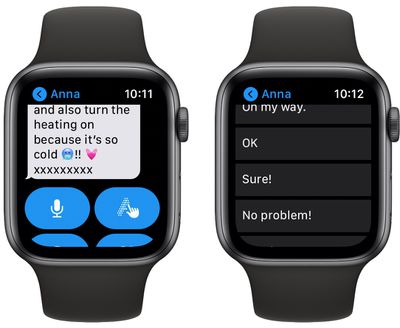
Whenever you receive a message or email on your Apple Watch, you'll see a selection of options that you can use to respond to it with a few quick taps.
watch
You can use voice dictation, scribble, send an emoji, draw a picture, or respond with a preset default reply to an incoming message or email, without the need to open up your iPhone.

It may not be immediately obvious, but you can customize the default replies that you see on Apple Watch whenever an email or message comes in. The following steps show you how it's done.

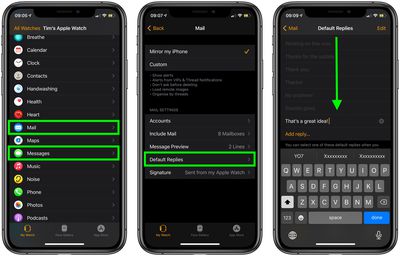
  1. Open the iOS Watch app on your ‌iPhone‌.
  2. Tap Mail or Messages, depending on which set of default replies you want to customize.
  3. Tap Default Replies.
  4. Swipe past the existing default replies, down to the bottom of the menu, then select Add reply....
  5. Type your custom default reply using the on-screen keyboard.
  6. Tap Done.

watch

Note that you can also remove individual Default Replies by tapping the Edit button on the last screen and then tapping the red minus circles next to the ones you want to delete.

You can write a lot in a default email reply. We were able to fill one with 400 characters, and hopefully you won't need to be sending pre-made replies longer than that from your Apple Watch.

When crafting a default email reply, consider that the recipient may wonder why you can't respond further if you are capable of responding at all. In that case, it's a good idea to let them know you're replying on your Apple Watch by adding the default "Sent from my Apple Watch" signature in the iOS Watch app (My Watch tab -> Mail -> Signature).


Popular Stories

Multicolored Low Cost A18 Pro MacBook Feature

Apple Accidentally Leaks 'MacBook Neo'

Tuesday March 3, 2026 7:00 am PST by
Apple appears to have prematurely revealed the name of its rumored lower-cost MacBook model, which is expected to be announced this Wednesday. A regulatory document for a "MacBook Neo" (Model A3404) has appeared on Apple's website. Unfortunately, there are no further details or images available yet. While the PDF file does not contain the "MacBook Neo" name, it briefly appeared in a link...
imac video apple feature

Apple Unveils Two New Products

Monday March 2, 2026 7:49 am PST by
Apple today introduced two new devices, including the iPhone 17e and an updated iPad Air. iPhone 17e features the same overall design as the iPhone 16e, but it gains Apple's A19 chip, MagSafe for magnetic wireless charging and magnetic accessories, Apple's second-generation C1X modem for faster 5G, and a doubled 256GB of base storage. In the U.S., the iPhone 17e starts at $599, just like the ...
Apple iPhone 17e feature

Apple Announces iPhone 17e With A19 Chip, MagSafe, and More

Monday March 2, 2026 6:07 am PST by
Apple today announced the iPhone 17e, featuring the A19 chip, MagSafe connectivity, faster charging, and more. The iPhone 17e contains the A19 chip introduced in iPhone 17. It features a 6-core GPU and a 4-core GPU. Apple pointed out that this makes it up to 2x faster than the iPhone 11. The new 16-core Neural Engine is optimized for large generative models. The iPhone 17e also contains...