In iOS 12, Apple added several new ways for users to control how and when they receive app notifications, including the ability to group notifications and change their behavior on the fly with Instant Tuning. A lesser known feature in this subset of options is called Critical Alerts. So what are they exactly?
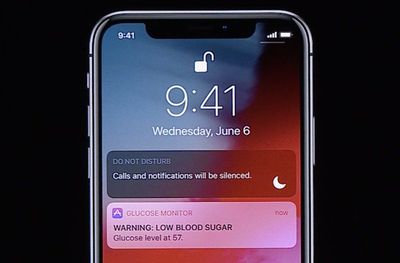
criticalalert1
The idea behind Critical Alerts is that if specific apps have crucial information that shouldn't be ignored – notifications related to health, home security, or public safety, for example – then you'll be alerted regardless of your other device settings.
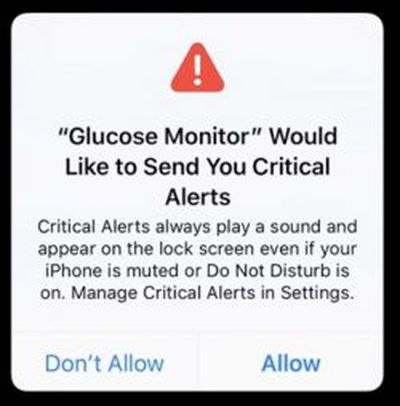
critical alertTo that end, Critical Alerts override the Do Not Disturb feature if you have it enabled on your iPhone or iPad, and will even arrive with an audio alert when your device is muted.

Naturally, the Critical Alerts feature is going to have limited use – you'd only want appropriate apps to have access to it (think glucose monitoring or weather warning apps) which is why Apple requires that developers apply for an entitlement to support them.

For that reason, there aren't a whole lot of apps that support these alerts just yet, but if you do come across one that advertises Critical Alerts, you still get to choose whether to enable them or not. Here's how.

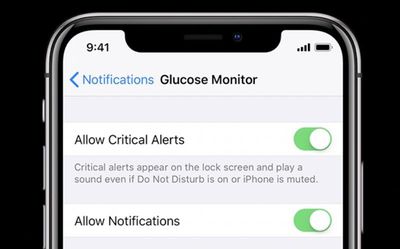
How to Disable or Enable Critical Alerts in iOS 12

  1. Launch the Settings app on your iPhone or iPad.
  2. Tap Notifications.
  3. Select the app from the list that you want to enable/disable Critical Alerts for.
  4. Toggle the Critical Alerts switch on/off.
criticalalerts2

Related Forum: iOS 12

Top Rated Comments

hansenc Avatar
92 months ago
Seriously an app has to apply for the entitlement to support critical alerts??? Turn it off by default and let me decide what is critical and what isn't.
Score: 8 Votes (Like | Disagree)
hortod1 Avatar
92 months ago
But how do I turn off “Presidential Alerts”
Score: 5 Votes (Like | Disagree)
Klae17 Avatar
92 months ago
I would like this for my alarm through SimpliSafe. However, there is no option for it at the moment. If there’s a break in at the office it would be nice. Apple has making it a strict opt-in feauture that needs their approval is a terrible decision. Let the user decide what is and isn’t critical by enabling it for everything.
Score: 4 Votes (Like | Disagree)
jclardy Avatar
92 months ago
Seriously an app has to apply for the entitlement to support critical alerts??? Turn it off by default and let me decide what is critical and what isn't.
I agree, this is a cool feature, but so many apps will never get approval from apple for this feature. Or at least it will take a while to adopt. I’d like to have my security system notifications override DND, but I’ll have to wait for them to support it. Users should have the ability to elevate notifications to this level.
Score: 3 Votes (Like | Disagree)
mikes63737 Avatar
92 months ago
Seriously an app has to apply for the entitlement to support critical alerts??? Turn it off by default and let me decide what is critical and what isn't.
Good, and thank god for Apple doing it this way. I can only imagine the hellscape my life would become if Slack or freemium games could do critical notifications.
Score: 3 Votes (Like | Disagree)
jimjiminyjim Avatar
92 months ago
Now if only this could be applied to government alerts. I got three loud horrific sounding alerts, in the middle of the night, for a missing child. Ok, that's serious. But... it happened 800 miles away, in a different province (state) and they knew that the getaway car was low on gas. If that's how the government is going to hijack my phone to send alerts, please, Apple, put them in their place (I realize they can't actually do this without breaking the law, because it is to do with regulation, I'm just airing my malcontent). They did find the child - apparently whoever stole the car she was in didn't realize anyone was in the back.
Score: 2 Votes (Like | Disagree)

Popular Stories

iOS 26

iOS 26.1 Available Now With These 8 New Features

Monday November 3, 2025 5:54 am PST by
Following more than a month of beta testing, Apple released iOS 26.1 on Monday, November 3. The update includes a handful of new features and changes, including the ability to adjust the look of Liquid Glass and more. Below, we outline iOS 26.1's key new features. Liquid Glass Toggle iOS 26.1 lets you choose your preferred look for Liquid Glass. In the Settings app, under Display...
Finder Siri Feature

Apple's New Siri Will Be Powered By Google Gemini

Wednesday November 5, 2025 11:57 am PST by
The smarter, more capable version of Siri that Apple is developing will be powered by Google Gemini, reports Bloomberg. Apple will pay Google approximately $1 billion per year for a 1.2 trillion parameter artificial intelligence model that was developed by Google. For context, parameters are a measure of how a model understands and responds to queries. More parameters generally means more...
2024 iPhone Boxes Feature

Apple Adjusts Trade-In Values for iPhones, iPads, Macs, and More

Thursday November 6, 2025 11:12 am PST by
Apple today updated its trade-in values for select iPhone, iPad, Mac, and Apple Watch models. Trade-ins can be completed on Apple's website, or at an Apple Store. The charts below provide an overview of Apple's current and previous trade-in values in the U.S., according to its website. Maximum values for most devices either decreased or saw no change, but the iPad Air received a slight bump. ...
Apple Logo Spotlight

Report: Apple to Launch These New Products in 2026

Sunday November 2, 2025 5:34 am PST by
Apple is planning to launch at least 15 new products in 2026, according to Bloomberg's Mark Gurman. Gurman outlined what to expect from Apple in 2026 in the latest edition of his "Power On" newsletter. He said the company is heading "into one of its most pivotal years in recent memory," with the rollout of major new Apple Intelligence features, intense regulatory pressure on the App Store,...
iOS 26

Apple Releases iOS 26.1 With Liquid Glass Toggle, Slide to Stop Alarm, New Apple Intelligence Languages and More

Monday November 3, 2025 1:11 pm PST by
Apple today released iOS 26.1, the first major update to the iOS 26 operating system that came out in September, iOS 26.1 comes over a month after iOS 26 launched. ‌iOS 26‌.1 is compatible with the ‌iPhone‌ 11 series and later, as well as the second-generation ‌iPhone‌ SE. The new software can be downloaded on eligible iPhones over-the-air by going to Settings > General >...
Liquid Glass General Feature

Apple Shares Liquid Glass Design Gallery

Thursday November 6, 2025 2:45 pm PST by
Apple is promoting the new Liquid Glass design in iOS 26, showing off the ways that third-party developers are embracing the aesthetic in their apps. On its developer website, Apple is featuring a visual gallery that demonstrates how "teams of all sizes" are creating Liquid Glass experiences. The gallery features examples of Liquid Glass in apps for iPhone, iPad, Apple Watch, and Mac. Apple...
apple watch se 3 always on

Apple to Remove iPhone-Apple Watch Wi-Fi Sync in EU With iOS 26.2

Thursday November 6, 2025 4:37 am PST by
Apple in iOS 26.2 will disable automatic Wi-Fi network syncing between iPhone and Apple Watch in the European Union to comply with the bloc's regulations, suggests a new report. Normally, when an iPhone connects to a new Wi-Fi network, it automatically shares the network credentials with the paired Apple Watch. This allows the watch to connect to the same network independently – for...
Early Black Friday Deals 2

The Best Early Black Friday Apple Deals

Sunday November 2, 2025 10:04 am PST by
We're officially in the month of Black Friday, which will take place on Friday, November 28 in 2025. As always, this will be the best time of the year to shop for great deals, including popular Apple products like AirPods, iPad, Apple Watch, and more. In this article, the majority of the discounts will be found on Amazon. Note: MacRumors is an affiliate partner with some of these vendors. When ...