iOS 16: How to Change Notifications Layout on Your Lock Screen - MacRumors
Skip to Content

iOS 16: How to Change Notifications Layout on Your Lock Screen

by

In iOS 16, Apple made sweeping changes to the way the iPhone Lock Screen works, adding multiple layers of customization and the ability to add widgets. As part of its design overhaul, Apple also changed the way notifications appear, and added options for how they should be displayed.
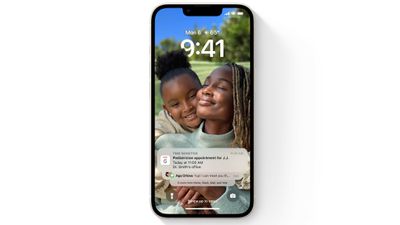
ios 16 notifications
Because of the new Lock Screen design, notifications now come in from the bottom of the display, rather than the top. This makes for a more subtle notification that stays out of the way of any widgets you have set up. You can swipe upward from the bottom of the display to see the notifications, and then swipe back down to hide them away.
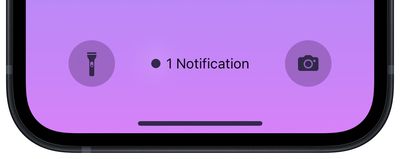
Lock Screen
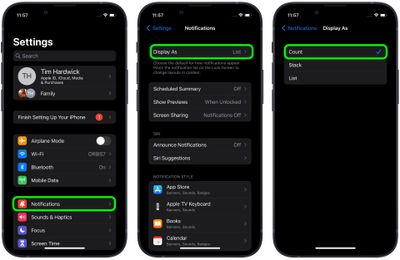
You can also pinch the notifications list on the Lock Screen to change the layouts. Notifications can appear as a standard list, a stack, or a number count telling you how many notifications are awaiting your attention. You can also select one of these layouts as the default for your Lock Screen using a new menu in Settings.

  1. Launch the Settings app on your iPhone.
  2. Tap Notifications.
  3. Tap Display As.
  4. Tap to select one of the following options: Count, Stack, and List.
    hide notifications ios

That's all there is to it. The change will be applied immediately and you should see all future notifications display on the Lock Screen based on your selected setting.


Popular Stories

iPhone 18 Pro Deep Red Feature

iPhone 18 Pro Launching in Two Months With These 12 New Features

Friday July 17, 2026 10:39 am PDT by
It is now mid-July, and that means the iPhone 18 Pro and iPhone 18 Pro Max are now just two months away. The devices are expected to look similar to the iPhone 17 Pro and iPhone 17 Pro Max, but there will still be many year-over-year changes, with rumored features including a smaller Dynamic Island, 5G via satellite, and more. Apple is expected to unveil the iPhone 18 Pro, iPhone 18 Pro Max, ...

Apple 2026 Back to School Graphic

Apple's 2026 Back to School Offer Just Went Live in Select Countries

Wednesday July 15, 2026 11:48 am PDT by
Apple's annual Back to School promotion is now live in select countries in Asia, including China, India, Malaysia, the Philippines, Singapore, Taiwan, Thailand, and Vietnam. The offer provides college students and educational staff with a free item with the purchase of an eligible Mac or iPad model. The exact offer varies by country, with options including a pack of four AirTags, AirPods 4,...
iphone 17 cyber

Apple Closes Unlocked iPhone Loophole for T-Mobile and Verizon Financing

Wednesday July 15, 2026 3:20 pm PDT by
Carrier-financed iPhones purchased from Apple will soon be locked to the carrier, ending a workaround customers used to purchase an unlocked iPhone on a payment plan. Until the rule change, buying an iPhone from Apple and opting for financing through Verizon or T-Mobile meant you would get an iPhone not locked to either carrier's network. That's no longer the case, and now iPhones financed...